> ## Documentation Index
> Fetch the complete documentation index at: https://support.i.moneyforward.com/llms.txt
> Use this file to discover all available pages before exploring further.
# Session settings
> How to configure the auto-close threshold and reminder settings for AI Helpdesk sessions
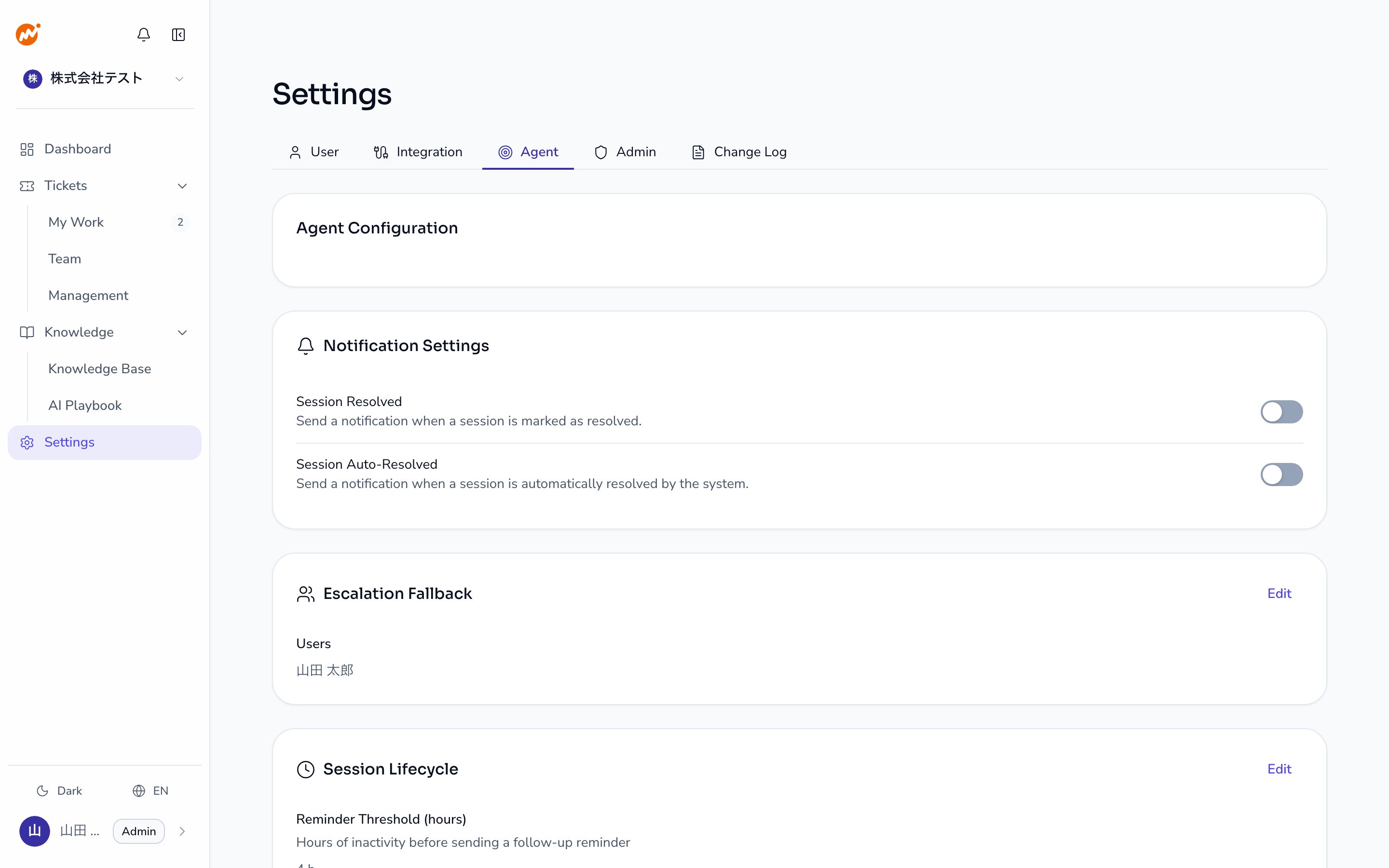
Go to **Settings** > **Agent** > **Session lifecycle** to configure when reminders are sent and when sessions are automatically closed after no reply. This is an **Admin** role action.
 ## Settings
| Setting | Description | Default | Range |
| -------------------------------- | -------------------------------------------------------------------------------------------- | -------- | ----------- |
| **Reminder threshold (hours)** | Sends a reminder to the requester after the specified number of hours since the last message | 4 hours | 1–168 hours |
| **Auto-close threshold (hours)** | Automatically closes the session after the specified number of hours since the last message | 24 hours | 1–720 hours |
| **Auto-close enabled** | Toggle to enable or disable the auto-close feature | On | — |
The **auto-close threshold (hours)** must be greater than the **reminder threshold (hours)**. You cannot configure the session to close before the reminder is sent.
## How to change settings
Open **Settings** > **Agent** in the admin console.
Click the **Edit** button in the upper right of the **Session lifecycle** section.
Change the **Reminder threshold (hours)**, **Auto-close threshold (hours)**, and **Auto-close enabled** toggle as needed.
Click **Save**. Changes take effect immediately.
## Session lifecycle flow
```
Requester sends a message
↓
AI or operator replies
↓
[Reminder threshold] elapses → Reminder sent to requester
↓
[Auto-close threshold] elapses → Session auto-closed (when auto-close is enabled)
```
## When auto-close may not be appropriate
Consider increasing the auto-close threshold or disabling auto-close in the following situations:
* Inquiries frequently require multiple days to resolve
* Inquiries arrive during employee vacations or extended absences
* Your SLA (response time target) exceeds 72 hours
Disabling auto-close means unresolved sessions remain open indefinitely. Regular session reviews are recommended in this case.
## Escalation settings
This tab also configures who gets notified when an escalated session has no operator assigned. Click the **Edit** button in the **Escalation settings** section and specify the **Queue notifiers**. Those users receive an in-app notification and a DM.
## Related pages
* [Notifications](/en/ai-helpdesk/admin/notifications) — Enable or disable session resolved and session auto-resolved notifications
* [Member management](/en/ai-helpdesk/admin/members) — Add operators and manage roles
## Settings
| Setting | Description | Default | Range |
| -------------------------------- | -------------------------------------------------------------------------------------------- | -------- | ----------- |
| **Reminder threshold (hours)** | Sends a reminder to the requester after the specified number of hours since the last message | 4 hours | 1–168 hours |
| **Auto-close threshold (hours)** | Automatically closes the session after the specified number of hours since the last message | 24 hours | 1–720 hours |
| **Auto-close enabled** | Toggle to enable or disable the auto-close feature | On | — |
The **auto-close threshold (hours)** must be greater than the **reminder threshold (hours)**. You cannot configure the session to close before the reminder is sent.
## How to change settings
Open **Settings** > **Agent** in the admin console.
Click the **Edit** button in the upper right of the **Session lifecycle** section.
Change the **Reminder threshold (hours)**, **Auto-close threshold (hours)**, and **Auto-close enabled** toggle as needed.
Click **Save**. Changes take effect immediately.
## Session lifecycle flow
```
Requester sends a message
↓
AI or operator replies
↓
[Reminder threshold] elapses → Reminder sent to requester
↓
[Auto-close threshold] elapses → Session auto-closed (when auto-close is enabled)
```
## When auto-close may not be appropriate
Consider increasing the auto-close threshold or disabling auto-close in the following situations:
* Inquiries frequently require multiple days to resolve
* Inquiries arrive during employee vacations or extended absences
* Your SLA (response time target) exceeds 72 hours
Disabling auto-close means unresolved sessions remain open indefinitely. Regular session reviews are recommended in this case.
## Escalation settings
This tab also configures who gets notified when an escalated session has no operator assigned. Click the **Edit** button in the **Escalation settings** section and specify the **Queue notifiers**. Those users receive an in-app notification and a DM.
## Related pages
* [Notifications](/en/ai-helpdesk/admin/notifications) — Enable or disable session resolved and session auto-resolved notifications
* [Member management](/en/ai-helpdesk/admin/members) — Add operators and manage roles