> ## Documentation Index
> Fetch the complete documentation index at: https://support.i.moneyforward.com/llms.txt
> Use this file to discover all available pages before exploring further.
# Baserow
> How to integrate Baserow with Admina using an ID and password. Admina retrieves data such as user names, email addresses, and roles and supports account creation and deletion.
export const IntegrationCapabilities = ({lang = "ja", modes = "", plan = "", lifecycle = "", automation = "", fetch = "", capabilities = "", memo = ""}) => {
const TEXT = ({
ja: {
rows: {
mode: "連携モード",
plan: "連携確認プラン",
lifecycle: "アカウントライフサイクル",
automation: "自動化",
fetch: "取得データ",
capabilities: "対応機能",
memo: "備考"
},
empty: "-",
more: "各項目の意味は[連携可能SaaS・機能対応一覧](/integrations/supported-saas)をご覧ください。",
mode: {
"API Key": "APIキー"
},
lifecycle: {
provisioning: "アカウント作成",
deactivate: "アカウント無効化",
delete: "アカウント削除"
},
automation: {
provisioning: "アカウント作成",
deactivate: "アカウント無効化",
delete: "アカウント削除"
},
fetch: {
User: "ユーザー名",
Mail: "メールアドレス",
Role: "ロール",
Status: "ステータス",
"2FA": "二要素認証",
LastActivity: "最終利用日",
Licenses: "ライセンス"
},
capabilities: {
"employee-master": "従業員マスター連携",
"identity-provider": "IDプロバイダー連携",
"cost-aggregation": "コスト管理",
"file-aggregation": "ファイル管理",
"file-permissions": "ファイル権限管理",
"device-aggregation": "MDM連携"
}
},
en: {
rows: {
mode: "Integration mode",
plan: "Verified plan",
lifecycle: "Account lifecycle",
automation: "Automation",
fetch: "Fetched data",
capabilities: "Capabilities",
memo: "Notes"
},
empty: "-",
more: "See [Supported SaaS and Capabilities](/en/integrations/supported-saas) for what each item means.",
mode: {},
lifecycle: {
provisioning: "Account creation",
deactivate: "Account deactivation",
delete: "Account deletion"
},
automation: {
provisioning: "Account creation",
deactivate: "Account deactivation",
delete: "Account deletion"
},
fetch: {
LastActivity: "Last Activity"
},
capabilities: {
"employee-master": "HR master",
"identity-provider": "Identity provider",
"cost-aggregation": "Cost management",
"file-aggregation": "File management",
"file-permissions": "File permissions",
"device-aggregation": "MDM integration"
}
}
})[lang === "en" ? "en" : "ja"];
const BADGE_COLORS = {
"ID/Password": "yellow",
"API Key": "cyan",
OAuth: "red",
App: "purple",
User: "blue",
Mail: "cyan",
Role: "orange",
Status: "teal",
"2FA": "pink",
LastActivity: "green",
Licenses: "purple",
provisioning: "green",
delete: "red",
deactivate: "yellow",
"employee-master": "blue",
"identity-provider": "teal",
"cost-aggregation": "yellow",
"file-aggregation": "cyan",
"file-permissions": "orange",
"device-aggregation": "purple"
};
const list = value => String(value || "").split(",").map(item => item.trim()).filter(Boolean);
const badges = (source, labels) => {
const values = list(source);
if (values.length === 0) {
return {TEXT.empty};
}
return values.map(value =>
{labels?.[value] ?? value}
);
};
const text = value => value || {TEXT.empty};
const linkify = value => {
if (!value) return null;
const parts = [];
let rest = String(value);
let key = 0;
for (; ; ) {
const mid = rest.indexOf("](");
if (mid < 0) break;
const open = rest.lastIndexOf("[", mid);
const close = rest.indexOf(")", mid);
if (close < 0) break;
if (open < 0) {
parts.push(rest.slice(0, mid + 2));
rest = rest.slice(mid + 2);
continue;
}
if (open > 0) parts.push(rest.slice(0, open));
parts.push(
{rest.slice(open + 1, mid)}
);
rest = rest.slice(close + 1);
}
if (rest) parts.push(rest);
return parts;
};
const ROWS = [["mode", badges(modes, TEXT.mode)], ["plan", text(plan)], ["lifecycle", badges(lifecycle, TEXT.lifecycle)], ["automation", badges(automation, TEXT.automation)], ["fetch", badges(fetch, TEXT.fetch)], ["capabilities", badges(capabilities, TEXT.capabilities)], ["memo", text(linkify(memo))]];
return
{ROWS.map(([key, value]) =>
- {TEXT.rows[key]}
- {value}
)}
;
};
## Integration Specifications
## Prerequisites
The integration uses the email address and password that you use to log in to Baserow.
External authentication accounts such as Google or SSO cannot be used for the integration. For details, see [Cannot connect with an external authentication account (Google, SSO)](/en/it-management/faq/7gbneu0vz5-auth-error#authentication-error).
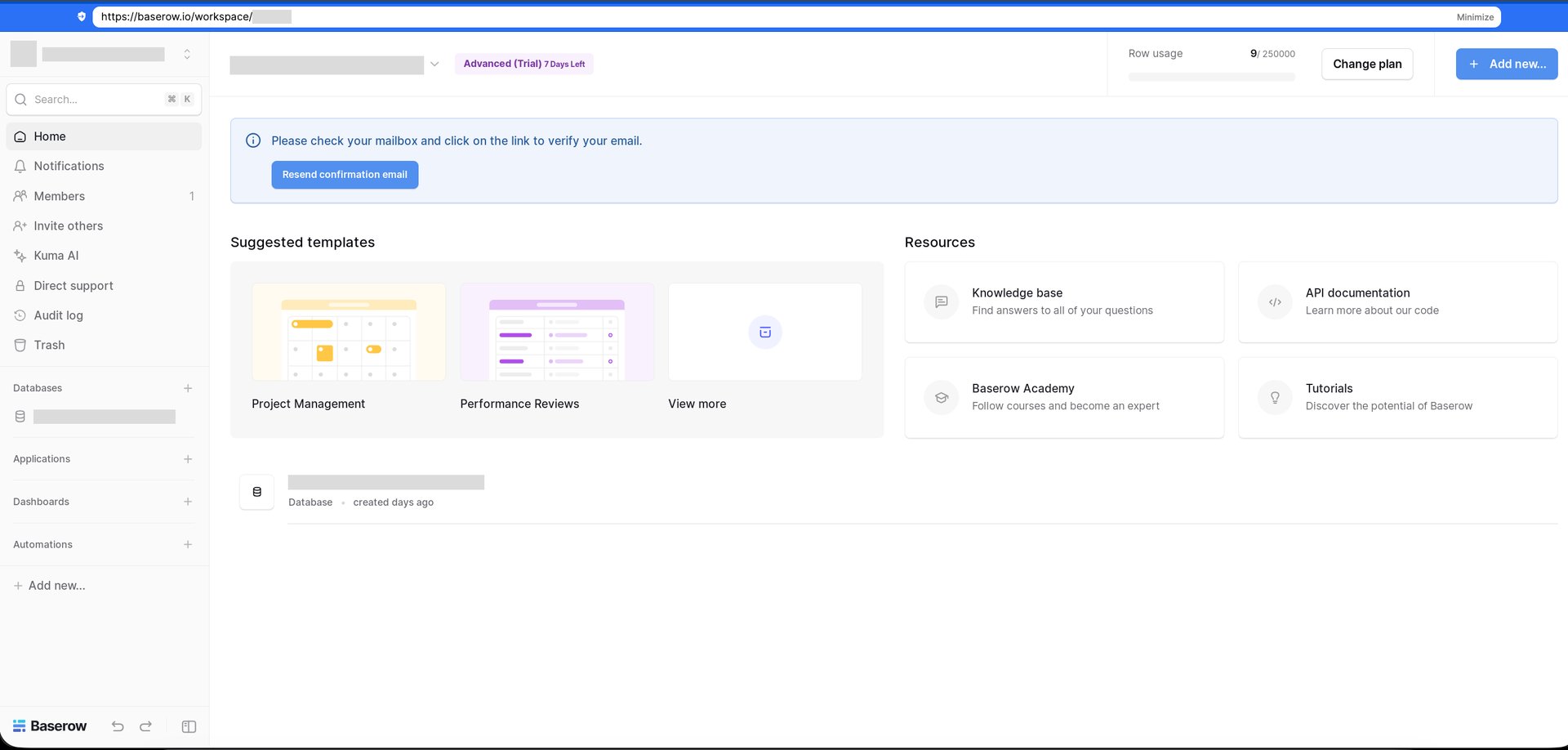
### How to obtain the workspace key (workspace ID)
1. Log in to [Baserow](https://baserow.io/login) and open the workspace that you want to integrate.
2. Check the URL in the browser address bar. The number after `https://baserow.io/workspace/` is the workspace ID.
 ## Setting up the integration
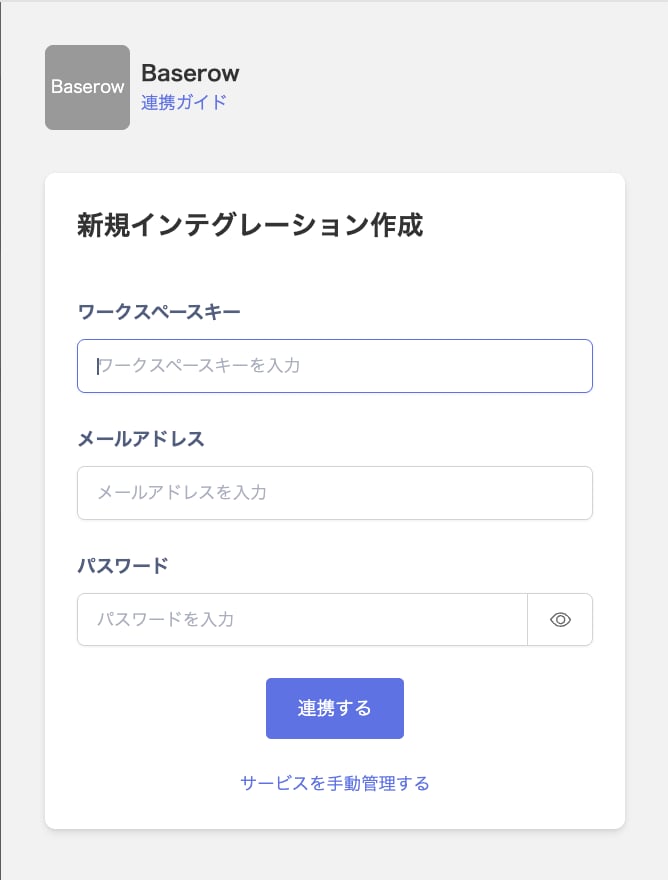
1. In the integration screen, search for **Baserow**.
2. Enter the workspace ID in **Workspace key**. Enter your Baserow login email address and password in **Email address** and **Password**, then click **Integrate**.
## Setting up the integration
1. In the integration screen, search for **Baserow**.
2. Enter the workspace ID in **Workspace key**. Enter your Baserow login email address and password in **Email address** and **Password**, then click **Integrate**.
 3. When the integration with Baserow succeeds, registered user information appears in the account list. If it does not complete successfully, first try the steps in [Troubleshoot SaaS integration errors](/en/it-management/saas-management/93nahw45is-trouble). If the issue persists, check [Information to provide](/en/it-management/saas-management/93nahw45is-trouble#info-to-provide) and contact [Support](/en/contact-support).
This documentation is built and hosted on [Mintlify](https://mintlify.com), a developer documentation platform.
3. When the integration with Baserow succeeds, registered user information appears in the account list. If it does not complete successfully, first try the steps in [Troubleshoot SaaS integration errors](/en/it-management/saas-management/93nahw45is-trouble). If the issue persists, check [Information to provide](/en/it-management/saas-management/93nahw45is-trouble#info-to-provide) and contact [Support](/en/contact-support).
This documentation is built and hosted on [Mintlify](https://mintlify.com), a developer documentation platform.