> ## Documentation Index
> Fetch the complete documentation index at: https://support.i.moneyforward.com/llms.txt
> Use this file to discover all available pages before exploring further.
# Active! gate SS
> How to integrate with Active! gate SS.
Translation Disclaimer: The documents herein have been machine translated for your convenience by translation software. While reasonable efforts are made to provide accurate translations, portions may be incorrect. If you would like to report a translation error or inaccuracy, we encourage you to please contact us.
This service is available in Japanese only.
## How to log in to Active! gate SS
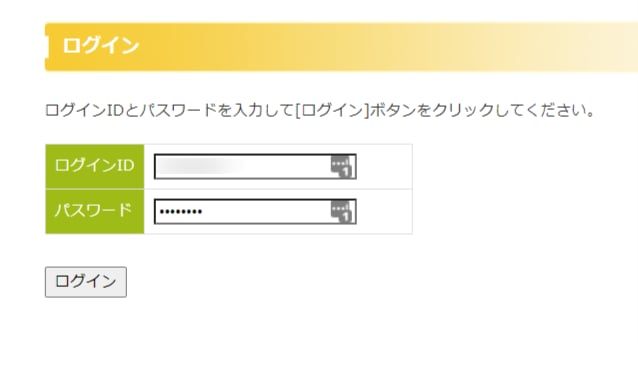
On the [Active! gate SS login page](https://service.activegate-ss.jp/login/), enter your login ID and password to log in.
 ## Integration setup
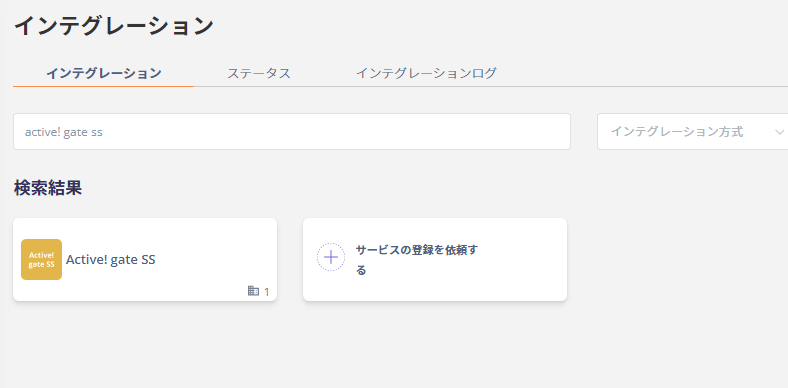
Search for **Active! gate SS** on the Admina by Money Forward integration screen.
## Integration setup
Search for **Active! gate SS** on the Admina by Money Forward integration screen.
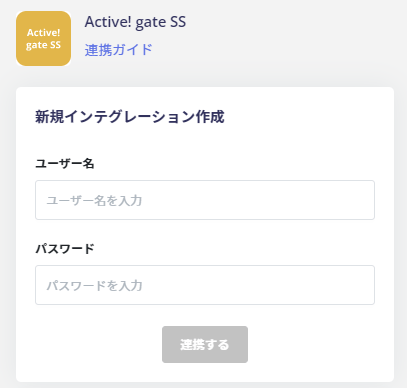
 Enter **the login ID and password for logging in to Active! gate SS** in Username **and Password**, respectively.
Click **Connect**.
Enter **the login ID and password for logging in to Active! gate SS** in Username **and Password**, respectively.
Click **Connect**.
 If the connection with Active! gate SS is successful, the registered user information will be displayed in the account list.
If it does not complete successfully, please **edit** from the status tab of the integration screen and try linking again.
If you can't solve it, please contact us by chat.
If the connection with Active! gate SS is successful, the registered user information will be displayed in the account list.
If it does not complete successfully, please **edit** from the status tab of the integration screen and try linking again.
If you can't solve it, please contact us by chat.