> ## Documentation Index
> Fetch the complete documentation index at: https://support.i.moneyforward.com/llms.txt
> Use this file to discover all available pages before exploring further.

# Teamwork

> Instructions for integrating with Teamwork.

## Supported Features

<Badge color="blue">Account Creation</Badge> <Badge color="blue">Account Deletion</Badge>

## Prerequisites

### How to Log in to Teamwork

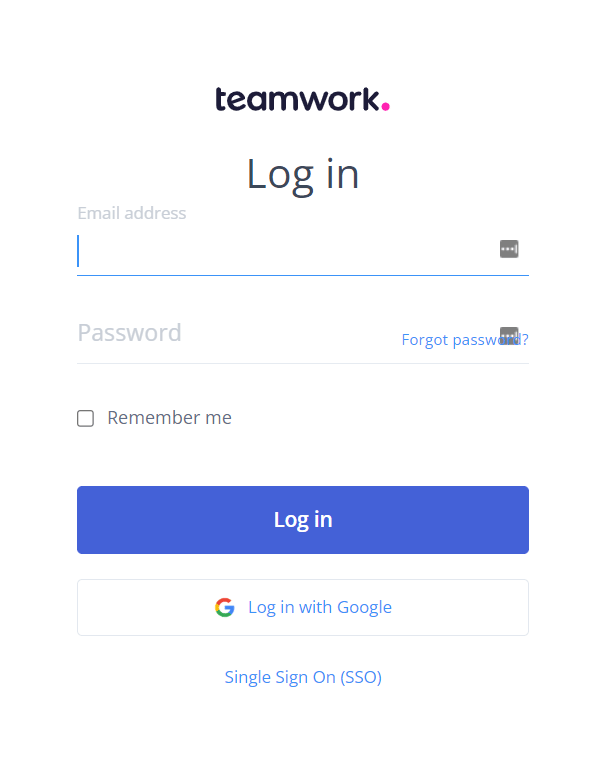
Go to the [Teamwork login page](https://www.teamwork.com/launchpad/login) and enter your email address and password to log in.
<img src="https://mintcdn.com/moneyforwardi/-1FHCVDHovQ5S9P9/images/integrations/f0x0a3adib/image-1.png?fit=max&auto=format&n=-1FHCVDHovQ5S9P9&q=85&s=992d781d7297cf88ca16712b2f63428e" alt="Teamwork login screen" width="602" height="764" data-path="images/integrations/f0x0a3adib/image-1.png" />

### How to Obtain Your Workspace Key

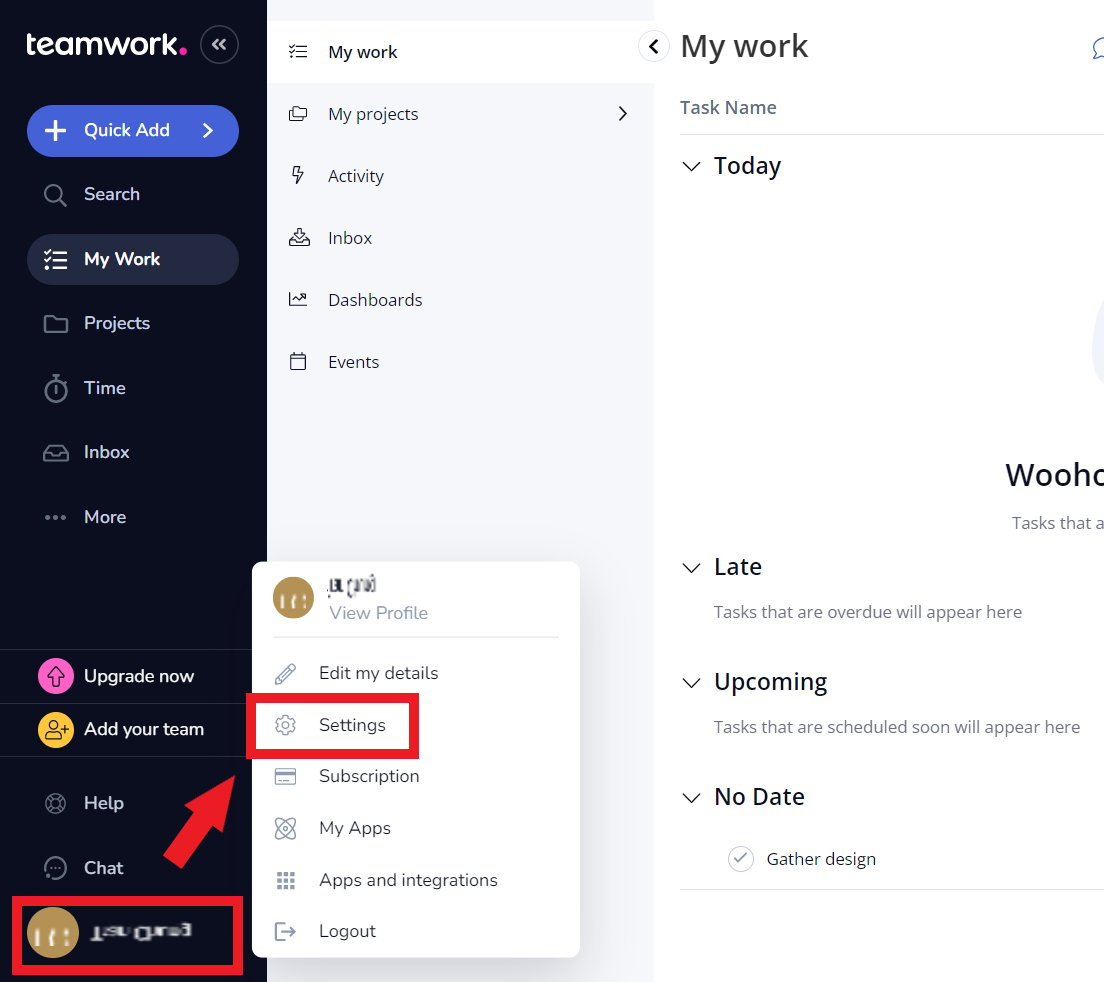
After logging in to Teamwork, click your **avatar** in the left menu and go to **Settings > General**.
<img src="https://mintcdn.com/moneyforwardi/-1FHCVDHovQ5S9P9/images/integrations/f0x0a3adib/1.png?fit=max&auto=format&n=-1FHCVDHovQ5S9P9&q=85&s=dcd7c9a3db79180218491ab27d08bc1c" alt="Navigating to Settings > General" data-og-width="1104" width="1104" data-og-height="982" height="982" data-path="images/integrations/f0x0a3adib/1.png" data-optimize="true" data-opv="3" srcset="https://mintcdn.com/moneyforwardi/-1FHCVDHovQ5S9P9/images/integrations/f0x0a3adib/1.png?w=280&fit=max&auto=format&n=-1FHCVDHovQ5S9P9&q=85&s=49c4008775c9e9f55b37ab47c8cf0561 280w, https://mintcdn.com/moneyforwardi/-1FHCVDHovQ5S9P9/images/integrations/f0x0a3adib/1.png?w=560&fit=max&auto=format&n=-1FHCVDHovQ5S9P9&q=85&s=938add7fbe2dca8161011859439d0443 560w, https://mintcdn.com/moneyforwardi/-1FHCVDHovQ5S9P9/images/integrations/f0x0a3adib/1.png?w=840&fit=max&auto=format&n=-1FHCVDHovQ5S9P9&q=85&s=dc6060bc910d6ff0c65dc7229bf40f45 840w, https://mintcdn.com/moneyforwardi/-1FHCVDHovQ5S9P9/images/integrations/f0x0a3adib/1.png?w=1100&fit=max&auto=format&n=-1FHCVDHovQ5S9P9&q=85&s=d05aa5864cd2cde38703d76b84c3a1f5 1100w, https://mintcdn.com/moneyforwardi/-1FHCVDHovQ5S9P9/images/integrations/f0x0a3adib/1.png?w=1650&fit=max&auto=format&n=-1FHCVDHovQ5S9P9&q=85&s=d3d40e8012c9cd4a9c3ad96a21ea16ce 1650w, https://mintcdn.com/moneyforwardi/-1FHCVDHovQ5S9P9/images/integrations/f0x0a3adib/1.png?w=2500&fit=max&auto=format&n=-1FHCVDHovQ5S9P9&q=85&s=d41b00997d3dad69d281c941ded8f7f5 2500w" />

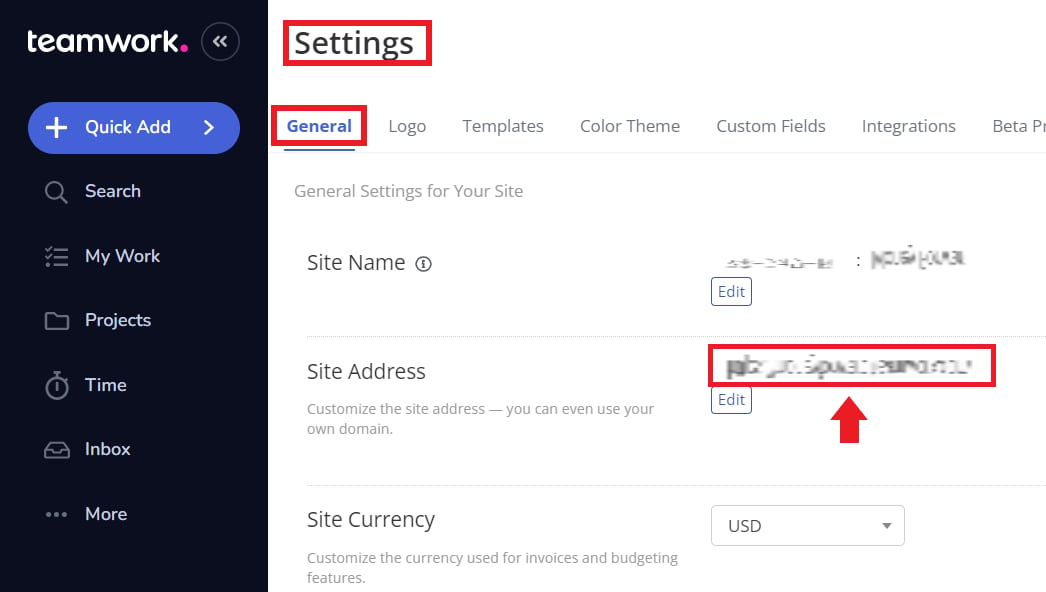
The **Site Address is your workspace key**. Save it for later.
<img src="https://mintcdn.com/moneyforwardi/-1FHCVDHovQ5S9P9/images/integrations/f0x0a3adib/2.png?fit=max&auto=format&n=-1FHCVDHovQ5S9P9&q=85&s=c1a385eefc1c6ca095af0f89ee553fc6" alt="Site Address (workspace key) display" width="1046" height="592" data-path="images/integrations/f0x0a3adib/2.png" />

### How to Obtain Your Access Key

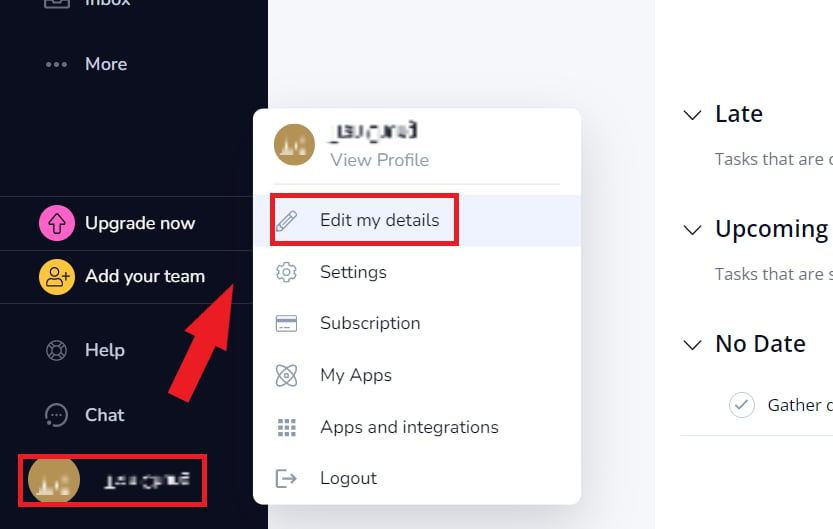
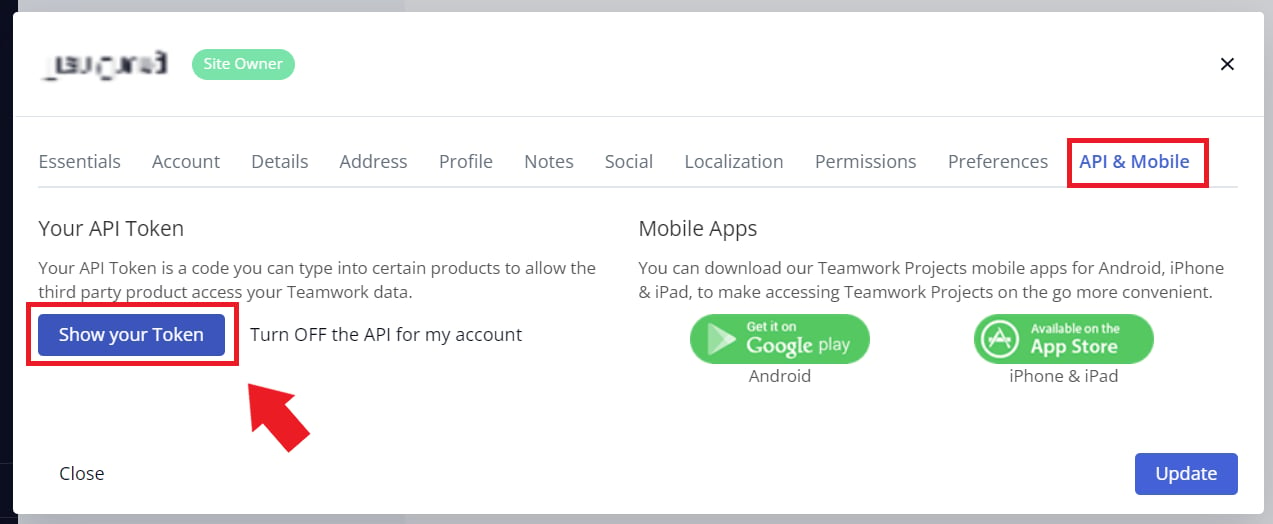
Click your **avatar** in the left menu and go to **Edit my details > API & Mobile**.
<img src="https://mintcdn.com/moneyforwardi/-1FHCVDHovQ5S9P9/images/integrations/f0x0a3adib/3.png?fit=max&auto=format&n=-1FHCVDHovQ5S9P9&q=85&s=3c6e148a490d86c83cecccd23147cf2f" alt="Navigating to Edit my details > API & Mobile" data-og-width="833" width="833" data-og-height="529" height="529" data-path="images/integrations/f0x0a3adib/3.png" data-optimize="true" data-opv="3" srcset="https://mintcdn.com/moneyforwardi/-1FHCVDHovQ5S9P9/images/integrations/f0x0a3adib/3.png?w=280&fit=max&auto=format&n=-1FHCVDHovQ5S9P9&q=85&s=8fab2d4f72fa49f5ceef1d4e97d2ba91 280w, https://mintcdn.com/moneyforwardi/-1FHCVDHovQ5S9P9/images/integrations/f0x0a3adib/3.png?w=560&fit=max&auto=format&n=-1FHCVDHovQ5S9P9&q=85&s=2eb2750dc02440dd8eb48d7255f7f965 560w, https://mintcdn.com/moneyforwardi/-1FHCVDHovQ5S9P9/images/integrations/f0x0a3adib/3.png?w=840&fit=max&auto=format&n=-1FHCVDHovQ5S9P9&q=85&s=e66a03a1590939f0efb1878702173411 840w, https://mintcdn.com/moneyforwardi/-1FHCVDHovQ5S9P9/images/integrations/f0x0a3adib/3.png?w=1100&fit=max&auto=format&n=-1FHCVDHovQ5S9P9&q=85&s=95f57dcb2f98a4ea74911f5db73f3ad7 1100w, https://mintcdn.com/moneyforwardi/-1FHCVDHovQ5S9P9/images/integrations/f0x0a3adib/3.png?w=1650&fit=max&auto=format&n=-1FHCVDHovQ5S9P9&q=85&s=1bd9727eafbc4078e85509854fed8c0c 1650w, https://mintcdn.com/moneyforwardi/-1FHCVDHovQ5S9P9/images/integrations/f0x0a3adib/3.png?w=2500&fit=max&auto=format&n=-1FHCVDHovQ5S9P9&q=85&s=60c1264d61a2bd5b2239cc003a6f54eb 2500w" />

Click **Show your Token** to display your **API Token**.
<img src="https://mintcdn.com/moneyforwardi/-1FHCVDHovQ5S9P9/images/integrations/f0x0a3adib/4.png?fit=max&auto=format&n=-1FHCVDHovQ5S9P9&q=85&s=bba0ae6b08739b03d069ff270a0a5bd9" alt="Show your Token button" width="1273" height="524" data-path="images/integrations/f0x0a3adib/4.png" />

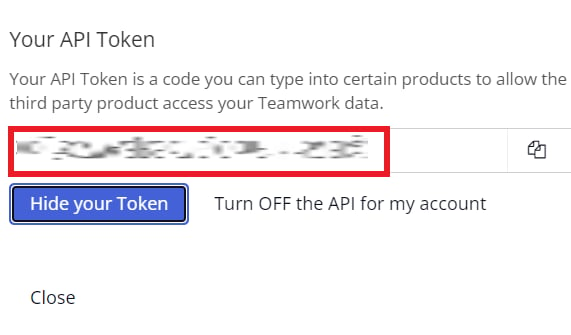
The **API Token is your access key**. Save it for later.
<img src="https://mintcdn.com/moneyforwardi/-1FHCVDHovQ5S9P9/images/integrations/f0x0a3adib/5.png?fit=max&auto=format&n=-1FHCVDHovQ5S9P9&q=85&s=b877bf45ec2c29b9f5484423c3d9c765" alt="API Token (access key) display" width="571" height="335" data-path="images/integrations/f0x0a3adib/5.png" />

## Integration Setup

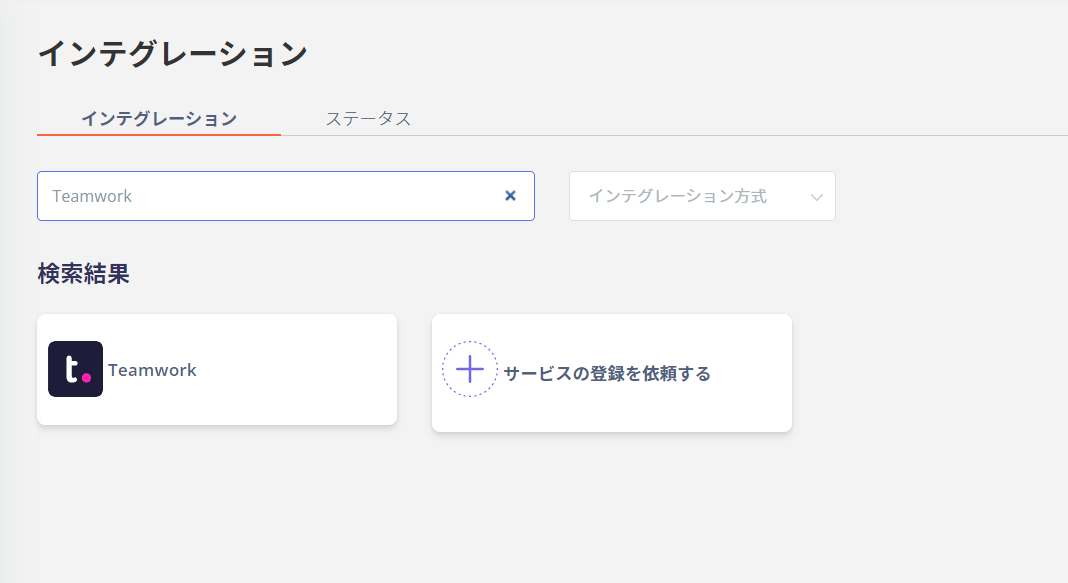
On the MoneyForward Admina integrations screen, search for **Teamwork**.
<img src="https://mintcdn.com/moneyforwardi/-1FHCVDHovQ5S9P9/images/integrations/f0x0a3adib/2022-02-24-102632.png?fit=max&auto=format&n=-1FHCVDHovQ5S9P9&q=85&s=2a4857d3ce4596e54f0ed84ffcb9a2b8" alt="Searching for Teamwork on the Admina integrations screen" width="1068" height="583" data-path="images/integrations/f0x0a3adib/2022-02-24-102632.png" />

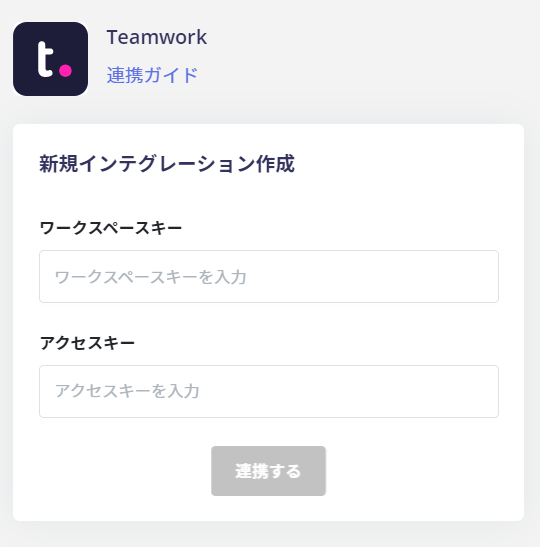
Enter the **workspace key and access key** obtained in the previous steps and click **Connect**.
<img src="https://mintcdn.com/moneyforwardi/-1FHCVDHovQ5S9P9/images/integrations/f0x0a3adib/2022-02-24-102656.png?fit=max&auto=format&n=-1FHCVDHovQ5S9P9&q=85&s=31b7b4892490f6c656d6fb18749d03a9" alt="Workspace key and access key input screen" width="540" height="547" data-path="images/integrations/f0x0a3adib/2022-02-24-102656.png" />

Once the integration with Teamwork is successful, registered user information will appear in the account list.

If it does not complete successfully, click **Edit** from the Status tab on the integrations screen and try again.

<Info>
  If the issue persists, please contact us via chat.
</Info>

For an overview of the Teamwork integration, see the [integration page](https://admina.moneyforward.com/en/integrations/teamwork).
