> ## Documentation Index
> Fetch the complete documentation index at: https://support.i.moneyforward.com/llms.txt
> Use this file to discover all available pages before exploring further.
# Browser extension policy conflicts and workarounds
> Find the cause and work around browser policy conflicts with asset management software or other deployments that stop the Admina extension from being force-installed.
This page describes the steps for Chrome. For Edge, read `chrome://policy` as `edge://policy`, `chrome://extensions` as `edge://extensions`, and the registry key `Software\Policies\Google\Chrome` as `Software\Policies\Microsoft\Edge`. For the Edge extension ID and update URL, see the [Windows manual setup](/en/it-management/admina-extension/windows-solo-setup) guide.
Sometimes the deployment settings reach the device, but the browser does not install the Admina extension. In most cases, a browser policy conflicts with another deployment.
This often happens when asset management software deploys its own extensions. Examples include SKYSEA Client View and LANSCOPE. This page explains how the conflict works, how to find the cause, and how to work around it.
## Symptoms
You see the following.
* Intune, GPO, or the Google Admin console reports that the deployment succeeded
* The Admina extension does not appear in `chrome://extensions`
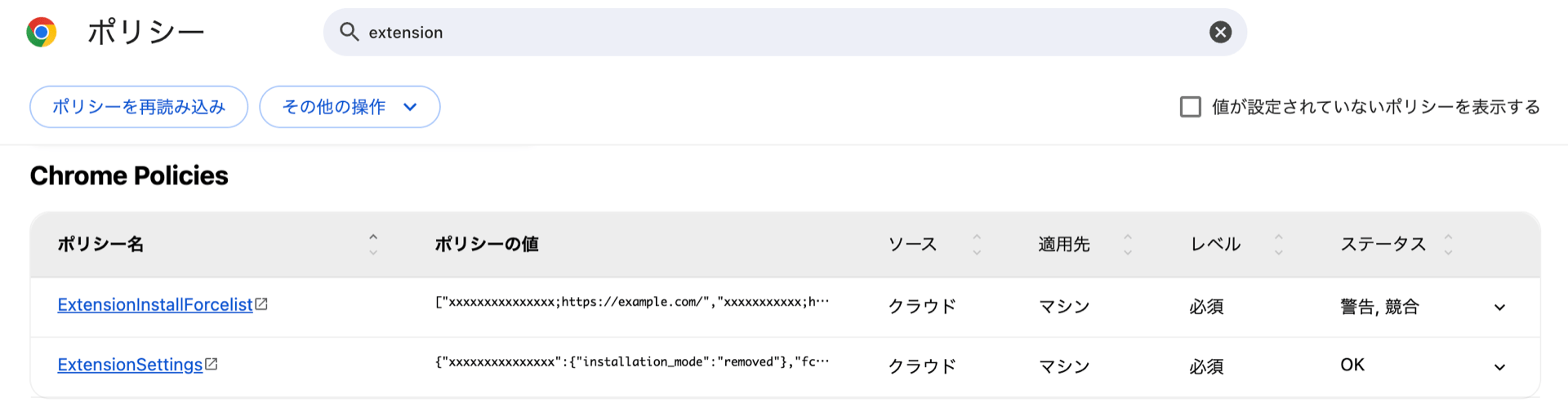
* `chrome://policy` shows a conflict for `ExtensionSettings` or `ExtensionInstallForcelist`
The Admina extension ID is `bdeanmdeckegmfjpbnngomallcedjold`. Use this ID to find the Admina extension in `chrome://extensions` and `chrome://policy`.
## How the conflict happens
### Where policies come from and precedence
The browser policy page (`chrome://policy`) shows a source and an Applies to value for each policy.
 | Item | Shown as | Meaning |
| - | - | - |
| Source | Platform | A value from the operating system settings. On Windows this is the registry, and on Mac it is a configuration profile. GPO, Intune, and asset management software write here |
| Source | Cloud | A value that the browser's cloud sends directly to the browser. In Chrome, you set it in the Google Admin console |
| Applies to | Machine | A setting for the whole PC or the whole browser. For Platform, this is `HKLM` in the Windows registry |
| Applies to | Current user | A setting for the signed-in user or the Google account. For Platform, this is `HKCU` in the Windows registry |
A cloud value is a setting that an administrator makes in the Google Admin console or a similar console. It reaches the browser directly. Among the Admina guides, the [Google Workspace](/en/it-management/admina-extension/bbb2v722bm-extension-bdv) guide for Chrome uses this method.
When the same policy arrives from more than one source, the browser applies them in this order by default. Platform (machine) comes first, then Cloud (machine), Platform (user), and Cloud (user).
The following diagram shows which level (source and Applies to) each deployment guide in the Admina Help Center uses.
| Item | Shown as | Meaning |
| - | - | - |
| Source | Platform | A value from the operating system settings. On Windows this is the registry, and on Mac it is a configuration profile. GPO, Intune, and asset management software write here |
| Source | Cloud | A value that the browser's cloud sends directly to the browser. In Chrome, you set it in the Google Admin console |
| Applies to | Machine | A setting for the whole PC or the whole browser. For Platform, this is `HKLM` in the Windows registry |
| Applies to | Current user | A setting for the signed-in user or the Google account. For Platform, this is `HKCU` in the Windows registry |
A cloud value is a setting that an administrator makes in the Google Admin console or a similar console. It reaches the browser directly. Among the Admina guides, the [Google Workspace](/en/it-management/admina-extension/bbb2v722bm-extension-bdv) guide for Chrome uses this method.
When the same policy arrives from more than one source, the browser applies them in this order by default. Platform (machine) comes first, then Cloud (machine), Platform (user), and Cloud (user).
The following diagram shows which level (source and Applies to) each deployment guide in the Admina Help Center uses.
 If asset management software writes to `HKLM`, `HKLM` is the highest level, so it wins over other deployment methods. Intune writes to the device registry, so its source shows as Platform. GPO User Configuration and the Admina Intune template write to `HKCU`, which is Platform (user). In the Google Admin console, settings on a browser organizational unit are Cloud (machine). Settings on a user organizational unit are Cloud (user).
### Policies with the same name do not merge
If two sources send a policy with the same name, by default the browser uses the whole value from the higher one. It does not combine the values. Policies with different names all take effect.
If asset management software writes to `HKLM`, `HKLM` is the highest level, so it wins over other deployment methods. Intune writes to the device registry, so its source shows as Platform. GPO User Configuration and the Admina Intune template write to `HKCU`, which is Platform (user). In the Google Admin console, settings on a browser organizational unit are Cloud (machine). Settings on a user organizational unit are Cloud (user).
### Policies with the same name do not merge
If two sources send a policy with the same name, by default the browser uses the whole value from the higher one. It does not combine the values. Policies with different names all take effect.
 Two policies can force-install extensions, **`ExtensionSettings`** and **`ExtensionInstallForcelist`**. If another product uses one of them, you can avoid the conflict by deploying Admina with the other.
| Policy | Format | What it can do |
| - | - | - |
| **`ExtensionSettings`** | A dictionary of settings per extension ID | Force install, remove or block, pin to the toolbar, and more |
| **`ExtensionInstallForcelist`** | A list of `extensionID;updateURL` entries | Force install only |
### Policies used by each deployment guide
Different guides use different policies, so be careful.
| Deployment guide | Policy |
| - | - |
| [Windows manual setup](/en/it-management/admina-extension/windows-solo-setup), [Windows GPO](/en/it-management/admina-extension/qegqblx598-windows-gpo), [Intune](/en/it-management/admina-extension/windows-intune) | **`ExtensionSettings`** |
| [Mac and MDM](/en/it-management/admina-extension/udu2t8mwne-mac-plist) | **`ExtensionInstallForcelist`** |
## Find the cause
Use the following flow to narrow down what to check and which workaround to use. The steps after the diagram explain each check.
Two policies can force-install extensions, **`ExtensionSettings`** and **`ExtensionInstallForcelist`**. If another product uses one of them, you can avoid the conflict by deploying Admina with the other.
| Policy | Format | What it can do |
| - | - | - |
| **`ExtensionSettings`** | A dictionary of settings per extension ID | Force install, remove or block, pin to the toolbar, and more |
| **`ExtensionInstallForcelist`** | A list of `extensionID;updateURL` entries | Force install only |
### Policies used by each deployment guide
Different guides use different policies, so be careful.
| Deployment guide | Policy |
| - | - |
| [Windows manual setup](/en/it-management/admina-extension/windows-solo-setup), [Windows GPO](/en/it-management/admina-extension/qegqblx598-windows-gpo), [Intune](/en/it-management/admina-extension/windows-intune) | **`ExtensionSettings`** |
| [Mac and MDM](/en/it-management/admina-extension/udu2t8mwne-mac-plist) | **`ExtensionInstallForcelist`** |
## Find the cause
Use the following flow to narrow down what to check and which workaround to use. The steps after the diagram explain each check.
 1. On the device where you want to install the extension, open `chrome://policy`. Enter `extension` in the search box to show only the extension policies.
2. Find the `ExtensionSettings` and `ExtensionInstallForcelist` rows.
3. Check whether the Admina extension ID appears in the rows. If it does not, the Admina setting has not reached the device. Review the deployment steps. If that does not solve it, [get the Diag data](/en/it-management/admina-extension/344geptwee-diag).
4. If the ID appears, expand the row and check the source and the Applies to value of **Value** and **Value (conflict)**. If the Admina extension ID is in **Value (conflict)**, the Admina setting loses. If it is in **Value**, the Admina setting wins. In that case, another cause is possible. [Get the Diag data](/en/it-management/admina-extension/344geptwee-diag).
5. When the Admina setting loses, check the policy name of the row (`ExtensionSettings` or `ExtensionInstallForcelist`). Both the Admina extension and the other deployment (usually asset management software) use that policy. In the [Workarounds](#workarounds) table, choose the method for that policy name.
A Platform source can be GPO, Intune, or asset management software. The page does not show which one. To check for a conflict with another deployment of your own (GPO or Intune), use the following methods.
| What to check | Method |
| - | - |
| Whether GPO deploys it | Run `gpresult /h result.html` and open the HTML file |
| Whether Intune deploys it | In Windows **Settings** > **Accounts** > **Access work or school**, select the connection, then select **Info** > **Create report** to export the MDM diagnostic report |
| Neither | Asset management software may write it. Check `HKLM\Software\Policies\Google\Chrome` in the registry |
1. On the device where you want to install the extension, open `chrome://policy`. Enter `extension` in the search box to show only the extension policies.
2. Find the `ExtensionSettings` and `ExtensionInstallForcelist` rows.
3. Check whether the Admina extension ID appears in the rows. If it does not, the Admina setting has not reached the device. Review the deployment steps. If that does not solve it, [get the Diag data](/en/it-management/admina-extension/344geptwee-diag).
4. If the ID appears, expand the row and check the source and the Applies to value of **Value** and **Value (conflict)**. If the Admina extension ID is in **Value (conflict)**, the Admina setting loses. If it is in **Value**, the Admina setting wins. In that case, another cause is possible. [Get the Diag data](/en/it-management/admina-extension/344geptwee-diag).
5. When the Admina setting loses, check the policy name of the row (`ExtensionSettings` or `ExtensionInstallForcelist`). Both the Admina extension and the other deployment (usually asset management software) use that policy. In the [Workarounds](#workarounds) table, choose the method for that policy name.
A Platform source can be GPO, Intune, or asset management software. The page does not show which one. To check for a conflict with another deployment of your own (GPO or Intune), use the following methods.
| What to check | Method |
| - | - |
| Whether GPO deploys it | Run `gpresult /h result.html` and open the HTML file |
| Whether Intune deploys it | In Windows **Settings** > **Accounts** > **Access work or school**, select the connection, then select **Info** > **Create report** to export the MDM diagnostic report |
| Neither | Asset management software may write it. Check `HKLM\Software\Policies\Google\Chrome` in the registry |
Workarounds
Choose a workaround based on the policy name of the row where Admina loses.
| Losing row or situation | Workaround |
| - | - |
| **`ExtensionSettings`** row loses | Deploy the Admina extension with **`ExtensionInstallForcelist`** ([values to set](#forcelist-values)). If the policy name differs from the asset management software, they do not conflict |
| **`ExtensionInstallForcelist`** row loses | Deploy the Admina extension with **`ExtensionSettings`**. The [Windows manual setup](/en/it-management/admina-extension/windows-solo-setup) and [Windows GPO](/en/it-management/admina-extension/qegqblx598-windows-gpo) guides can deploy it. To deploy from an MDM, use the [Intune](/en/it-management/admina-extension/windows-intune) guide as a reference and deploy from your own MDM |
| It still loses after switching to the other policy | Combine the deployment into one tool, and deploy both the asset management software extension and the Admina extension from it. Ask the asset management software vendor which tool you can combine them in |
Values for ExtensionInstallForcelist
The deployment files from Admina (bat and ADMX) use `ExtensionSettings`. To deploy with `ExtensionInstallForcelist`, set the following values with your deployment tool. In Intune, use **Configure the list of force-installed apps and extensions** in the settings catalog.
```text theme={null}
bdeanmdeckegmfjpbnngomallcedjold;https://clients2.google.com/service/update2/crx
```
To write the registry directly, use the key `Software\Policies\Google\Chrome\ExtensionInstallForcelist`. Add a string value (REG\_SZ) to it. Name each value with a sequential number such as `1` or `2`. If values already exist, use an unused number.
`ExtensionInstallForcelist` replaces only the force-install part. Deploy the ApiKey and other settings (under `3rdparty`) as each guide describes. The `3rdparty` settings are a separate policy. They still take effect even when the Admina `ExtensionSettings` loses to the asset management software.
## Related pages
* [About Admina Extension](/en/it-management/admina-extension/what-is-admina-extension)
* [Set up the browser extension (Windows manual)](/en/it-management/admina-extension/windows-solo-setup)
* [Set up the browser extension (Windows Intune)](/en/it-management/admina-extension/windows-intune)
* [Distribute the browser extension (Google Workspace)](/en/it-management/admina-extension/bbb2v722bm-extension-bdv)
* [Get Diag data for the browser extension](/en/it-management/admina-extension/344geptwee-diag)
This documentation is built and hosted on [Mintlify](https://mintlify.com), a developer documentation platform.