> ## Documentation Index
> Fetch the complete documentation index at: https://support.i.moneyforward.com/llms.txt
> Use this file to discover all available pages before exploring further.
# Admina Tracker released
> We released Admina Tracker, which automatically collects application usage from devices in your organization.
 We released Admina Tracker, which automatically collects application usage from devices in your organization.
## See application usage with Admina Tracker
Admina Tracker is agent software that you install on macOS and Windows devices. It runs in the background, collects information about running applications, and sends it to the Admina admin console. Use it to see which applications your organization uses and to find shadow IT.
* Automatic collection of application usage. Admina Tracker collects information about applications running on the device and sends it to Admina automatically.
* macOS and Windows support. It runs on macOS 10.15 (Catalina) or later and on Windows 10 / 11 (x64). You can install it on each device manually. On Windows, you can also deploy it in bulk with Microsoft Intune.
* Automatic updates. When a new version is available, Admina Tracker updates itself in the background. No manual update is required.
In this release, application usage (running applications) is available. Collection of hardware information, system information, network information, and event logs is planned for a future release. The device events mentioned on the settings screen refer to these event logs.
## How to use
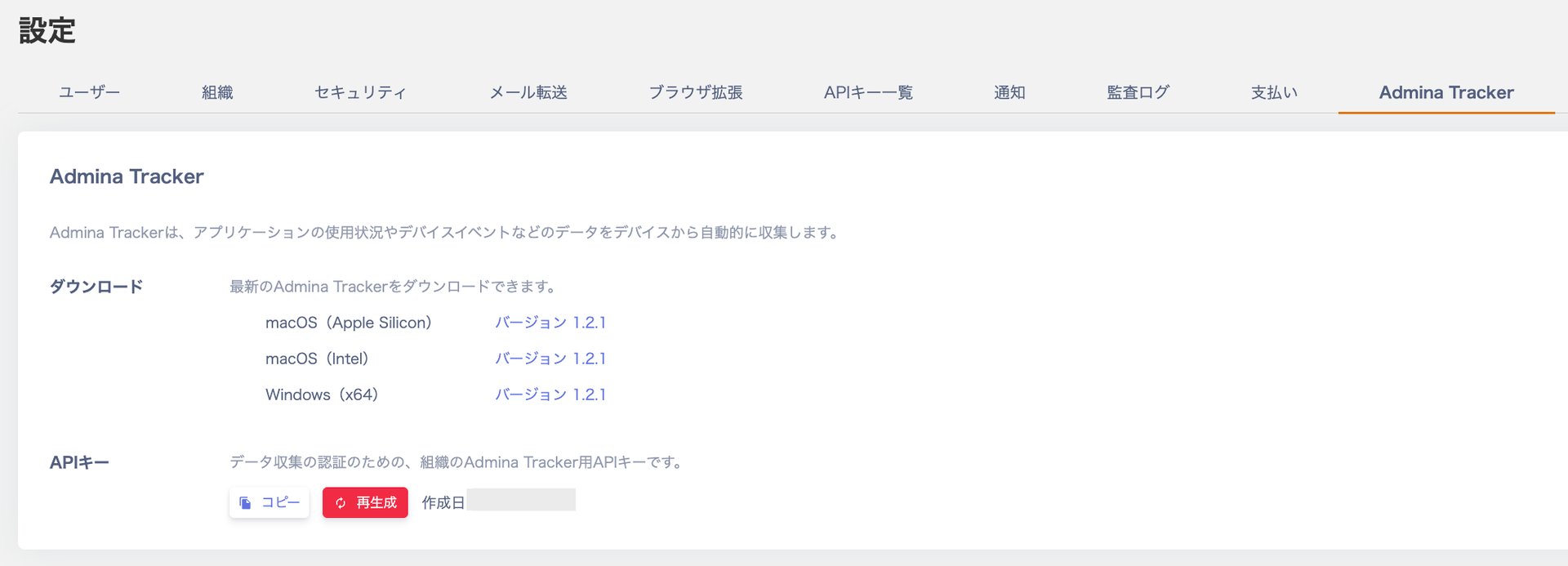
In the Admina admin console, open **Settings** > **Admina Tracker**. Generate an API key and download the installer for your OS. Set the API key and organization ID during installation to start automatic collection.
We released Admina Tracker, which automatically collects application usage from devices in your organization.
## See application usage with Admina Tracker
Admina Tracker is agent software that you install on macOS and Windows devices. It runs in the background, collects information about running applications, and sends it to the Admina admin console. Use it to see which applications your organization uses and to find shadow IT.
* Automatic collection of application usage. Admina Tracker collects information about applications running on the device and sends it to Admina automatically.
* macOS and Windows support. It runs on macOS 10.15 (Catalina) or later and on Windows 10 / 11 (x64). You can install it on each device manually. On Windows, you can also deploy it in bulk with Microsoft Intune.
* Automatic updates. When a new version is available, Admina Tracker updates itself in the background. No manual update is required.
In this release, application usage (running applications) is available. Collection of hardware information, system information, network information, and event logs is planned for a future release. The device events mentioned on the settings screen refer to these event logs.
## How to use
In the Admina admin console, open **Settings** > **Admina Tracker**. Generate an API key and download the installer for your OS. Set the API key and organization ID during installation to start automatic collection.
 See [About Admina Tracker](/en/it-management/admina-tracker) for details. The following help pages cover system requirements and installation steps.
* [Admina Tracker (macOS)](/en/it-management/admina-tracker/install-mac)
* [Install Admina Tracker (macOS solo)](/en/it-management/admina-tracker/install-mac-solo)
* [Admina Tracker (Windows)](/en/it-management/admina-tracker/install-windows)
* [Install Admina Tracker (Windows solo)](/en/it-management/admina-tracker/install-windows-solo)
* [Deploy Admina Tracker (Microsoft Intune)](/en/it-management/admina-tracker/install-windows-intune)
To check the installation or diagnose connection issues, see [Admina Tracker CLI command reference](/en/it-management/admina-tracker/cli-command-reference).
If you have any questions, feel free to reach out through our [support contact page](/en/contact-support).
This documentation is built and hosted on [Mintlify](https://mintlify.com), a developer documentation platform.
See [About Admina Tracker](/en/it-management/admina-tracker) for details. The following help pages cover system requirements and installation steps.
* [Admina Tracker (macOS)](/en/it-management/admina-tracker/install-mac)
* [Install Admina Tracker (macOS solo)](/en/it-management/admina-tracker/install-mac-solo)
* [Admina Tracker (Windows)](/en/it-management/admina-tracker/install-windows)
* [Install Admina Tracker (Windows solo)](/en/it-management/admina-tracker/install-windows-solo)
* [Deploy Admina Tracker (Microsoft Intune)](/en/it-management/admina-tracker/install-windows-intune)
To check the installation or diagnose connection issues, see [Admina Tracker CLI command reference](/en/it-management/admina-tracker/cli-command-reference).
If you have any questions, feel free to reach out through our [support contact page](/en/contact-support).
This documentation is built and hosted on [Mintlify](https://mintlify.com), a developer documentation platform.