> ## Documentation Index
> Fetch the complete documentation index at: https://support.i.moneyforward.com/llms.txt
> Use this file to discover all available pages before exploring further.

# 1-0. Device Screen Overview

> This page explains each item and feature on the Device screen.

#### Screen Description (Devices)

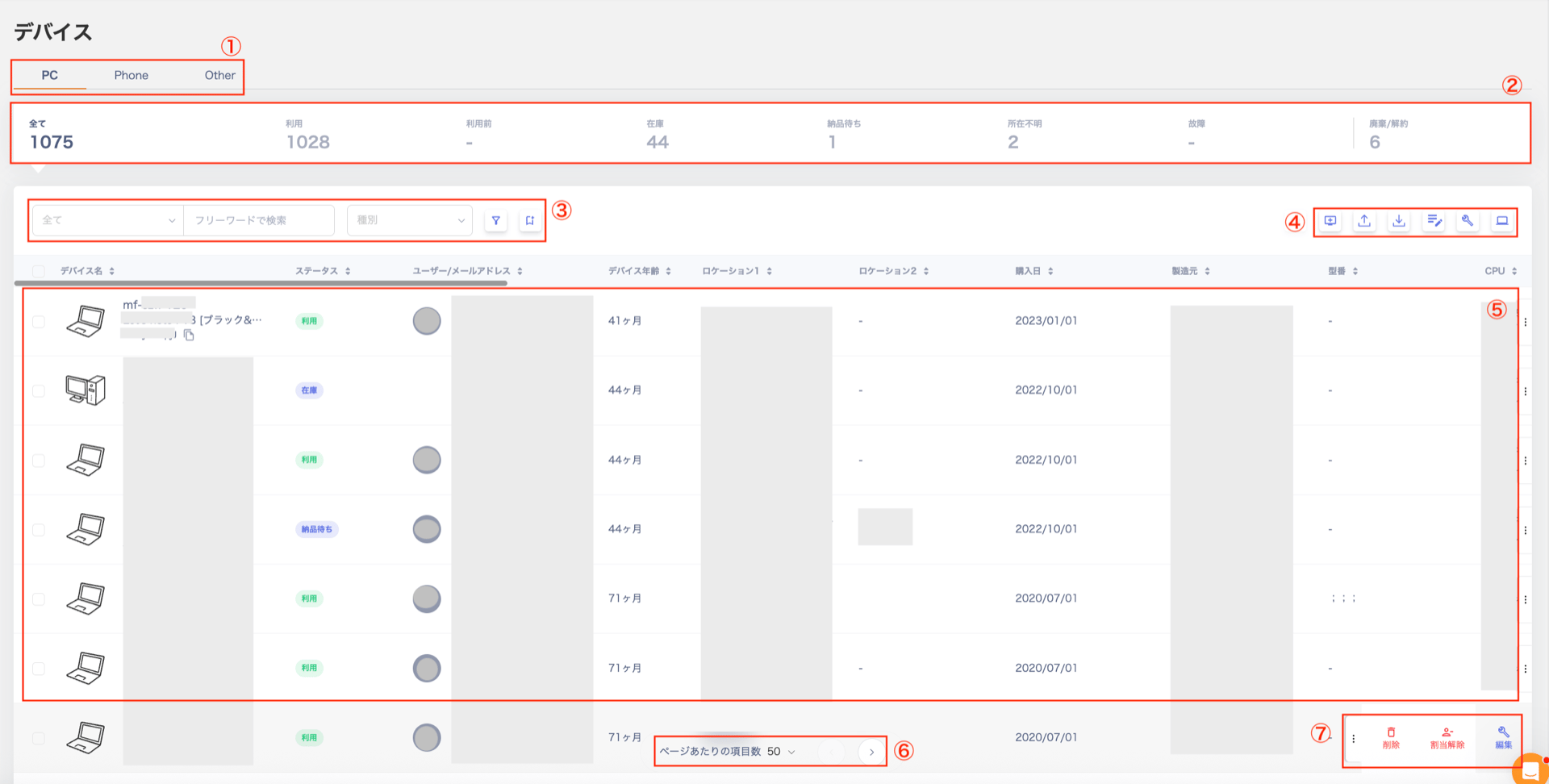
<img src="https://mintcdn.com/moneyforwardi/7hMGu_weqPvLV7P4/images/it-management/erfxlknd5e/2026-06-02-19-29-47.png?fit=max&auto=format&n=7hMGu_weqPvLV7P4&q=85&s=49fc58985ceec9b6d401c1ce838a0457" alt="Screen description (Devices)" width="1920" height="972" data-path="images/it-management/erfxlknd5e/2026-06-02-19-29-47.png" />

<table>
  <thead><tr><th style={{width:"60px"}}>#</th><th>Item</th><th>Description</th></tr></thead>

  <tbody>
    <tr><td>1</td><td>Device Category</td><td>Switch the view between "PC / Phone / Other" to check owned devices.</td></tr>
    <tr><td>2</td><td>Dashboard</td><td>View counts for "In use / Not yet used / In stock / Awaiting delivery / Unknown location / Broken / Disposed / Cancelled".</td></tr>
    <tr><td>3</td><td>Search and Filter</td><td>Search or filter by status and department. For details, see [Identify Self-Managed IDs (Devices)](/en/it-management/device/mt70ejcvcx-id).</td></tr>
    <tr><td>4</td><td>Action Buttons</td><td>Buttons in the upper right: "[New Device](/en/it-management/device/tmkn2wxi35-manage-device) / [Import](/en/it-management/device/dwrsgbckjp-device-csv) / Export / [Asset Number Policy Settings](/en/it-management/device/q9mrjyd4r7-asset-number) / [Settings (Edit Table)](/en/it-management/device/2gdbiob664-device-itme) / [Device Type Management](/en/it-management/device/5vqd5lbjjw-device-type)".</td></tr>
    <tr><td>5</td><td>Device List</td><td>View the list of all devices.</td></tr>
    <tr><td>6</td><td>Items per Page</td><td>Switch between "50 / 100" items per page. Use the buttons on the right to navigate to the next or previous page.</td></tr>
    <tr><td>7</td><td>Three-dot Menu</td><td>Select "Delete / Assign / Edit" from the three-dot menu \[**︙**].</td></tr>
  </tbody>
</table>

#### Device Detail Screen (Info Tab)

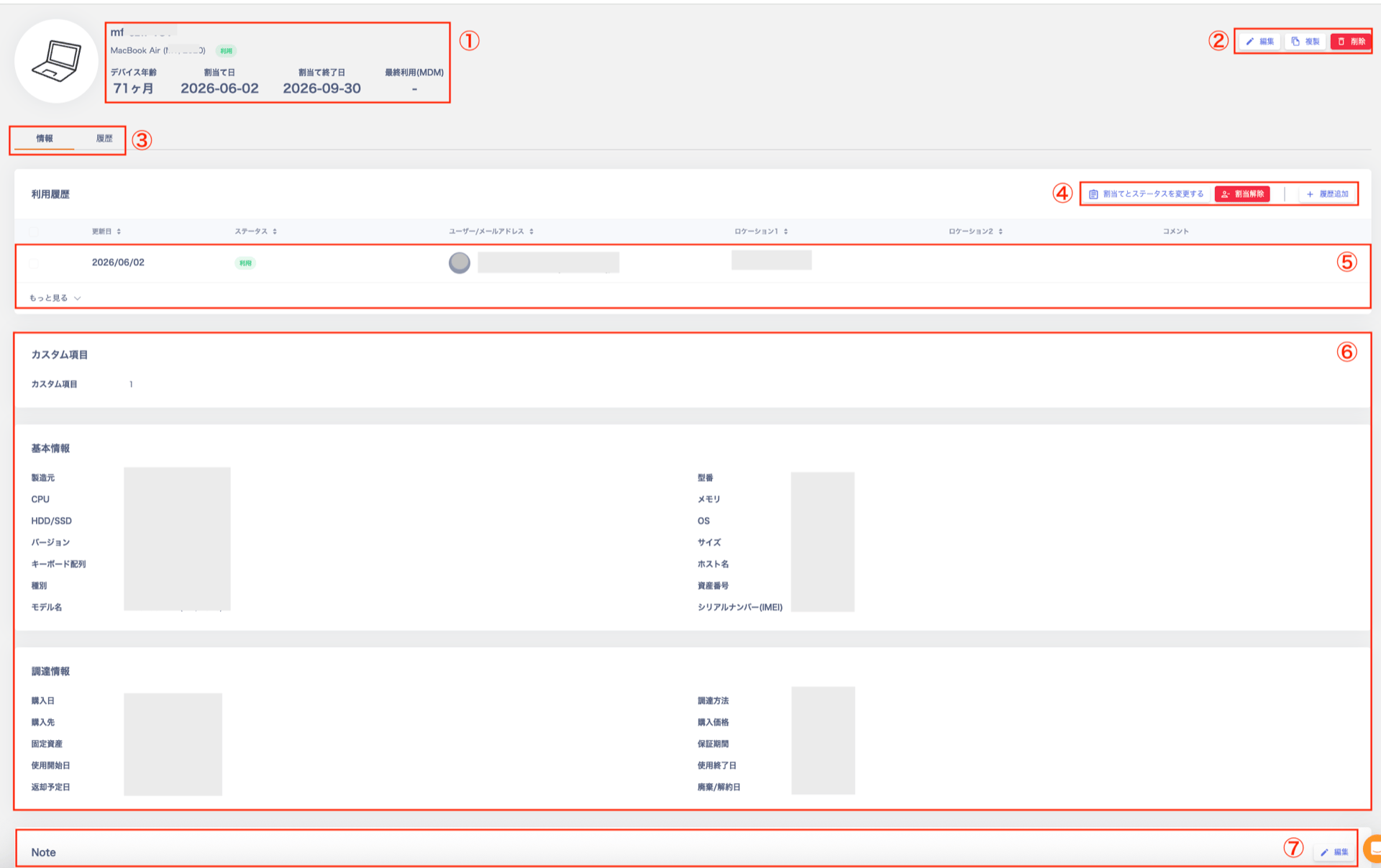
<img src="https://mintcdn.com/moneyforwardi/7hMGu_weqPvLV7P4/images/it-management/erfxlknd5e/2026-06-02-19-12-07.png?fit=max&auto=format&n=7hMGu_weqPvLV7P4&q=85&s=224148e5b02eac215a5cd26c81060d20" alt="Device detail screen" width="1920" height="1207" data-path="images/it-management/erfxlknd5e/2026-06-02-19-12-07.png" />

<table>
  <thead><tr><th style={{width:"60px"}}>#</th><th>Item</th><th>Description</th></tr></thead>

  <tbody>
    <tr><td>1</td><td>Device Information</td><td>Displays "Asset Info / Device Age / Assignment Date / Assignment End Date / Last Used Date (MDM)". For MDM-linked devices, the MDM link and icon appear. For details, see [MDM Fields](/en/it-management/device/axw9ezvkgc-mdm-security).</td></tr>
    <tr><td>2</td><td>Action Buttons</td><td>"[Edit](/en/it-management/device/tmkn2wxi35-manage-device) / Duplicate / Delete" buttons.</td></tr>
    <tr><td>3</td><td>Tab Menu</td><td>Switch between the "Info" and "History" tabs.</td></tr>
    <tr><td>4</td><td>Usage History Action Buttons</td><td>"Change Assignment and Status / Unassign / Add History" buttons.</td></tr>
    <tr><td>5</td><td>Usage History</td><td>Select "See More" at the bottom left to view the full history. Use the three-dot menu \[**︙**] to "Delete / Edit" entries. Select "Collapse" to hide the history section.</td></tr>
    <tr><td>6</td><td>Field List</td><td>List of device fields. View "Custom Fields / Basic Info / Procurement Info". For details, see [Custom Fields](/en/it-management/device/2gdbiob664-device-itme) and [Device Management Field List](/en/it-management/device/qlla5169py-devicetype).</td></tr>
    <tr><td>7</td><td>Note</td><td>Supports Markdown syntax.</td></tr>
  </tbody>
</table>

#### Device Detail Screen (History Tab)

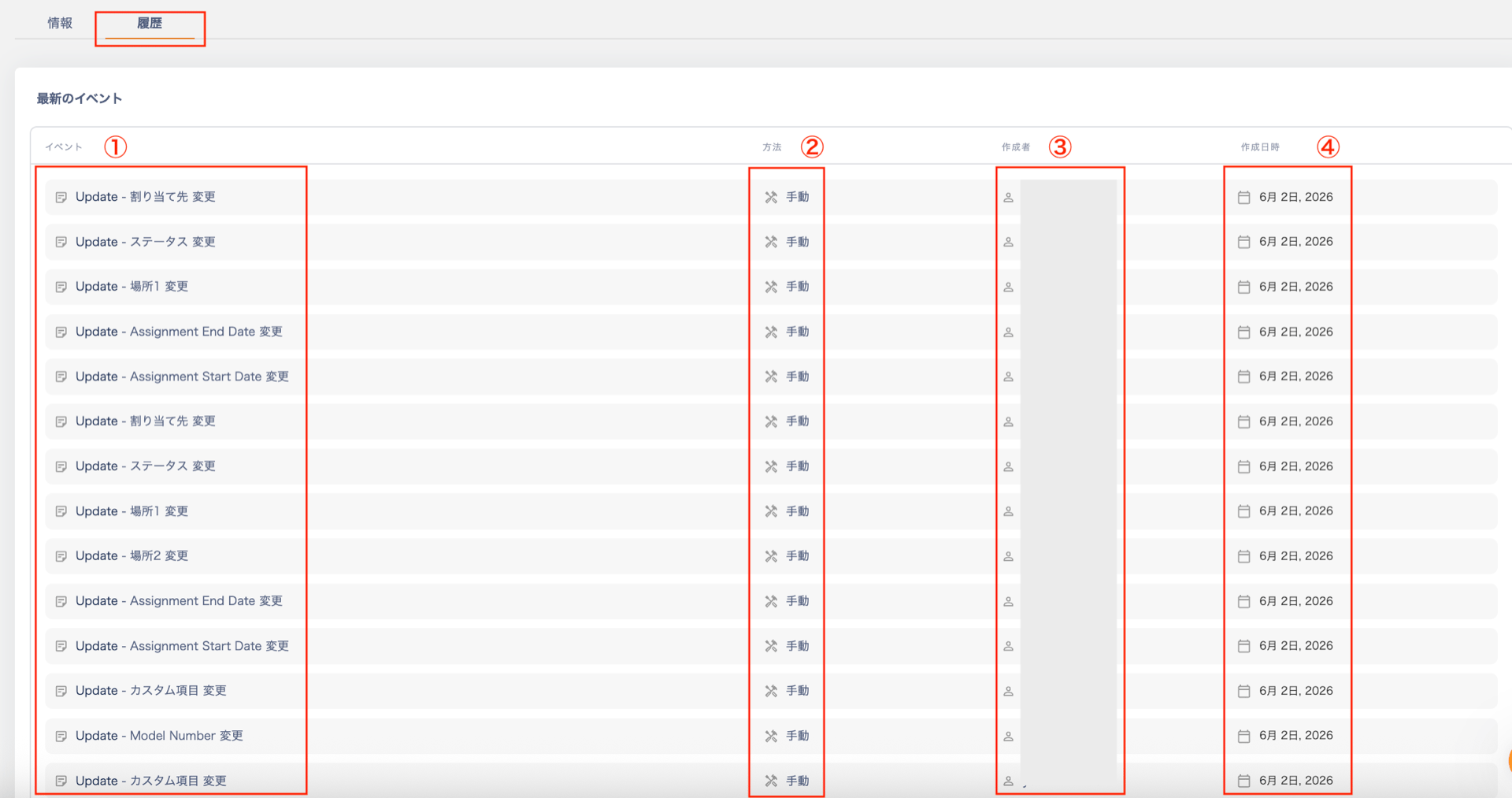
The device's "History" tab shows the operation history for the device, including the following information.

<img src="https://mintcdn.com/moneyforwardi/64FvcR3KW43g7T0p/images/it-management/erfxlknd5e/2026-06-02-20-40-17.png?fit=max&auto=format&n=64FvcR3KW43g7T0p&q=85&s=b7f74068f7ce360e7975e6afbdf19365" alt="Device detail screen (History tab)" width="1920" height="1013" data-path="images/it-management/erfxlknd5e/2026-06-02-20-40-17.png" />

<table>
  <thead><tr><th style={{width:"60px"}}>#</th><th>Item</th><th>Description</th></tr></thead>

  <tbody>
    <tr><td>1</td><td>Event</td><td>The type and target of the operation.<br />Type: Device created / Field updated / Assigned to user / Unassigned / Status changed / Memo updated<br />Target: Status / Asset number / Manufacturer / Model name / Serial number / Location 1 / Location 2 / Assignee / Memo / Custom field</td></tr>
    <tr><td>2</td><td>Method</td><td>The source of the operation: Manual.</td></tr>
    <tr><td>3</td><td>Created by</td><td>The name of the user who performed the operation.</td></tr>
    <tr><td>4</td><td>Created at</td><td>The date and time the operation was performed.</td></tr>
  </tbody>
</table>

#### Device Export

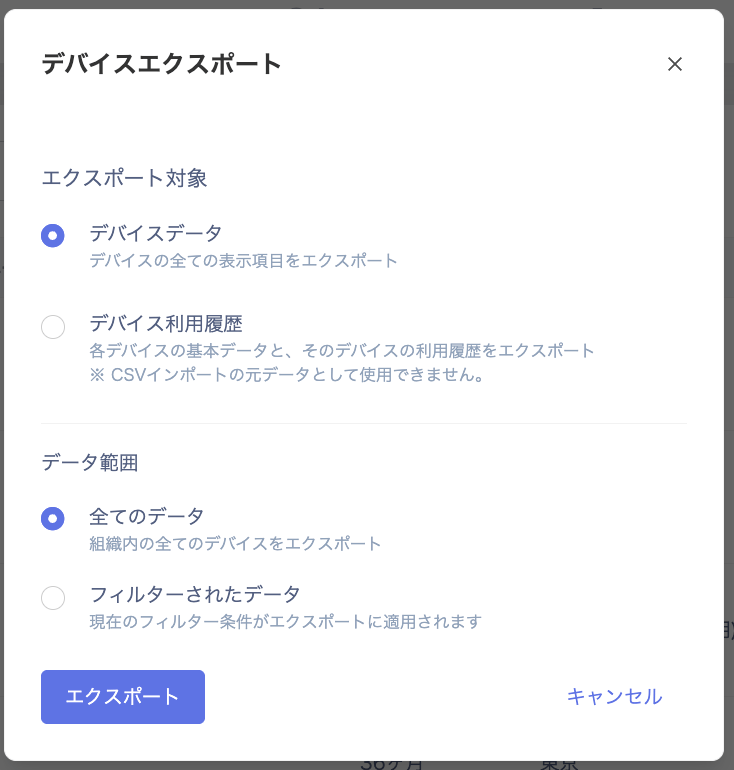
On the "Device Export" screen, specify the export conditions and save the CSV file by selecting \[Export].

#### Export Conditions

**Export Target**: Device data, Device usage history

**Data Range**: All data (includes all categories: "PC / Phone / Other"), or Filtered data (narrowed by specific conditions)

<img src="https://mintcdn.com/moneyforwardi/0FfE6EsyXirDkNvw/images/it-management/erfxlknd5e/2025-10-29-16-16-22.png?fit=max&auto=format&n=0FfE6EsyXirDkNvw&q=85&s=f82c2a27437aa1b3600f605c38caa829" alt="Export conditions" width="734" height="770" data-path="images/it-management/erfxlknd5e/2025-10-29-16-16-22.png" />

#### Output Preview

The following images show the CSV headers after export. (This is a preview without any custom fields configured.)

**Device Data**

<img src="https://mintcdn.com/moneyforwardi/0FfE6EsyXirDkNvw/images/it-management/erfxlknd5e/2025-10-29-22-17-27.png?fit=max&auto=format&n=0FfE6EsyXirDkNvw&q=85&s=99d7ed089401dcdc694d21d8d14134d4" alt="Device data CSV output preview" width="1784" height="122" data-path="images/it-management/erfxlknd5e/2025-10-29-22-17-27.png" />

**Device Usage History**

<img src="https://mintcdn.com/moneyforwardi/0FfE6EsyXirDkNvw/images/it-management/erfxlknd5e/2025-10-29-16-28-58.png?fit=max&auto=format&n=0FfE6EsyXirDkNvw&q=85&s=83f80dbea2c10b55d4b7bc2cdd30c61d" alt="Device usage history CSV output preview" width="2572" height="80" data-path="images/it-management/erfxlknd5e/2025-10-29-16-28-58.png" />