> ## Documentation Index
> Fetch the complete documentation index at: https://support.i.moneyforward.com/llms.txt
> Use this file to discover all available pages before exploring further.
# Export Google Drive Files Using the API
> How to run the API to export Google Drive file lists to a CSV file.
You can export file lists (including Google Drive) directly from the UI. Refer to this guide only when you want to export using the API.
### **API**
We provide a public API so you can use the retrieved data however you like.
For details on the available API endpoints, see the [API documentation](/en/api-reference/it-management).
You can also access it from **Settings** > **API Keys** > "API Documentation".
 #### **API for File Export**
[Get files for a service in an organization](/en/api-reference/it-management#tag/Services/operation/publicGetServicesFiles) is the API endpoint for exporting file data.
**GET** [https://api.itmc.i.moneyforward.com/api/v1/organizations/\`\{organizationId}\`/services/\`\{serviceId}\`/files](https://api.itmc.i.moneyforward.com/api/v1/organizations/`\{organizationId}`/services/`\{serviceId}`/files)
This returns a list of files for the specified `ServiceID`.
`organizationId` is the ID assigned to each individual tenant.
#### **Preparing Your Execution Environment**
* Web API execution environment
Prepare an environment to call the Web API. Options include Python and CLI (curl). This guide uses the following Chrome extension:
[Talend API Tester - Free Edition](https://chrome.google.com/webstore/detail/talend-api-tester-free-ed/aejoelaoggembcahagimdiliamlcdmfm)
* File conversion tool
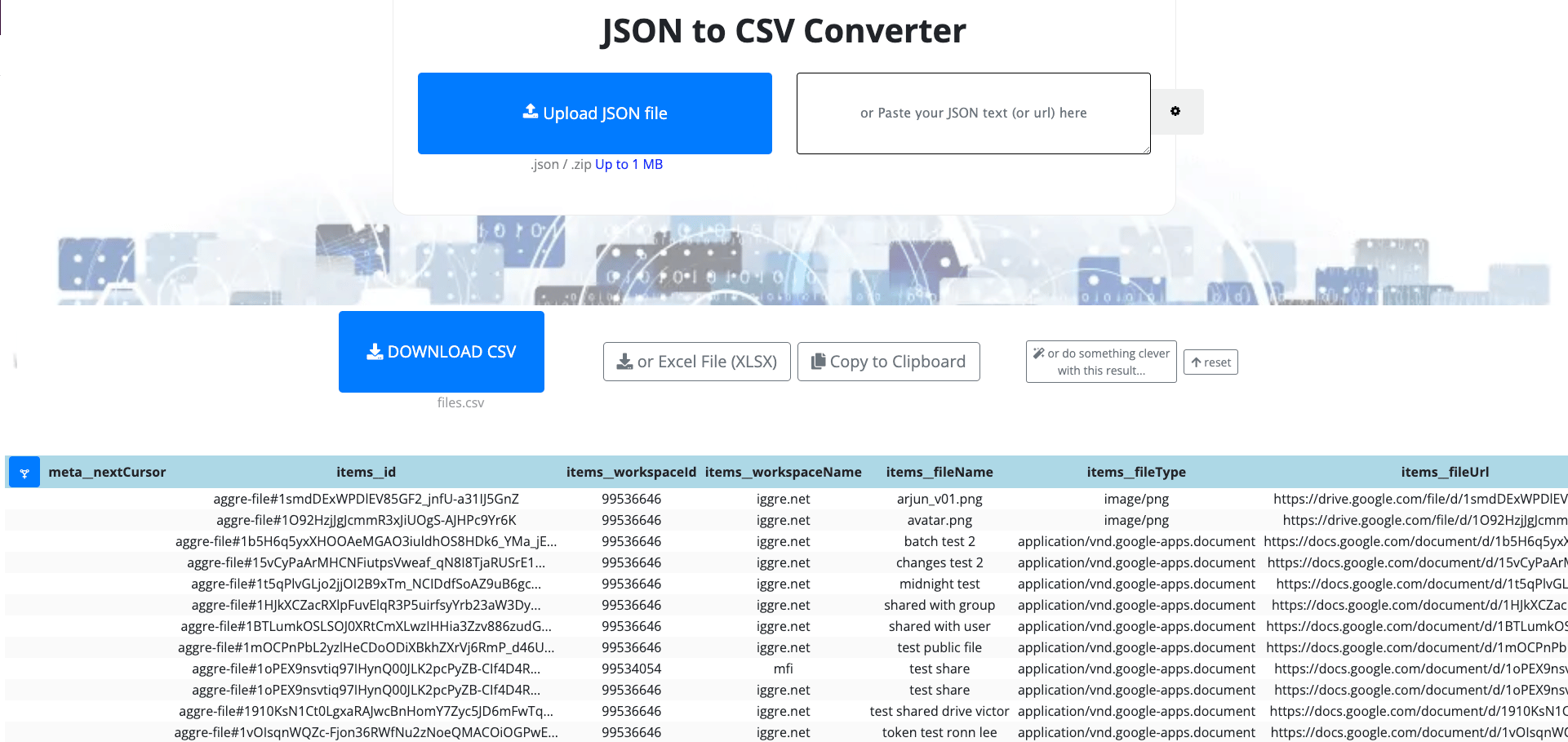
Convert the JSON output from the API to CSV or Excel format. A service like the following works well:
[JSON to CSV Converter](https://data.page/json/csv)
#### **Steps (Exporting the Google Drive Public File List)**
#### **Finding Your OrganizationID**
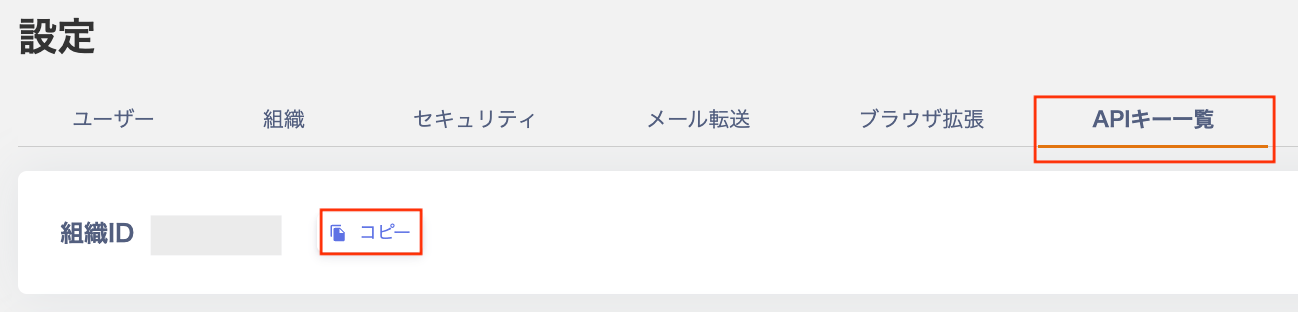
The **Organization ID** shown under **Settings** > **API Keys** is your OrganizationID. Copy it for later use.
#### **API for File Export**
[Get files for a service in an organization](/en/api-reference/it-management#tag/Services/operation/publicGetServicesFiles) is the API endpoint for exporting file data.
**GET** [https://api.itmc.i.moneyforward.com/api/v1/organizations/\`\{organizationId}\`/services/\`\{serviceId}\`/files](https://api.itmc.i.moneyforward.com/api/v1/organizations/`\{organizationId}`/services/`\{serviceId}`/files)
This returns a list of files for the specified `ServiceID`.
`organizationId` is the ID assigned to each individual tenant.
#### **Preparing Your Execution Environment**
* Web API execution environment
Prepare an environment to call the Web API. Options include Python and CLI (curl). This guide uses the following Chrome extension:
[Talend API Tester - Free Edition](https://chrome.google.com/webstore/detail/talend-api-tester-free-ed/aejoelaoggembcahagimdiliamlcdmfm)
* File conversion tool
Convert the JSON output from the API to CSV or Excel format. A service like the following works well:
[JSON to CSV Converter](https://data.page/json/csv)
#### **Steps (Exporting the Google Drive Public File List)**
#### **Finding Your OrganizationID**
The **Organization ID** shown under **Settings** > **API Keys** is your OrganizationID. Copy it for later use.
 #### **Generating an API Key**
1. Go to **Settings** > **API Keys** and click **Generate API Key**.
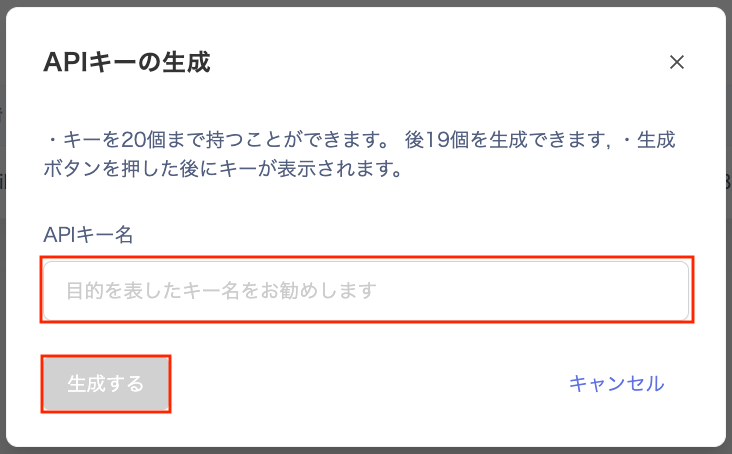
2. On the "Generate API Key" screen, enter a name for the key and click **Generate**.
#### **Generating an API Key**
1. Go to **Settings** > **API Keys** and click **Generate API Key**.
2. On the "Generate API Key" screen, enter a name for the key and click **Generate**.
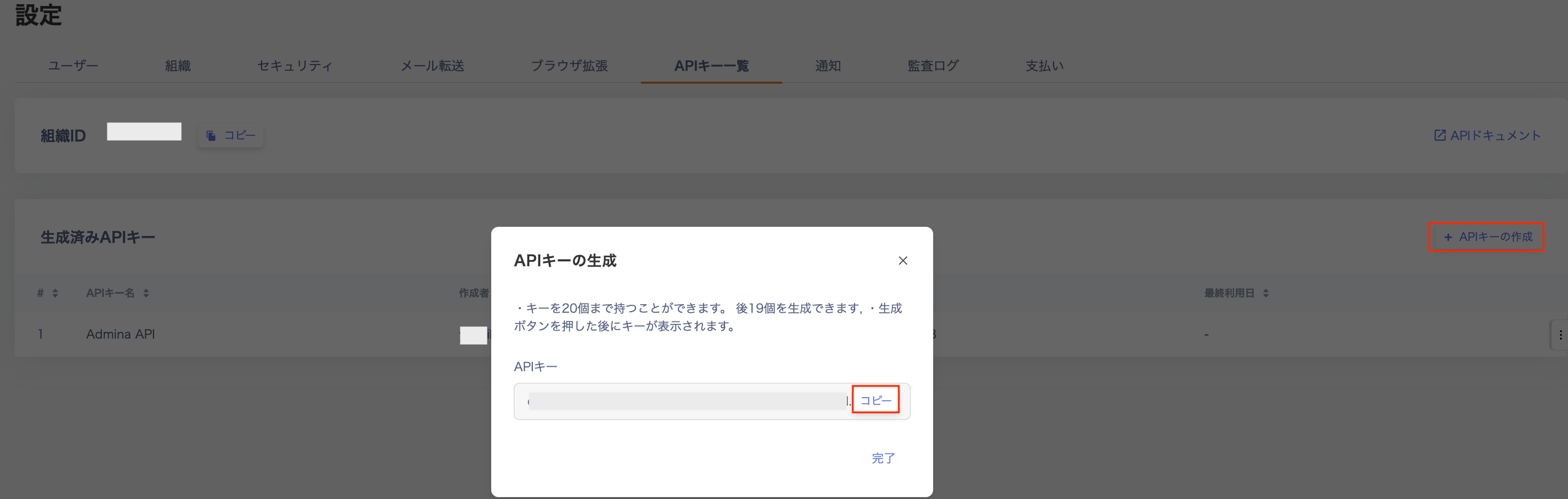
 3. Your API key will be issued. Copy and save it.
Note: This key is required to call the API. It is displayed only once, so save it before closing the dialog.
3. Your API key will be issued. Copy and save it.
Note: This key is required to call the API. It is displayed only once, so save it before closing the dialog.
 #### **Finding the Service ID**
Find the ServiceID for the service whose file data you want to retrieve. Click on the relevant service and check the URL to see its ServiceID.
#### **Finding the Service ID**
Find the ServiceID for the service whose file data you want to retrieve. Click on the relevant service and check the URL to see its ServiceID.
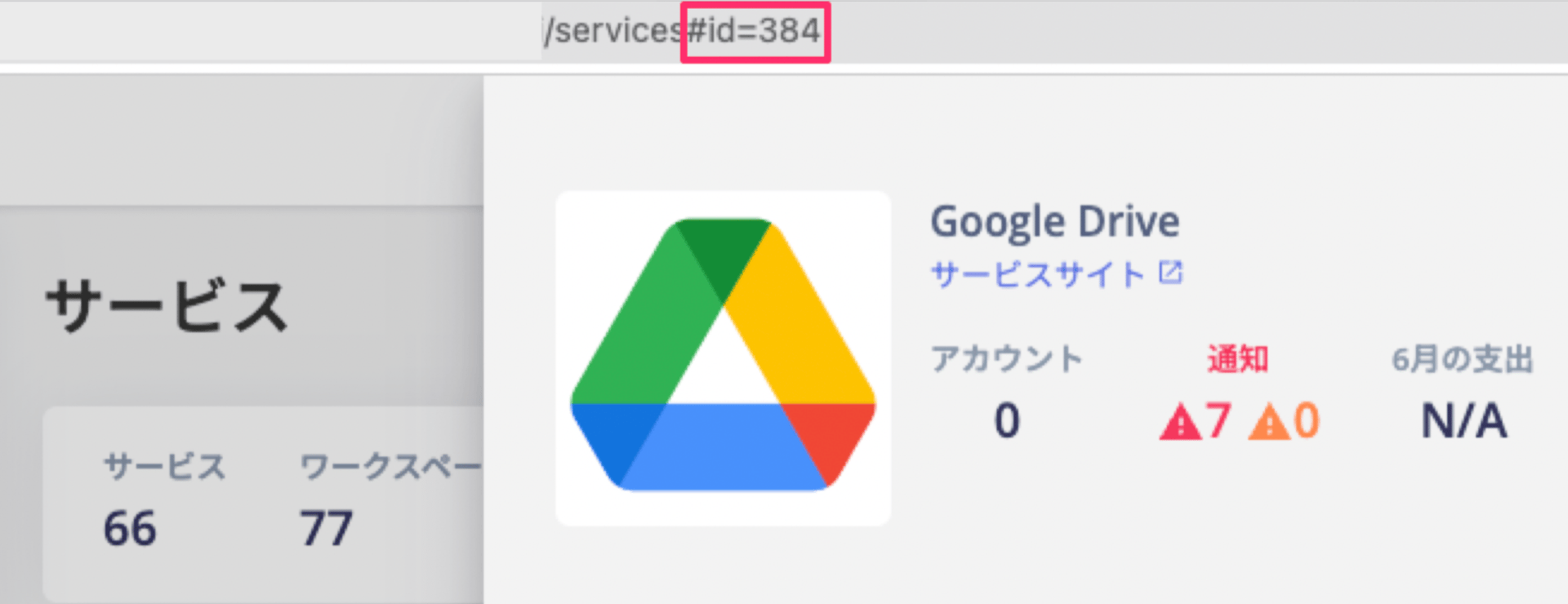 For Google Drive, the ServiceID is `384`.
#### **Running the API**
Start your Web API execution environment and call the API.
```bash theme={null}
curl -i -X GET -H "Authorization:Bearer " https://api.itmc.i.moneyforward.com/api/v1/organizations/{organizationID}/services/384/files'
```
This outputs Google Drive files (up to 200 items).
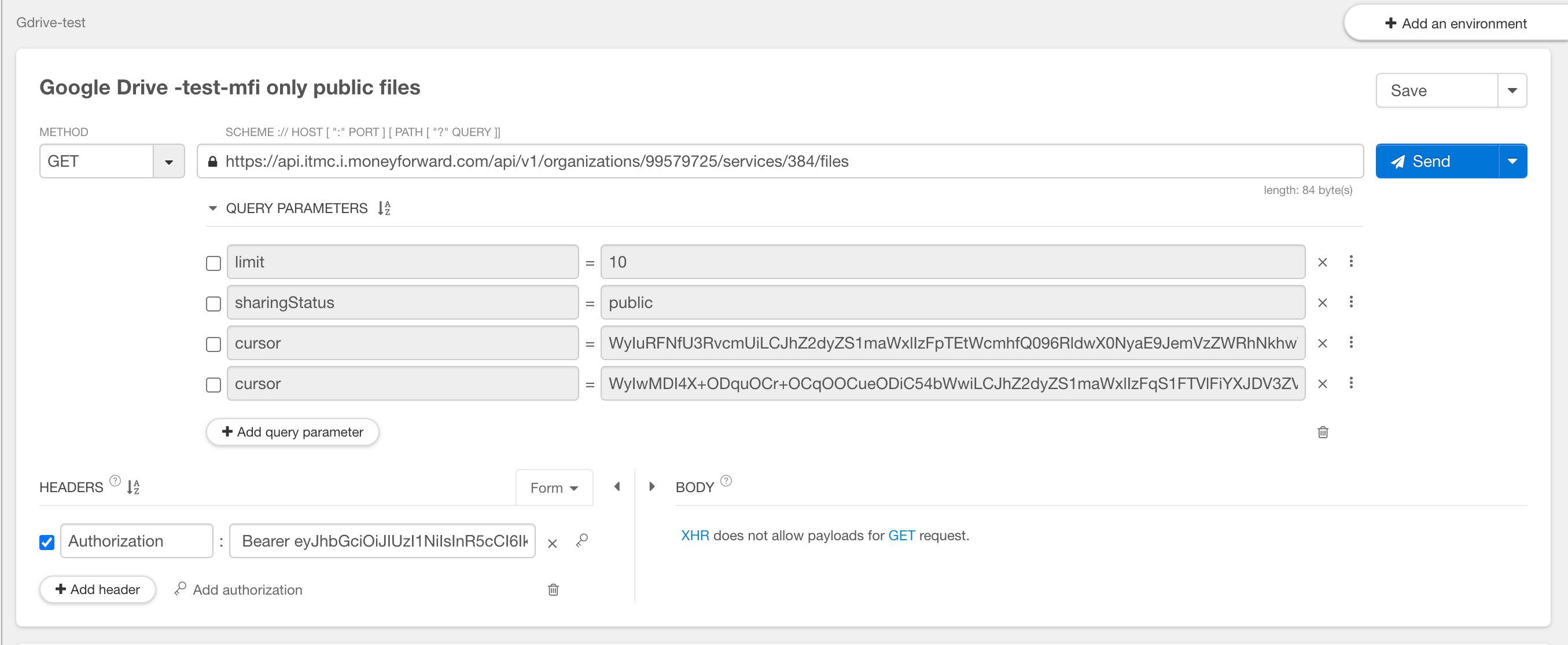
Below is a sample execution using [Talend API Tester - Free Edition](https://chrome.google.com/webstore/detail/talend-api-tester-free-ed/aejoelaoggembcahagimdiliamlcdmfm).
For Google Drive, the ServiceID is `384`.
#### **Running the API**
Start your Web API execution environment and call the API.
```bash theme={null}
curl -i -X GET -H "Authorization:Bearer " https://api.itmc.i.moneyforward.com/api/v1/organizations/{organizationID}/services/384/files'
```
This outputs Google Drive files (up to 200 items).
Below is a sample execution using [Talend API Tester - Free Edition](https://chrome.google.com/webstore/detail/talend-api-tester-free-ed/aejoelaoggembcahagimdiliamlcdmfm).
 #### **Setting Authentication Credentials**
Set the authentication credentials to access the service as follows:
`Authorization:Bearer `
#### **Specifying Query Parameters**
You can filter the output by specifying query parameters. For example, you can limit results to files owned by admins or files shared publicly.
The available query parameters are listed below.
```
limit=10
sharingStatus=pubilc
https://api.itmc.i.moneyforward.com/api/v1/organizations/99579724/services/384/files?limit=10&sharingStatus=pubilc
```
| Parameter | Description |
| ----------------- | -------------------------------------------------------------------------------------------------------------------------------------------------------------------------------------------------------------------------------------------------------------------------------- |
| **keyword** | Filter by a keyword in the file name. |
| **workspaceId** | Filter by workspace ID to retrieve files from a specific workspace. |
| **sharingStatus** | Filter by sharing status.
#### **Setting Authentication Credentials**
Set the authentication credentials to access the service as follows:
`Authorization:Bearer `
#### **Specifying Query Parameters**
You can filter the output by specifying query parameters. For example, you can limit results to files owned by admins or files shared publicly.
The available query parameters are listed below.
```
limit=10
sharingStatus=pubilc
https://api.itmc.i.moneyforward.com/api/v1/organizations/99579724/services/384/files?limit=10&sharingStatus=pubilc
```
| Parameter | Description |
| ----------------- | -------------------------------------------------------------------------------------------------------------------------------------------------------------------------------------------------------------------------------------------------------------------------------- |
| **keyword** | Filter by a keyword in the file name. |
| **workspaceId** | Filter by workspace ID to retrieve files from a specific workspace. |
| **sharingStatus** | Filter by sharing status.
`"public"`: Files shared with everyone
`"shared"`: Files shared externally |
| **limit** | Set the number of results. Maximum is 200. Defaults to 50 if not specified.
Example: `limit=50` |
| **sortBy** | Sort results by the specified field. Available sort fields:
`"fileName"`: File name
`"source"`: Source SaaS
`"sharingStatus"`: Sharing status
`"creationDate"`: File creation date
`"workspaceId"`: Workspace ID
`"workspaceName"`: Workspace name |
| **FileType** | Filter by type.
`"file"`: Retrieve files only
`"folder"`: Retrieve folders only |
| **owners** | Filter by file owner (email address). |
| **sortOrder** | Set the sort direction.
`"DESC"`: Descending
`"ASC"`: Ascending |
#### **Checking the Results**
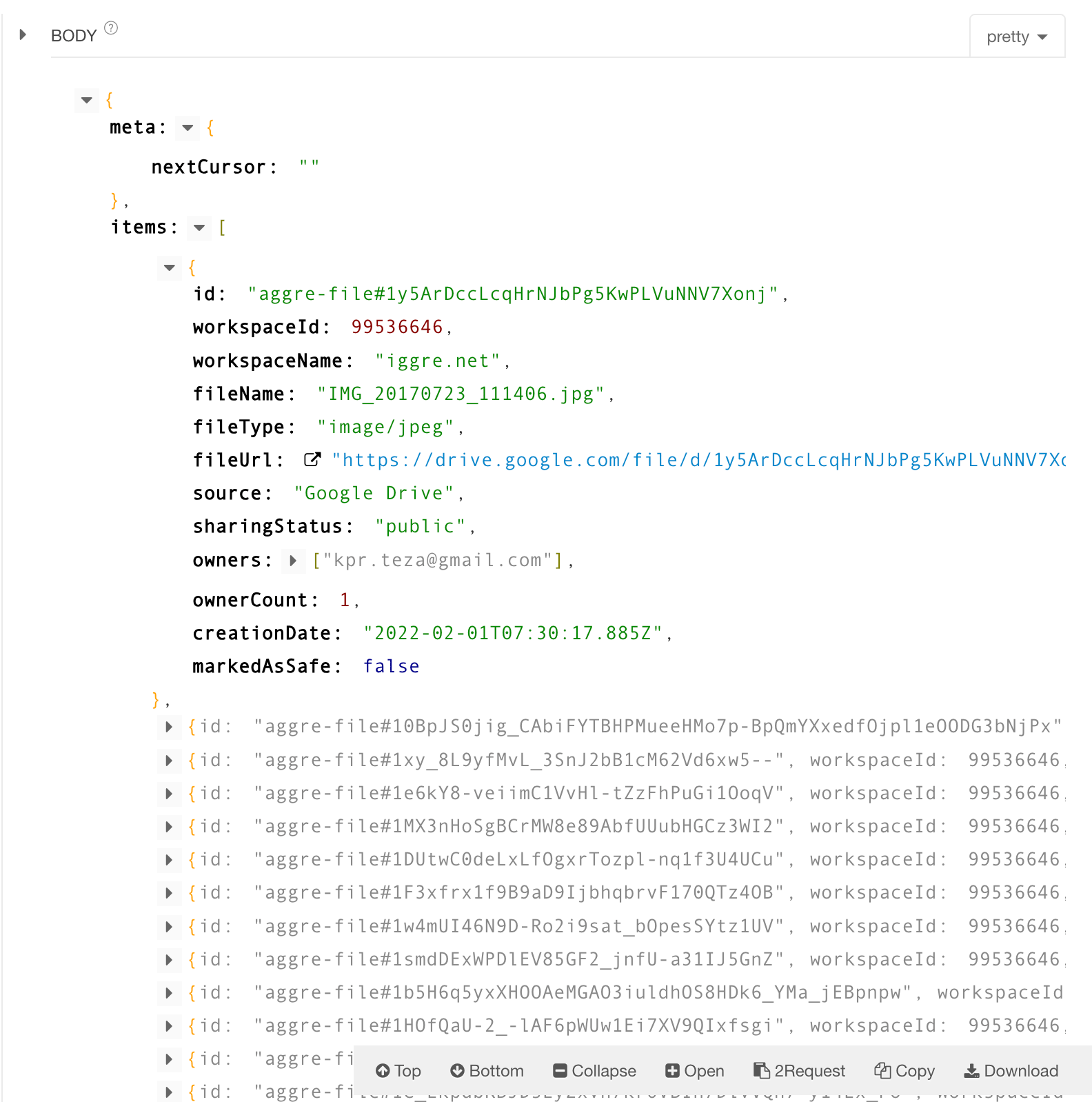
When the API call succeeds, results appear in the Body section.
 * Meta > nextCursor
When more than 200 results are returned, use this cursor to retrieve items 201 and beyond. Pass the `nextCursor` value as a query parameter to retrieve the next page of results.
* Item: Details for each individual file.
#### **Exporting JSON and Converting to CSV**
Download the results to save them as a JSON file.
Then convert the downloaded JSON file to CSV format.
Visit a service such as [JSON to CSV Converter](https://data.page/json/csv), upload the JSON file, and download the resulting CSV.
* Meta > nextCursor
When more than 200 results are returned, use this cursor to retrieve items 201 and beyond. Pass the `nextCursor` value as a query parameter to retrieve the next page of results.
* Item: Details for each individual file.
#### **Exporting JSON and Converting to CSV**
Download the results to save them as a JSON file.
Then convert the downloaded JSON file to CSV format.
Visit a service such as [JSON to CSV Converter](https://data.page/json/csv), upload the JSON file, and download the resulting CSV.