> ## Documentation Index
> Fetch the complete documentation index at: https://support.i.moneyforward.com/llms.txt
> Use this file to discover all available pages before exploring further.
# External Sharing Content Management
> Retrieve the sharing status of files in external storage services.
#### Feature Overview
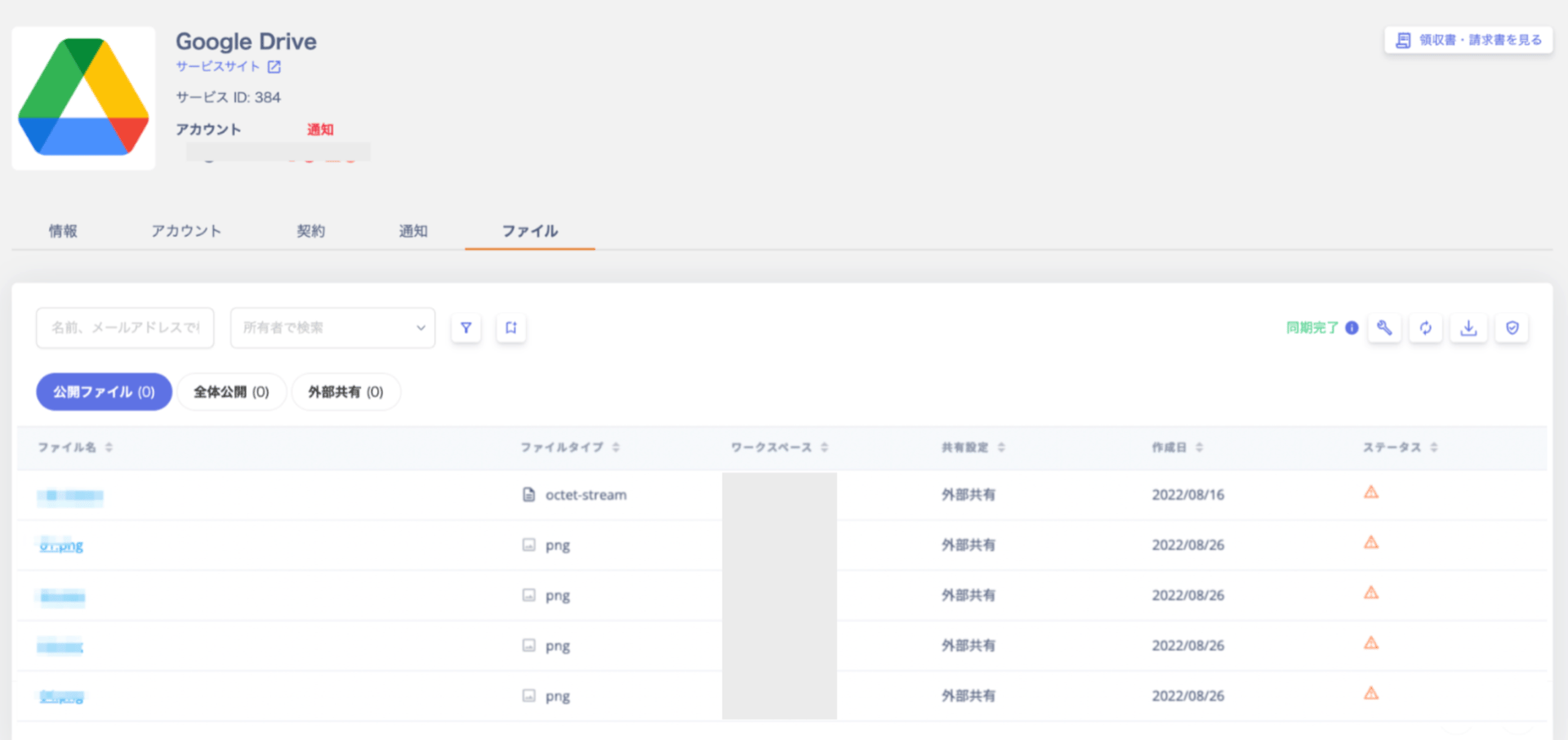
This feature retrieves the sharing status of files in external storage services. It collects information on externally shared files and sends alerts to help you address unintended sharing.
The `Admin` role is required to view the Files tab. For details on roles, see [Managing Admin Users and Roles](/en/it-management/settings/yne7fl2lcy-role-new).
 #### Supported SaaS
Integrate the following SaaS services to retrieve the sharing status of files. Follow the link for each service to view the integration steps.
| **Supported SaaS** | | | | |
| -------------------------------------- | ------------------------------------------ | -------------------------------------------------------- | -------------------------------------------- | -------------------------------------------------- |
| [Box](/en/integrations/w1zy4zi45d-box) | [Figma](/en/integrations/p1quea1tdz-figma) | [Google Drive](/en/integrations/k7vonejs7q-google-drive) | [Notion](/en/integrations/w4m649fp11-notion) | [One Drive](/en/integrations/wzq7l0abvj-one-drive) |
**About Notion Integration**
Due to Notion's FileList API limitations, time lags and data gaps may occur when retrieving files. Notion does not rebuild indexes in real time, and the API does not guarantee all files are returned. (As of March 2025)
#### Alert Detection
Files that match the following conditions are detected as externally shared and treated as alerts.
You can dismiss alerts by fixing the original settings or by using [Safelist — Exclude detected files](/en/it-management/file-management/b77md9ed8m-safelist).
| **Alert Level** | **Condition** | **How to Fix** |
| --------------- | ------------------------------------------------------------------------------ | ------------------------------------------------------------------------------------------------------ |
| **Alert** | Determined to be **publicly shared** (see below) | Fix the sharing settings, or mark the file as safe in the safelist (excluded from future detection) |
| **Warning** | Determined to be **externally shared** (see below) | Fix the sharing settings, or mark the file as safe in the safelist (excluded from future detection) |
| (Not detected) | Shared only within your organization's domain, or matches a safelist condition | (No action required, but periodically reviewing the safelist helps prevent overlooked setting changes) |
#### Sync Execution
#### Automatic Sync
Automatic sync runs approximately once a week. Syncing may take multiple hours with large numbers of files.
#### Manual Sync
You can trigger a manual sync using the \[Sync] button on the **Files** tab.
Note that clicking the workspace sync button does not sync file information.
#### Supported SaaS
Integrate the following SaaS services to retrieve the sharing status of files. Follow the link for each service to view the integration steps.
| **Supported SaaS** | | | | |
| -------------------------------------- | ------------------------------------------ | -------------------------------------------------------- | -------------------------------------------- | -------------------------------------------------- |
| [Box](/en/integrations/w1zy4zi45d-box) | [Figma](/en/integrations/p1quea1tdz-figma) | [Google Drive](/en/integrations/k7vonejs7q-google-drive) | [Notion](/en/integrations/w4m649fp11-notion) | [One Drive](/en/integrations/wzq7l0abvj-one-drive) |
**About Notion Integration**
Due to Notion's FileList API limitations, time lags and data gaps may occur when retrieving files. Notion does not rebuild indexes in real time, and the API does not guarantee all files are returned. (As of March 2025)
#### Alert Detection
Files that match the following conditions are detected as externally shared and treated as alerts.
You can dismiss alerts by fixing the original settings or by using [Safelist — Exclude detected files](/en/it-management/file-management/b77md9ed8m-safelist).
| **Alert Level** | **Condition** | **How to Fix** |
| --------------- | ------------------------------------------------------------------------------ | ------------------------------------------------------------------------------------------------------ |
| **Alert** | Determined to be **publicly shared** (see below) | Fix the sharing settings, or mark the file as safe in the safelist (excluded from future detection) |
| **Warning** | Determined to be **externally shared** (see below) | Fix the sharing settings, or mark the file as safe in the safelist (excluded from future detection) |
| (Not detected) | Shared only within your organization's domain, or matches a safelist condition | (No action required, but periodically reviewing the safelist helps prevent overlooked setting changes) |
#### Sync Execution
#### Automatic Sync
Automatic sync runs approximately once a week. Syncing may take multiple hours with large numbers of files.
#### Manual Sync
You can trigger a manual sync using the \[Sync] button on the **Files** tab.
Note that clicking the workspace sync button does not sync file information.
 #### Stopping Sharing
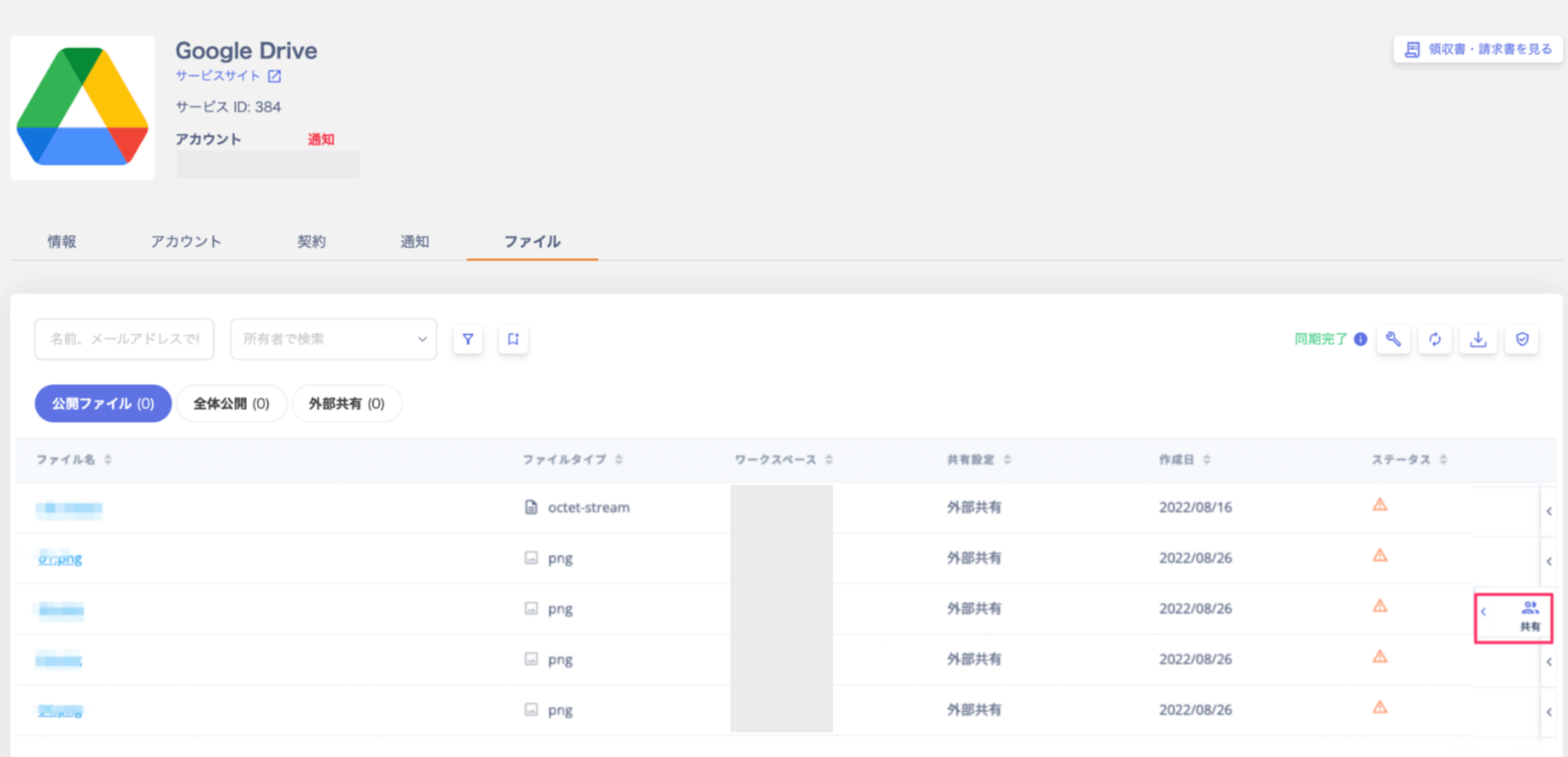
1. Review the status of retrieved shared files and stop sharing as needed. Click the three-dot menu \[**︙**] on the right end, then click \[Share].
#### Stopping Sharing
1. Review the status of retrieved shared files and stop sharing as needed. Click the three-dot menu \[**︙**] on the right end, then click \[Share].
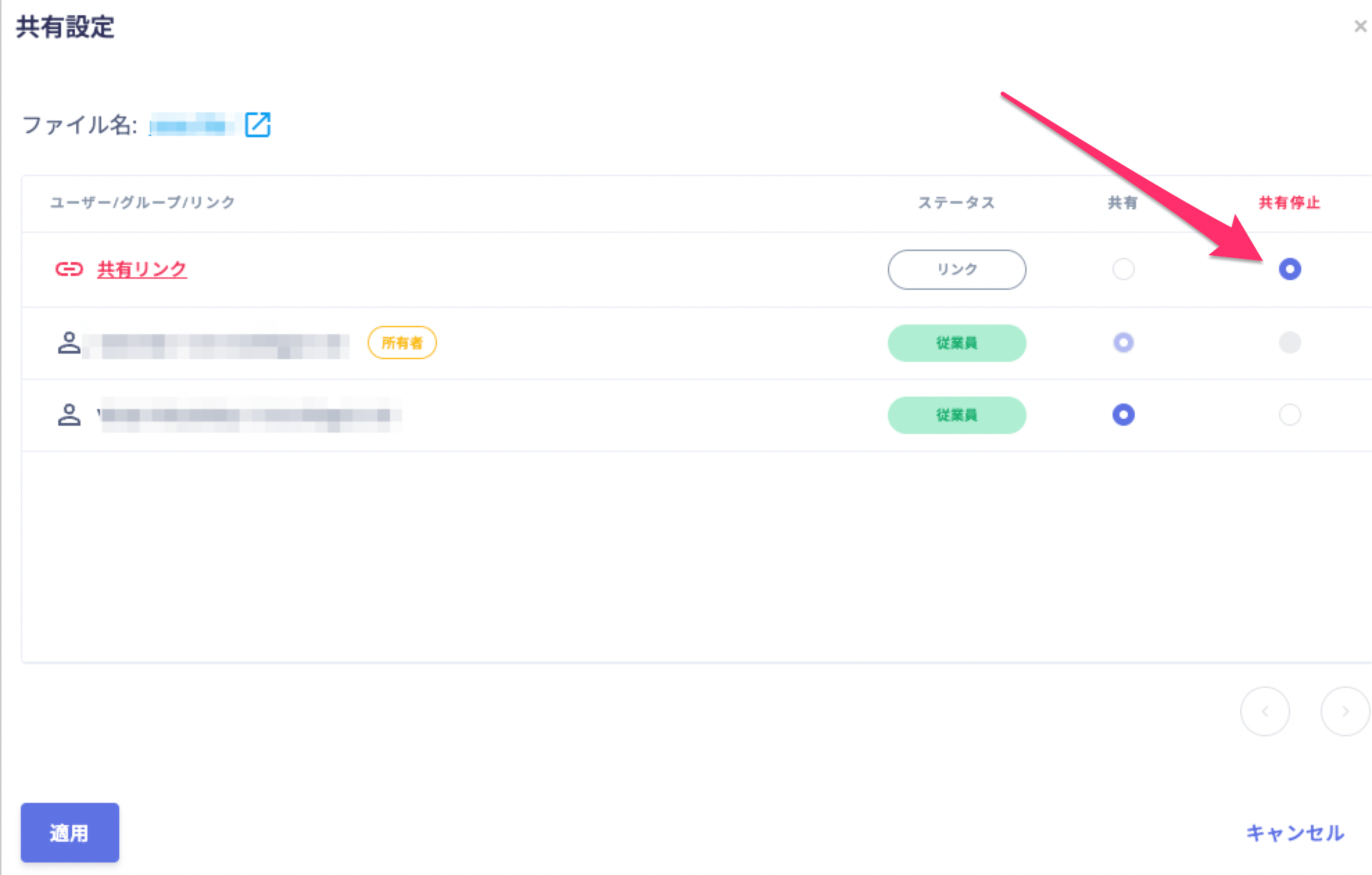
 2. Select the users, groups, or links you want to stop sharing with, then click \[Apply].
 #### Exporting Files
You can export detected files as a CSV file. Click \[Export] in the upper right to download the CSV.
The maximum export limit is `20,000 records`. To export more than 20,000 records, see [Export Google Drive files via API](/en/it-management/faq/6yb06ewr4f-api-google-drive).
#### Exporting Files
You can export detected files as a CSV file. Click \[Export] in the upper right to download the CSV.
The maximum export limit is `20,000 records`. To export more than 20,000 records, see [Export Google Drive files via API](/en/it-management/faq/6yb06ewr4f-api-google-drive).
 #### Limitations
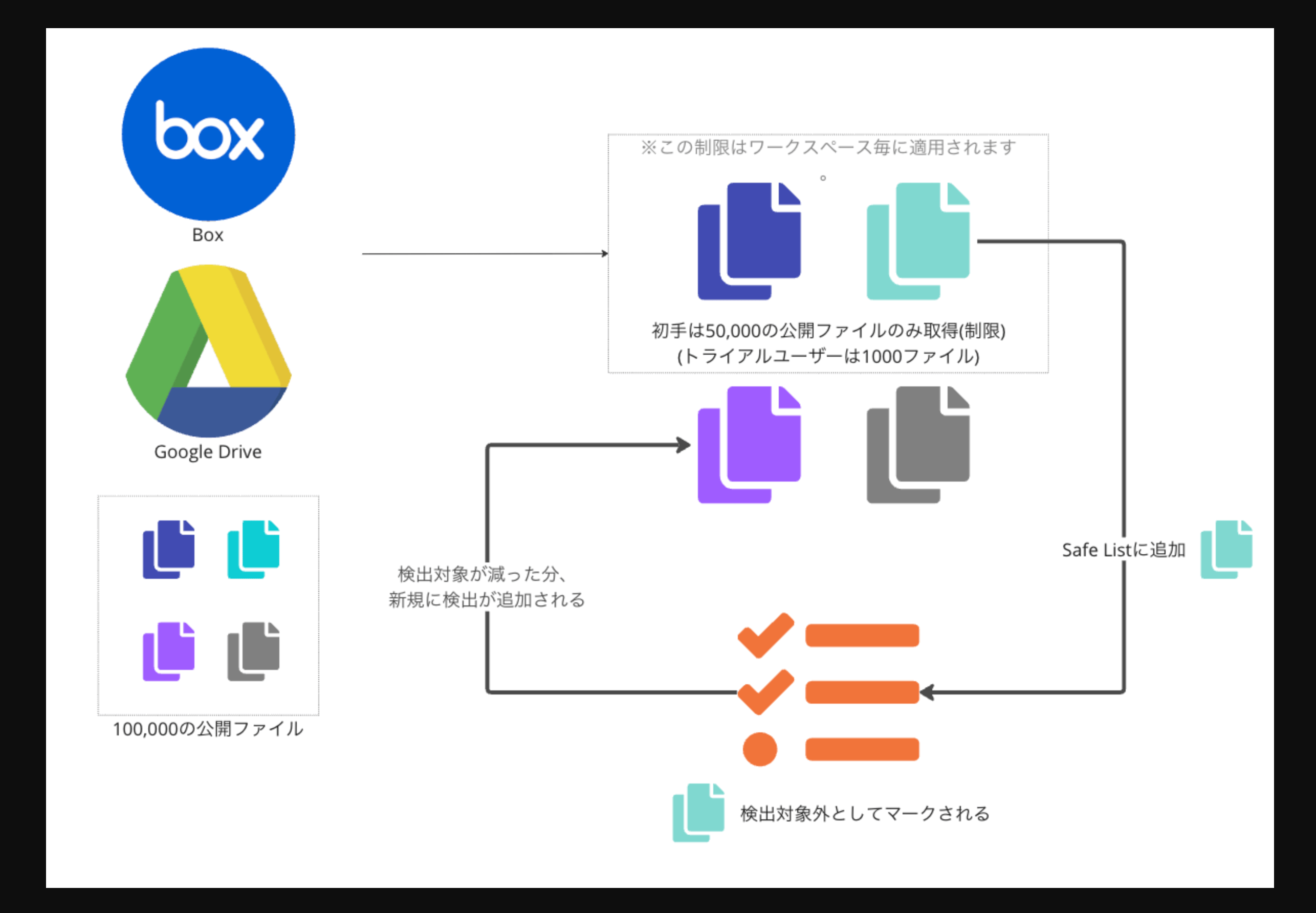
To optimize data storage and retrieval costs, the following limits apply to file retrieval.
| **Plan** | **Detected files (publicly shared + externally shared)** | **Total files processed** |
| ------------------------------------------------ | -------------------------------------------------------- | ----------------------------- |
| **Trial** | `1,000` files / workspace | `10,000` files / workspace |
| **Active (including free use for up to 50 IDs)** | `50,000` files / workspace | `1,000,000` files / workspace |
**When the limit is reached**
Once the limit is reached, you cannot add new entries to the safelist.
If you resolve an alert before reaching the limit, the next sync detects new files up to the maximum. You can also use [Safelist](/en/it-management/file-management/b77md9ed8m-safelist) and [Filtering](/en/it-management/file-management/8ltduljmjc-drive-filterling) to narrow the scope.
#### Limitations
To optimize data storage and retrieval costs, the following limits apply to file retrieval.
| **Plan** | **Detected files (publicly shared + externally shared)** | **Total files processed** |
| ------------------------------------------------ | -------------------------------------------------------- | ----------------------------- |
| **Trial** | `1,000` files / workspace | `10,000` files / workspace |
| **Active (including free use for up to 50 IDs)** | `50,000` files / workspace | `1,000,000` files / workspace |
**When the limit is reached**
Once the limit is reached, you cannot add new entries to the safelist.
If you resolve an alert before reaching the limit, the next sync detects new files up to the maximum. You can also use [Safelist](/en/it-management/file-management/b77md9ed8m-safelist) and [Filtering](/en/it-management/file-management/8ltduljmjc-drive-filterling) to narrow the scope.
 #### FAQ
**What does each file sharing status mean?**
**External sharing**
"Externally shared" means the file is shared with addresses outside your organization's registered domains. Box, OneDrive, and Google Drive only.
**Publicly shared**
The following two states are notified as "publicly shared" alerts:
1. Files or pages shared via a link accessible to anyone on the web — for example, "Anyone with the link"
2. (Google Docs, Slides, Sheets, and similar files only) Files published to the web
#### FAQ
**What does each file sharing status mean?**
**External sharing**
"Externally shared" means the file is shared with addresses outside your organization's registered domains. Box, OneDrive, and Google Drive only.
**Publicly shared**
The following two states are notified as "publicly shared" alerts:
1. Files or pages shared via a link accessible to anyone on the web — for example, "Anyone with the link"
2. (Google Docs, Slides, Sheets, and similar files only) Files published to the web
