> ## Documentation Index
> Fetch the complete documentation index at: https://support.i.moneyforward.com/llms.txt
> Use this file to discover all available pages before exploring further.
# Check for Remaining Retired Accounts
> This page explains how to check whether retired employees still have accounts in cloud services.
#### Prerequisites
[Employee master integration](/en/it-management/tutorial/ikf8odm6ti-2) must be configured.
#### Use the Retired Filter
#### Check by Account
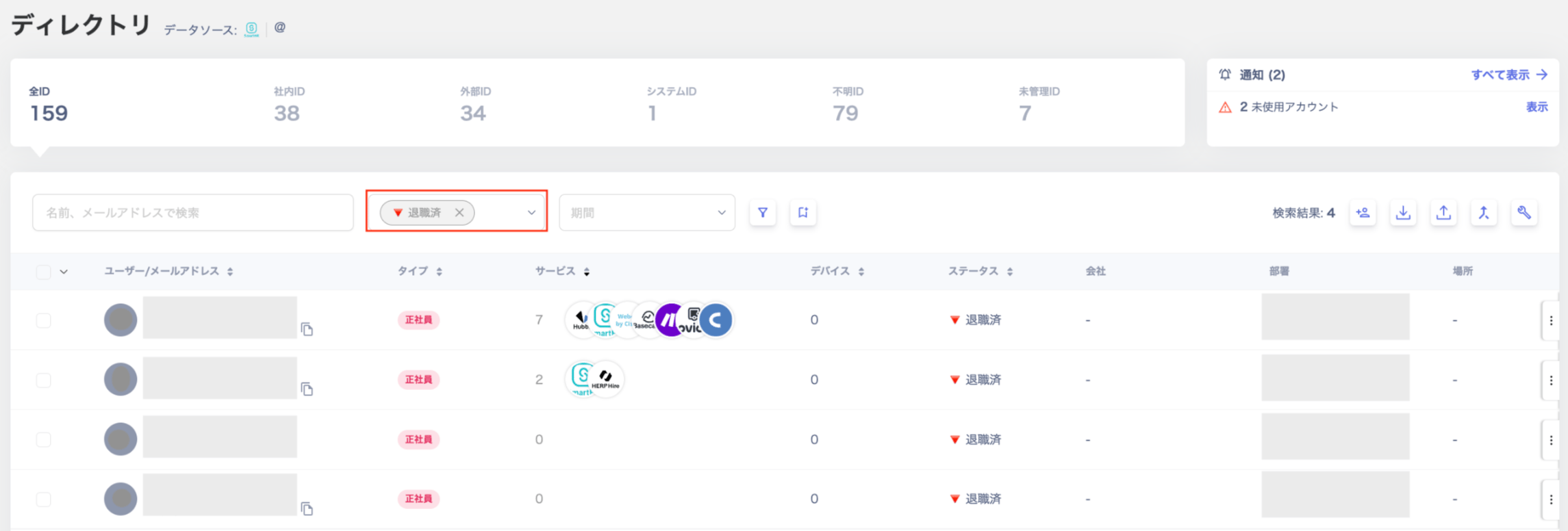
In the Directory, select "Retired" from the "Status" filter.
After filtering by "Retired", check for accounts that still show services in the "Services" column. These may have been missed during offboarding.
 #### Check Retired Accounts via Alert Notifications
Navigate to Services > (target service) > Notifications to review retired accounts. For details, see [**Alert Notification Operations Guide**](/en/it-management/retired/alcptx3rdr-offboarding#alert-notification-workflow).
#### Check Retired Accounts via Alert Notifications
Navigate to Services > (target service) > Notifications to review retired accounts. For details, see [**Alert Notification Operations Guide**](/en/it-management/retired/alcptx3rdr-offboarding#alert-notification-workflow).
 #### When Accounts Remain After Deletion
Some services do not support account deletion, so accounts may remain in a deactivated state. Employees on leave may also appear with a retired flag. If something looks incorrect, contact us via chat with a description of the issue.
#### Next Step
From here, the work is simply repeating the integration process. Invite cloud service administrators and have them connect their services. Use the steps below to invite additional users.
[Invite Users](/en/it-management/tutorial/93a9bikaqq-user)
#### Related Articles
[How to manage retired accounts](/en/it-management/retired/alcptx3rdr-offboarding)
#### When Accounts Remain After Deletion
Some services do not support account deletion, so accounts may remain in a deactivated state. Employees on leave may also appear with a retired flag. If something looks incorrect, contact us via chat with a description of the issue.
#### Next Step
From here, the work is simply repeating the integration process. Invite cloud service administrators and have them connect their services. Use the steps below to invite additional users.
[Invite Users](/en/it-management/tutorial/93a9bikaqq-user)
#### Related Articles
[How to manage retired accounts](/en/it-management/retired/alcptx3rdr-offboarding)