> ## Documentation Index
> Fetch the complete documentation index at: https://support.i.moneyforward.com/llms.txt
> Use this file to discover all available pages before exploring further.
# 3-3. Managing Multiple Workspaces (Domains, Tenants)
> Learn how to connect multiple tenants, for example when you have multiple contracts for a single SaaS. This page also covers renaming workspaces and customizing workspace details.
## What is a workspace?
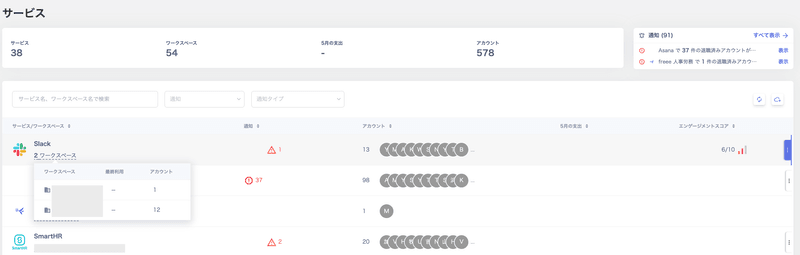
A workspace is the unit for managing services. You can assign any name to each domain or tenant.
 ## Connecting multiple workspaces
You can manage multiple workspaces for all supported SaaS integrations.
## Steps to connect multiple workspaces
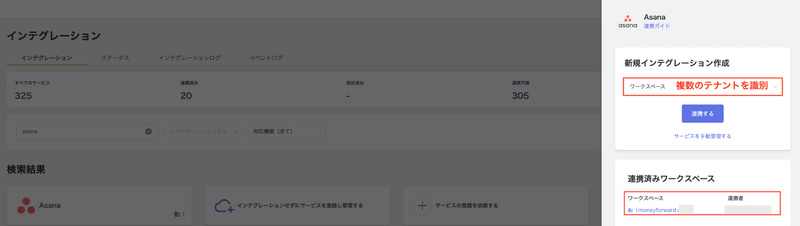
1. Go to **Integrations > Integrations** and connect the first workspace of the target SaaS.
2. Follow the same steps to connect the second workspace of the same SaaS from **Integrations > Integrations**.
## Connecting multiple workspaces
You can manage multiple workspaces for all supported SaaS integrations.
## Steps to connect multiple workspaces
1. Go to **Integrations > Integrations** and connect the first workspace of the target SaaS.
2. Follow the same steps to connect the second workspace of the same SaaS from **Integrations > Integrations**.
 | Connection method | Description |
| ---------------------------------- | ------------------------------------------------------------------------------------------------------------------------------------------------------------------------------------------------------------------------------------------------------------------------------------------------------------------------------------------------- |
| **Connecting via OAuth** | The authenticated account determines the tenant. Account information from that tenant is imported automatically. |
| **Connecting via API key** | The issued API key or workspace key determines the tenant. Account information from that tenant is imported automatically. |
| **Connecting via ID and password** | The authenticated account or workspace key determines the tenant. Account information from that tenant is imported automatically. Each SaaS supports different integration patterns, such as OAuth and API. For details, see [3-1. Checking SaaS Integration Patterns (Integration Methods)](/en/it-management/saas-management/8iscw8ce8k-saa-s). |
## Renaming a workspace
1. Go to **Services > Information**, click the arrow at the far right, and select **Rename** to change the workspace name.
| Connection method | Description |
| ---------------------------------- | ------------------------------------------------------------------------------------------------------------------------------------------------------------------------------------------------------------------------------------------------------------------------------------------------------------------------------------------------- |
| **Connecting via OAuth** | The authenticated account determines the tenant. Account information from that tenant is imported automatically. |
| **Connecting via API key** | The issued API key or workspace key determines the tenant. Account information from that tenant is imported automatically. |
| **Connecting via ID and password** | The authenticated account or workspace key determines the tenant. Account information from that tenant is imported automatically. Each SaaS supports different integration patterns, such as OAuth and API. For details, see [3-1. Checking SaaS Integration Patterns (Integration Methods)](/en/it-management/saas-management/8iscw8ce8k-saa-s). |
## Renaming a workspace
1. Go to **Services > Information**, click the arrow at the far right, and select **Rename** to change the workspace name.
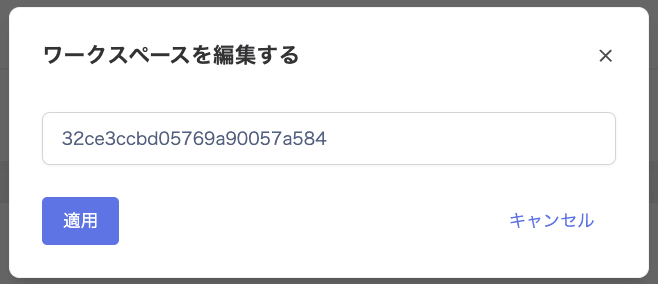
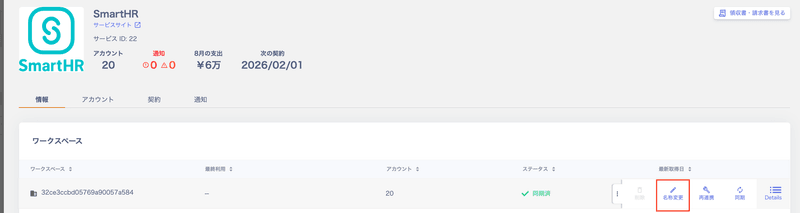 2. On the **Edit Workspace** screen, update the workspace name and click **Apply**.
 ## Customizing workspace details
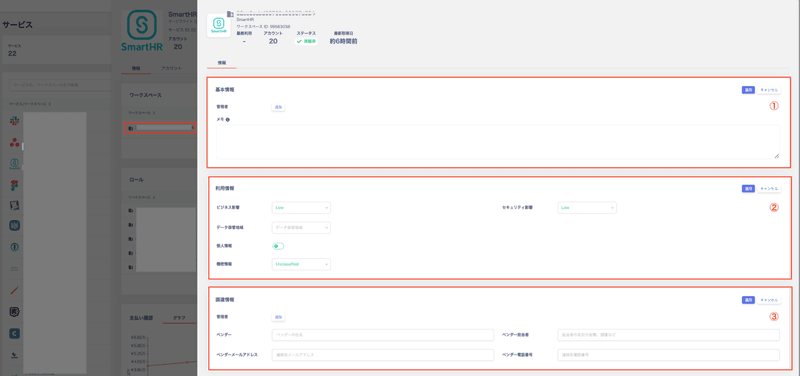
Click the workspace name of a connected service to add detailed information. This includes administrators, usage information, and procurement information.
For more details, see [Service Management and Exporting Lists for IT Audits](/en/it-management/saas-management/nqtcb7uc41-it-services).
## Customizing workspace details
Click the workspace name of a connected service to add detailed information. This includes administrators, usage information, and procurement information.
For more details, see [Service Management and Exporting Lists for IT Audits](/en/it-management/saas-management/nqtcb7uc41-it-services).
 | No. | Item | Description |
| :-: | --------------------------- | -------------------------------------------------------------------------------------------------------------- |
| 1 | **Basic information** | Configure administrators and enter notes. The Notes field supports Markdown formatting. |
| 2 | **Usage information** | Set business impact, security impact, data storage region, personal information, and confidential information. |
| 3 | **Procurement information** | Set the administrator, vendor, vendor contact, vendor email address, and vendor phone number. |
## Service basic information
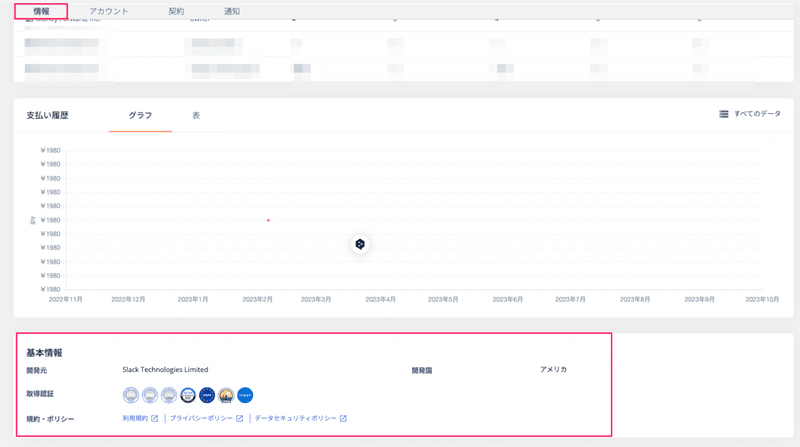
View the basic information of a SaaS from **Services > Information > Basic Information**. This section shows external authentication methods in use and links to terms of service. It also includes other information provided by the vendor.
| No. | Item | Description |
| :-: | --------------------------- | -------------------------------------------------------------------------------------------------------------- |
| 1 | **Basic information** | Configure administrators and enter notes. The Notes field supports Markdown formatting. |
| 2 | **Usage information** | Set business impact, security impact, data storage region, personal information, and confidential information. |
| 3 | **Procurement information** | Set the administrator, vendor, vendor contact, vendor email address, and vendor phone number. |
## Service basic information
View the basic information of a SaaS from **Services > Information > Basic Information**. This section shows external authentication methods in use and links to terms of service. It also includes other information provided by the vendor.