> ## Documentation Index
> Fetch the complete documentation index at: https://support.i.moneyforward.com/llms.txt
> Use this file to discover all available pages before exploring further.
# 2-5. Identify Unused SaaS Accounts with Surveys
> Learn how to identify inactive accounts and run surveys to reduce SaaS license costs and security risks.
All operations for this feature require **Admin** privileges or the **Survey Manager** role. Viewing requires **Member** privileges or the **Survey Viewer** role. See [Basic Roles](/en/it-management/settings/yne7fl2lcy-role-new#basic-roles) for details.
To use the target type "Device", you must separately enable the "Device" feature add-on.
This page explains how to identify inactive accounts and run surveys. Doing so reduces SaaS license costs and lowers security risks.
#### How to Check for Unused Accounts
In our service, an **unused account** is one whose last activity date is **45 days or more** in the past. See [**Alerts for Services**](/en/it-management/saas-management/q6jgukpnvh-alert#service-alerts) for details.
Start by checking which accounts have not been used for 45 days or more. You can do this in two ways.
#### Check from the Services Screen
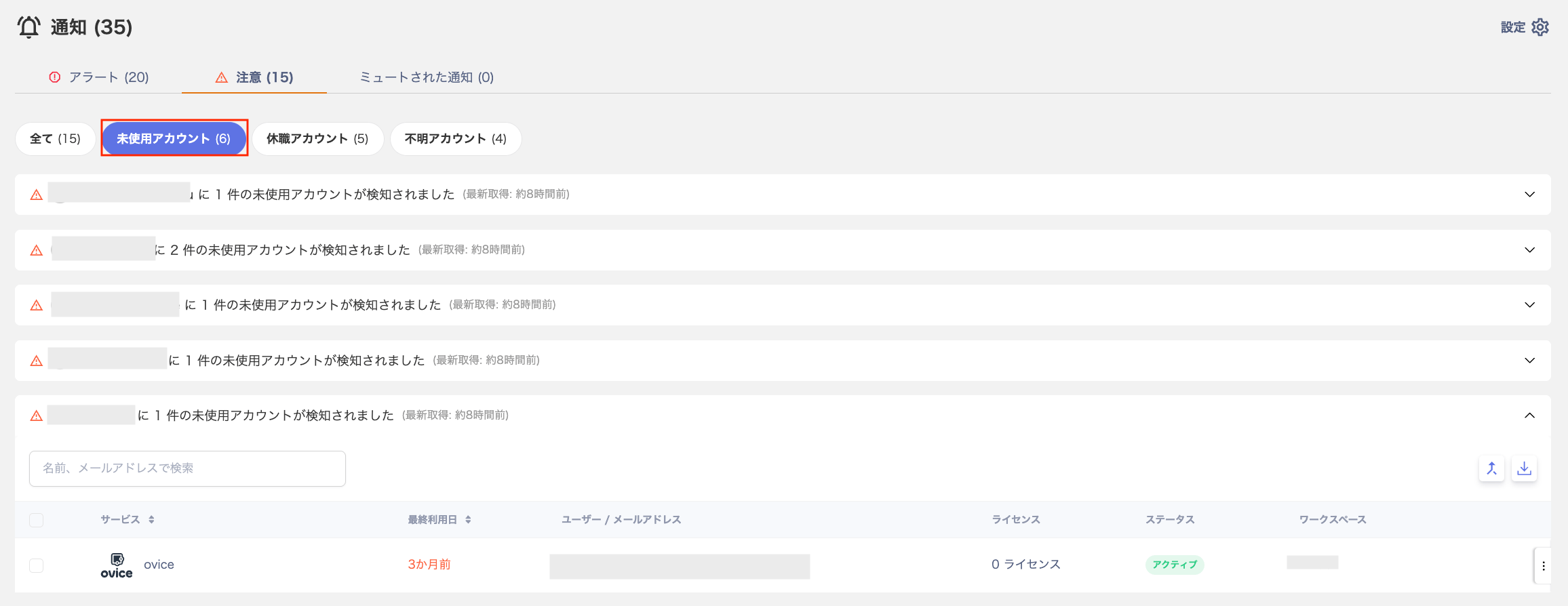
On the service list screen, use the "Notification Type" filter at the top and select **Unused Accounts**. The list narrows to services that have matching accounts.
To export the unused account list as a CSV, go to SaaS > Notifications > "Unused — accounts not used for a long time…". Then use the Export button in the upper right.
 #### Check from the Directory Screen
Go to Notifications (upper right) > Show All → > Warnings > Unused Accounts to view the list of affected accounts. Click an account to see the associated service. You can also export the results as a CSV using the Export button in the upper right of that screen.
#### Check from the Directory Screen
Go to Notifications (upper right) > Show All → > Warnings > Unused Accounts to view the list of affected accounts. Click an account to see the associated service. You can also export the results as a CSV using the Export button in the upper right of that screen.
 #### Creating a Survey and Configuring Recipients
Create a survey to ask whether the identified unused accounts are still needed.
1. Create a survey. Follow the steps in [Create a new survey](/en/it-management/survey/as4mbd7pzr-2-survey#create-new-survey).
2. In step ⑧ of [Create a new survey](/en/it-management/survey/as4mbd7pzr-2-survey#create-new-survey), use the dropdown in the upper left of the "Select targets" screen. Select the target SaaS.
You can configure targets per SaaS or across multiple SaaS services at once. See [Create a survey with target type "SaaS app"](/en/it-management/survey/ouobmg3dsc-5#saas-app-target-type) for details.
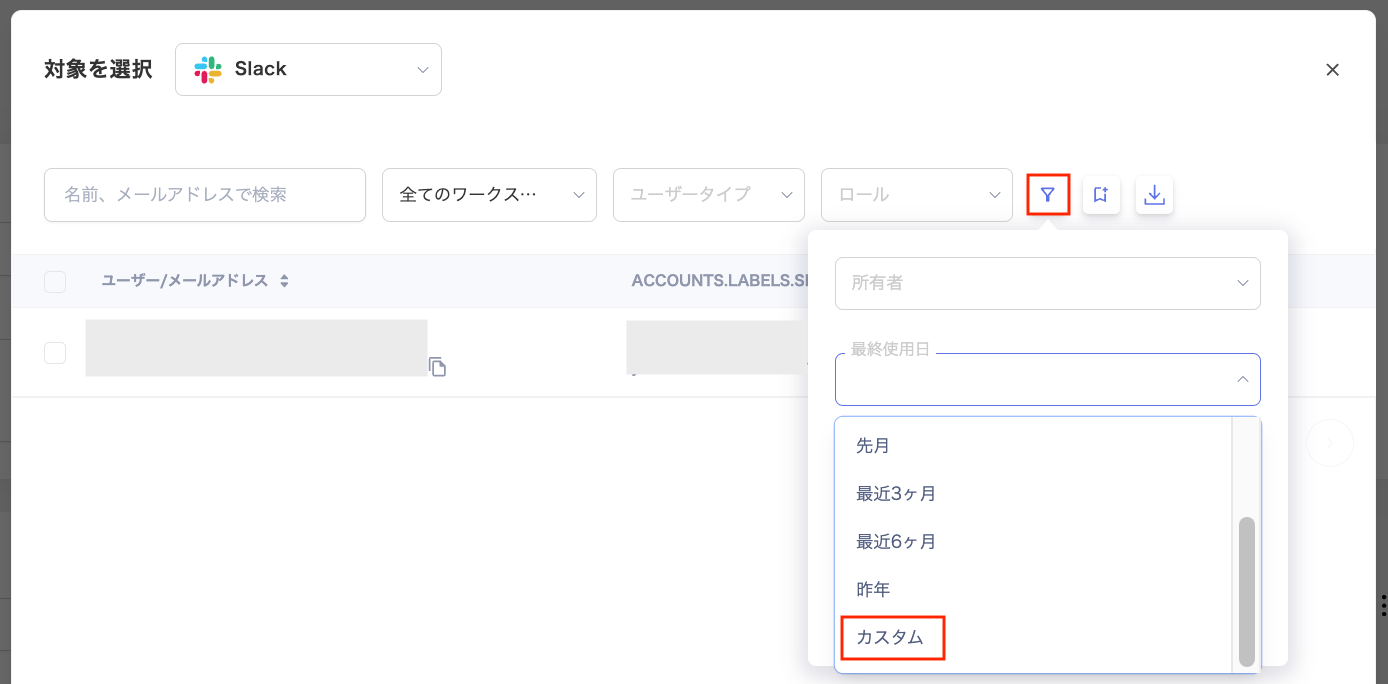
3. In the "Select targets" screen, use the filter at the top to choose "Custom" under "Last Used Date". Then specify a date range in the "Custom Range" dialog.
#### Creating a Survey and Configuring Recipients
Create a survey to ask whether the identified unused accounts are still needed.
1. Create a survey. Follow the steps in [Create a new survey](/en/it-management/survey/as4mbd7pzr-2-survey#create-new-survey).
2. In step ⑧ of [Create a new survey](/en/it-management/survey/as4mbd7pzr-2-survey#create-new-survey), use the dropdown in the upper left of the "Select targets" screen. Select the target SaaS.
You can configure targets per SaaS or across multiple SaaS services at once. See [Create a survey with target type "SaaS app"](/en/it-management/survey/ouobmg3dsc-5#saas-app-target-type) for details.
3. In the "Select targets" screen, use the filter at the top to choose "Custom" under "Last Used Date". Then specify a date range in the "Custom Range" dialog.
 4. Continue with step ⑨ and beyond from [Create a new survey](/en/it-management/survey/as4mbd7pzr-2-survey#create-new-survey).
#### Running Surveys Efficiently
Once you create a survey, past surveys appear as templates on the [**Create New Survey**](/en/it-management/survey/f0f1hd50lx-1#create-survey-screen) screen. You can use these templates to start surveys for other SaaS services with minimal setup.
4. Continue with step ⑨ and beyond from [Create a new survey](/en/it-management/survey/as4mbd7pzr-2-survey#create-new-survey).
#### Running Surveys Efficiently
Once you create a survey, past surveys appear as templates on the [**Create New Survey**](/en/it-management/survey/f0f1hd50lx-1#create-survey-screen) screen. You can use these templates to start surveys for other SaaS services with minimal setup.