> ## Documentation Index
> Fetch the complete documentation index at: https://support.i.moneyforward.com/llms.txt
> Use this file to discover all available pages before exploring further.

# AppFollow

> AppFollow APIキー取得から管理者権限での連携手順。Admina統合の詳細な設定ガイド。

<Info>
  連携には管理者権限のアカウントが必要です。
</Info>

## 事前準備

### ログイン方法

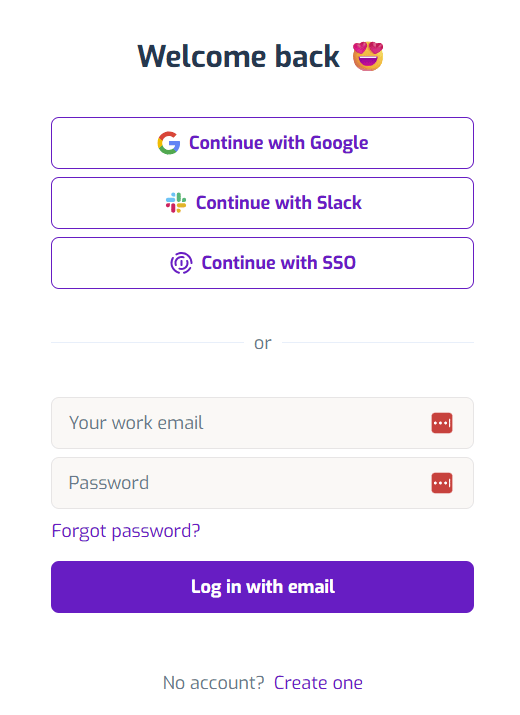
[Appfollowログインページ](https://watch.appfollow.io)にて、メールアドレス・パスワードを入力し、ログインします。
<img src="https://mintcdn.com/moneyforwardi/yRr9M1Mo9PbmsShv/images/integrations/7cfqtg86oq/2025-12-04-183655.png?fit=max&auto=format&n=yRr9M1Mo9PbmsShv&q=85&s=f8004f7a927646d3fd1b60f7261fe419" alt="Appfollowログイン画面" width="520" height="715" data-path="images/integrations/7cfqtg86oq/2025-12-04-183655.png" />

### APIキーの取得方法

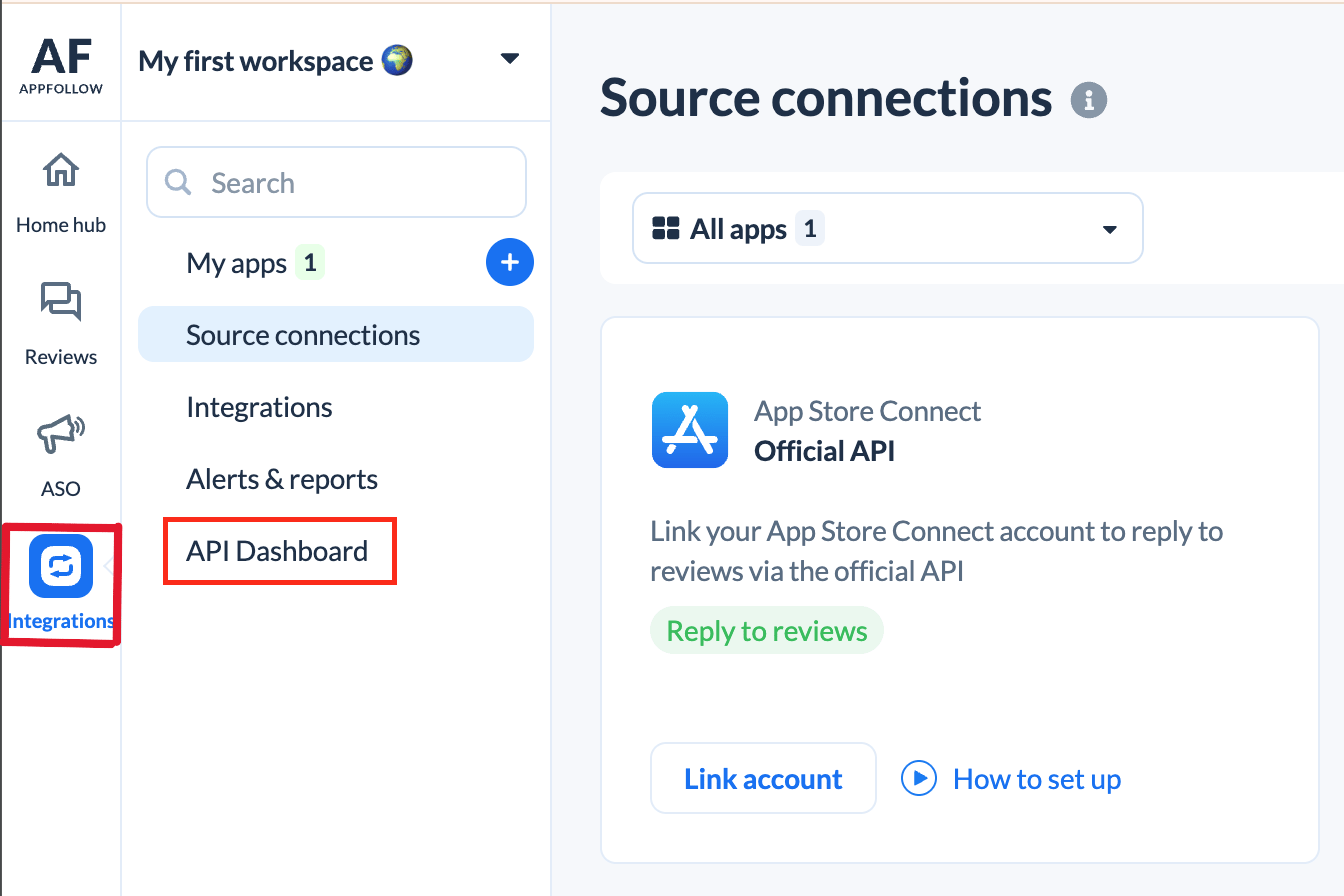
Appfollowログイン後、**Integrations > API Dashboard** をクリックします。
<img src="https://mintcdn.com/moneyforwardi/yRr9M1Mo9PbmsShv/images/integrations/7cfqtg86oq/screenshot-2025-12-01-at-11-01-03.png?fit=max&auto=format&n=yRr9M1Mo9PbmsShv&q=85&s=7a192c29f2190597970d0f4592b3289a" alt="Integrations > API Dashboard" data-og-width="1344" width="1344" data-og-height="896" height="896" data-path="images/integrations/7cfqtg86oq/screenshot-2025-12-01-at-11-01-03.png" data-optimize="true" data-opv="3" srcset="https://mintcdn.com/moneyforwardi/yRr9M1Mo9PbmsShv/images/integrations/7cfqtg86oq/screenshot-2025-12-01-at-11-01-03.png?w=280&fit=max&auto=format&n=yRr9M1Mo9PbmsShv&q=85&s=aa2373929e9208d06e7fadd58cca4ac4 280w, https://mintcdn.com/moneyforwardi/yRr9M1Mo9PbmsShv/images/integrations/7cfqtg86oq/screenshot-2025-12-01-at-11-01-03.png?w=560&fit=max&auto=format&n=yRr9M1Mo9PbmsShv&q=85&s=b885b8965e961c335e75d53c43aadd87 560w, https://mintcdn.com/moneyforwardi/yRr9M1Mo9PbmsShv/images/integrations/7cfqtg86oq/screenshot-2025-12-01-at-11-01-03.png?w=840&fit=max&auto=format&n=yRr9M1Mo9PbmsShv&q=85&s=f05e15fb489f5bfd4e55de6e04c54775 840w, https://mintcdn.com/moneyforwardi/yRr9M1Mo9PbmsShv/images/integrations/7cfqtg86oq/screenshot-2025-12-01-at-11-01-03.png?w=1100&fit=max&auto=format&n=yRr9M1Mo9PbmsShv&q=85&s=640dbae7379bc70564a96f8faf4c9d7a 1100w, https://mintcdn.com/moneyforwardi/yRr9M1Mo9PbmsShv/images/integrations/7cfqtg86oq/screenshot-2025-12-01-at-11-01-03.png?w=1650&fit=max&auto=format&n=yRr9M1Mo9PbmsShv&q=85&s=a3371c388613516b146aafae59c3c33e 1650w, https://mintcdn.com/moneyforwardi/yRr9M1Mo9PbmsShv/images/integrations/7cfqtg86oq/screenshot-2025-12-01-at-11-01-03.png?w=2500&fit=max&auto=format&n=yRr9M1Mo9PbmsShv&q=85&s=80d1f191fee28131d283e758015807b4 2500w" />

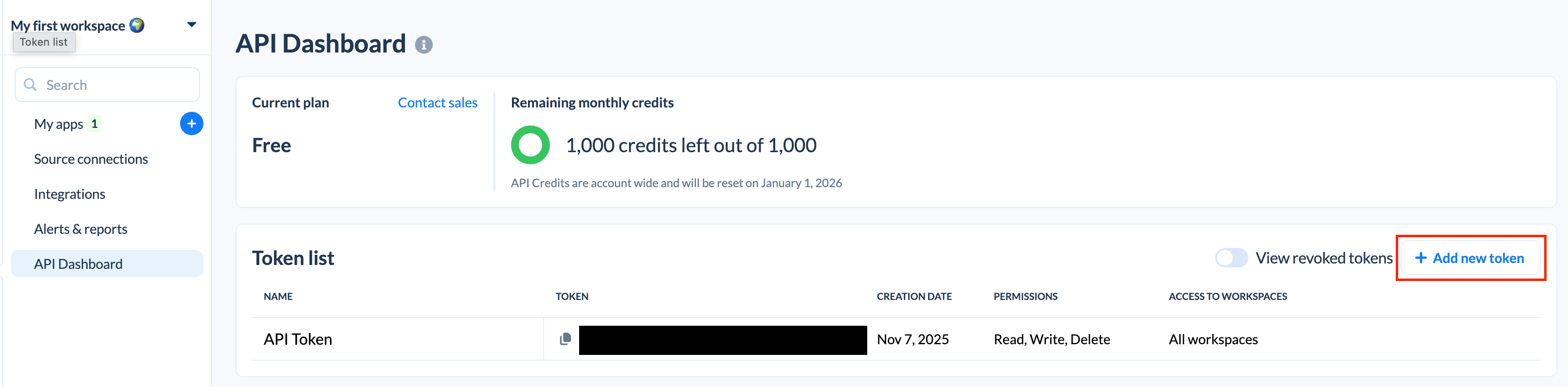
**Add new token** をクリックします。

<img src="https://mintcdn.com/moneyforwardi/yRr9M1Mo9PbmsShv/images/integrations/7cfqtg86oq/screenshot-2025-12-01-at-11-02-01.png?fit=max&auto=format&n=yRr9M1Mo9PbmsShv&q=85&s=011274b08ca416c5d151def11447d0cd" alt="Add new token" width="3222" height="796" data-path="images/integrations/7cfqtg86oq/screenshot-2025-12-01-at-11-02-01.png" />

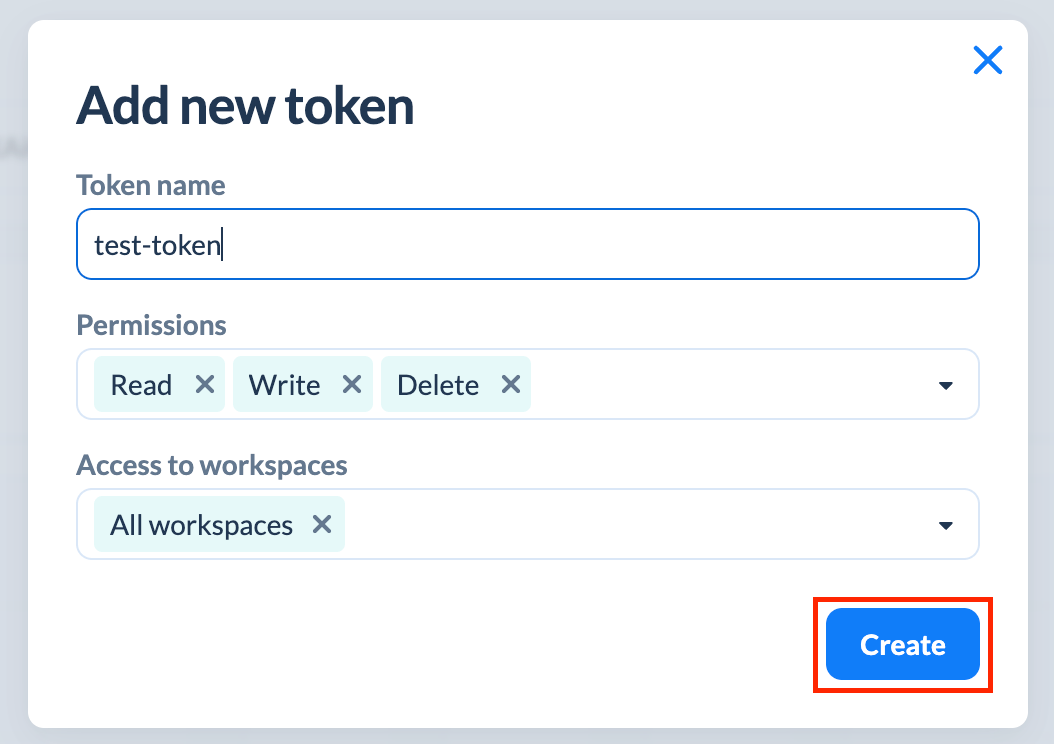
以下の通り入力し、**Create**をクリックします。

* Token name：任意のトークン名を入力
* Permissions：Select all を選択
* Access to workspaces：All woekspaces を選択

<img src="https://mintcdn.com/moneyforwardi/yRr9M1Mo9PbmsShv/images/integrations/7cfqtg86oq/screenshot-2025-12-01-at-11-04-27.png?fit=max&auto=format&n=yRr9M1Mo9PbmsShv&q=85&s=ba4637e6a338d384992bea20bec11183" alt="トークン作成画面" width="1054" height="744" data-path="images/integrations/7cfqtg86oq/screenshot-2025-12-01-at-11-04-27.png" />

作成された**APIキー**をコピーします。

## インテグレーションのセットアップ

インテグレーション画面にて、**Appfollow**で検索します。

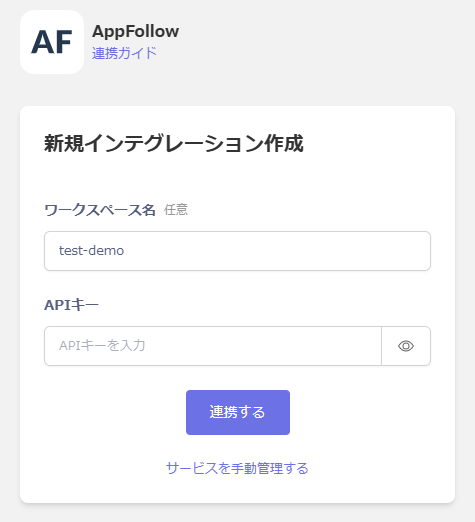
任意のワークスペース名、前の手順で取得した**APIキー**を入力し、**連携する**をクリックします。
<img src="https://mintcdn.com/moneyforwardi/yRr9M1Mo9PbmsShv/images/integrations/7cfqtg86oq/2025-12-05-121748.png?fit=max&auto=format&n=yRr9M1Mo9PbmsShv&q=85&s=006cebd3898e8bcecf2917b268197315" alt="Admina連携画面" width="475" height="522" data-path="images/integrations/7cfqtg86oq/2025-12-05-121748.png" />

連携に成功すると、アカウント一覧に登録済みのユーザー情報が表示されます。

正常に完了しない場合は、インテグレーション画面のステータスタブから**編集**し、再度連携をお試しください。

解決しない場合はチャットにてお問い合わせください。