> ## Documentation Index
> Fetch the complete documentation index at: https://support.i.moneyforward.com/llms.txt
> Use this file to discover all available pages before exploring further.

# GrooveHQ

> 管理者権限でGrooveHQのAPIキーを取得、Adminaに連携し、ユーザー情報を同期する手順

<Info>
  このサービスは基本的なアカウント情報の取得・集計のみに対応しています。
</Info>

<Info>
  連携には管理者権限のアカウントが必要です。
</Info>

## 事前準備

### ログイン方法

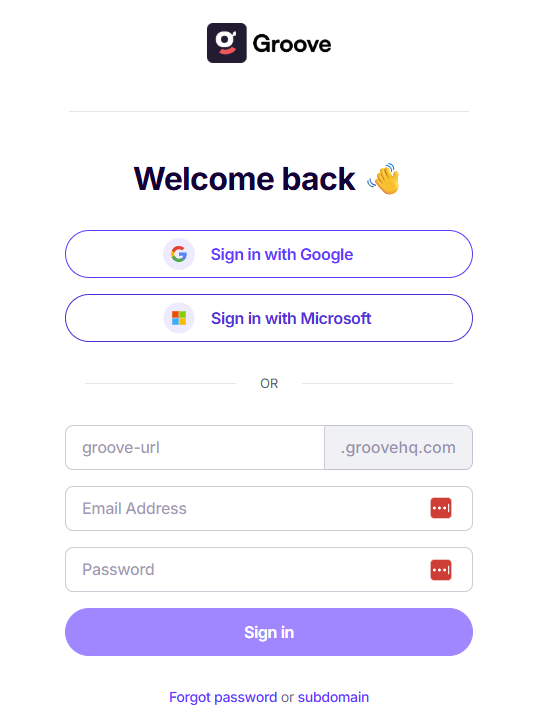
[GrooveHQログインページ](https://app.groovehq.com/)にて、URL・メールアドレス・パスワードを入力し、ログインします。
<img src="https://mintcdn.com/moneyforwardi/yRr9M1Mo9PbmsShv/images/integrations/7fg2w7lma3/2026-02-16-141534.png?fit=max&auto=format&n=yRr9M1Mo9PbmsShv&q=85&s=9ce5e78ba9c8ea8eeb9b7258594b7674" alt="GrooveHQログイン画面" width="539" height="718" data-path="images/integrations/7fg2w7lma3/2026-02-16-141534.png" />

### APIキーの確認方法

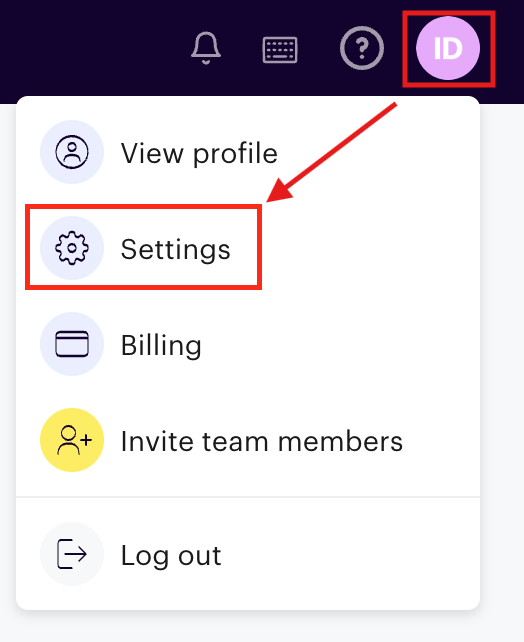
GrooveHQログイン後、**アイコン** > **Settings** をクリックします。
<img src="https://mintcdn.com/moneyforwardi/yRr9M1Mo9PbmsShv/images/integrations/7fg2w7lma3/screenshot-2026-02-04-at-10-19-28.png?fit=max&auto=format&n=yRr9M1Mo9PbmsShv&q=85&s=5892aa23a22d656daa034a71e4c2029a" alt="Settingsメニュー" width="524" height="642" data-path="images/integrations/7fg2w7lma3/screenshot-2026-02-04-at-10-19-28.png" />

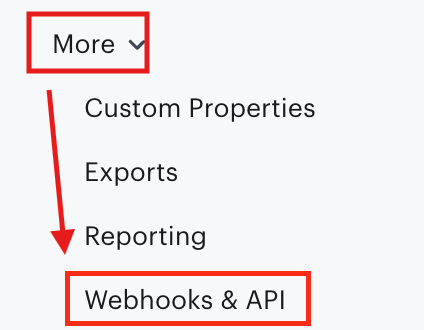
**More > Webhooks & API** をクリックします。

<img src="https://mintcdn.com/moneyforwardi/yRr9M1Mo9PbmsShv/images/integrations/7fg2w7lma3/screenshot-2026-02-04-at-10-20-04.png?fit=max&auto=format&n=yRr9M1Mo9PbmsShv&q=85&s=00f3edae3b3ec2a670ee8b775138bc39" alt="Webhooks & APIメニュー" width="424" height="330" data-path="images/integrations/7fg2w7lma3/screenshot-2026-02-04-at-10-20-04.png" />

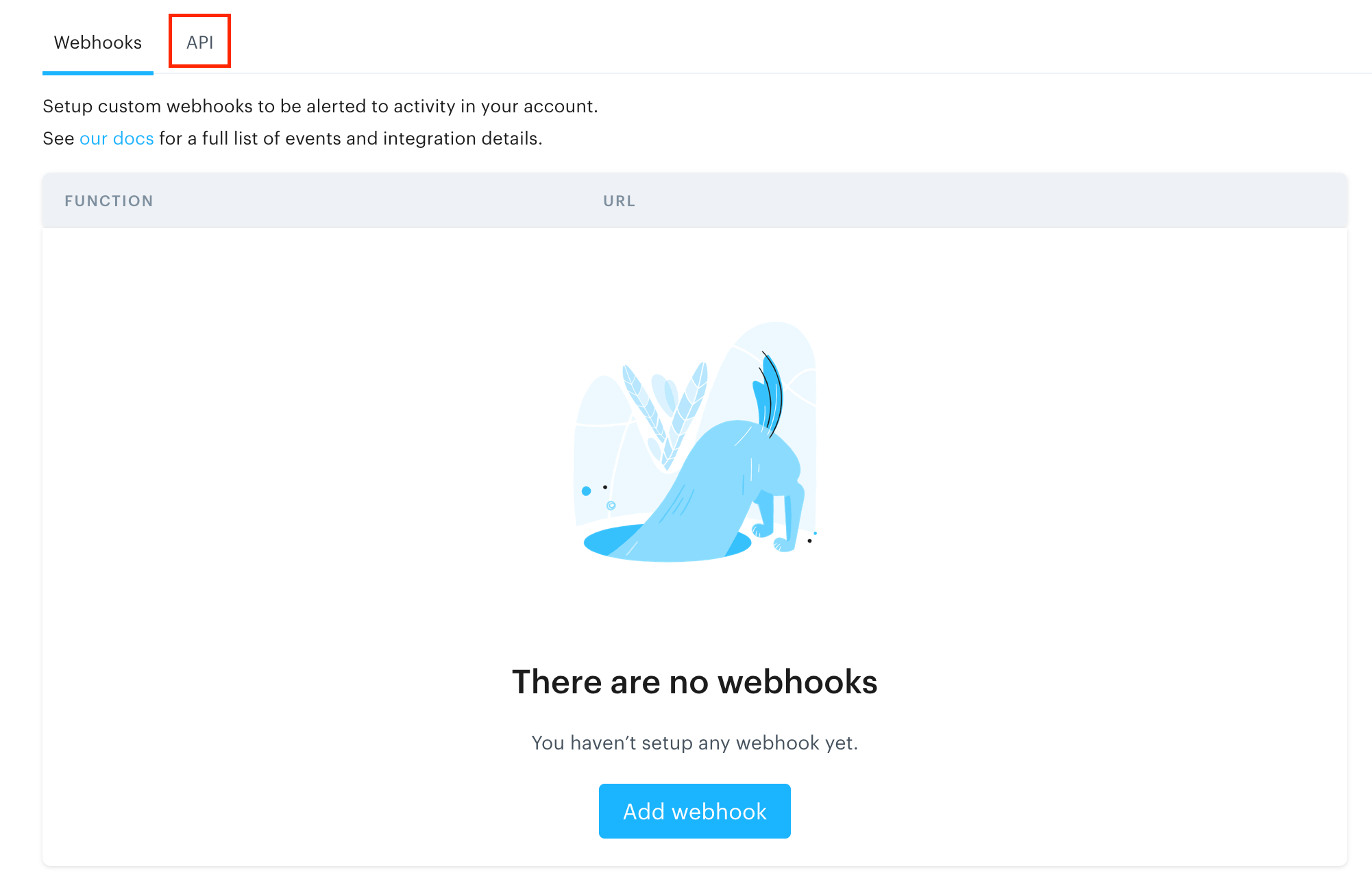
**API** をクリックし、**Global token** に表示されている **APIキー**をコピーします。
<img src="https://mintcdn.com/moneyforwardi/yRr9M1Mo9PbmsShv/images/integrations/7fg2w7lma3/screenshot-2026-02-04-at-10-20-25.png?fit=max&auto=format&n=yRr9M1Mo9PbmsShv&q=85&s=a09af2d02e677d387434cdcc71aa060b" alt="API設定画面" width="2002" height="1302" data-path="images/integrations/7fg2w7lma3/screenshot-2026-02-04-at-10-20-25.png" />

<img src="https://mintcdn.com/moneyforwardi/yRr9M1Mo9PbmsShv/images/integrations/7fg2w7lma3/screenshot-2026-02-04-at-10-20-58.png?fit=max&auto=format&n=yRr9M1Mo9PbmsShv&q=85&s=dcc03bd666714cbae345eb0442b9a73f" alt="APIキーのコピー" width="1122" height="176" data-path="images/integrations/7fg2w7lma3/screenshot-2026-02-04-at-10-20-58.png" />

## インテグレーションのセットアップ

インテグレーション画面にて、**GrooveHQ**で検索します。

任意のワークスペース名、前の手順で取得した**APIキー**を入力し、**連携する**をクリックします。
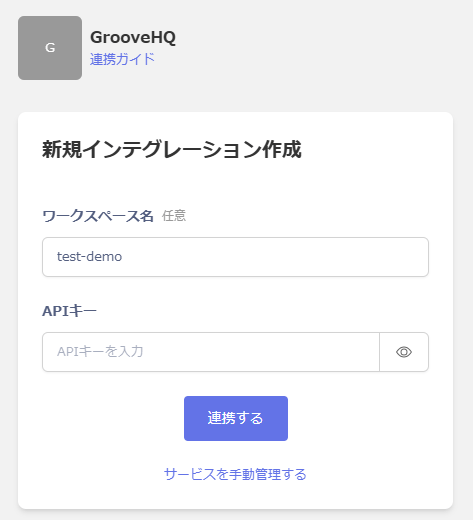
<img src="https://mintcdn.com/moneyforwardi/yRr9M1Mo9PbmsShv/images/integrations/7fg2w7lma3/2026-02-16-143815.png?fit=max&auto=format&n=yRr9M1Mo9PbmsShv&q=85&s=8e5e5bcc6af533dc29427158bc07f087" alt="Admina連携画面" width="473" height="520" data-path="images/integrations/7fg2w7lma3/2026-02-16-143815.png" />

連携に成功すると、アカウント一覧に登録済みのユーザー情報が表示されます。

正常に完了しない場合は、インテグレーション画面のステータスタブから**編集**し、再度連携をお試しください。

解決しない場合はチャットにてお問い合わせください。