> ## Documentation Index
> Fetch the complete documentation index at: https://support.i.moneyforward.com/llms.txt
> Use this file to discover all available pages before exploring further.

# Apollo

> Apollo APIキー取得し、Adminaと連携。管理者権限で設定、ワークスペース登録で簡単インテグレーション。

<Info>
  連携には管理者権限のアカウントが必要です。
</Info>

## 事前準備

### ログイン方法

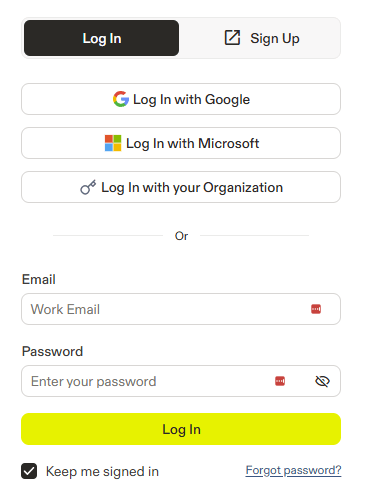
[Apolloログインページ](https://app.apollo.io/#/login?locale=en)にて、メールアドレス・パスワードを入力し、ログインします。
<img src="https://mintcdn.com/moneyforwardi/yRr9M1Mo9PbmsShv/images/integrations/7qfa2jo3vg/2025-12-19-112735.png?fit=max&auto=format&n=yRr9M1Mo9PbmsShv&q=85&s=523eed6d48b580ea88b648147460bebb" alt="Apolloログイン画面" width="366" height="499" data-path="images/integrations/7qfa2jo3vg/2025-12-19-112735.png" />

### APIキーの取得方法

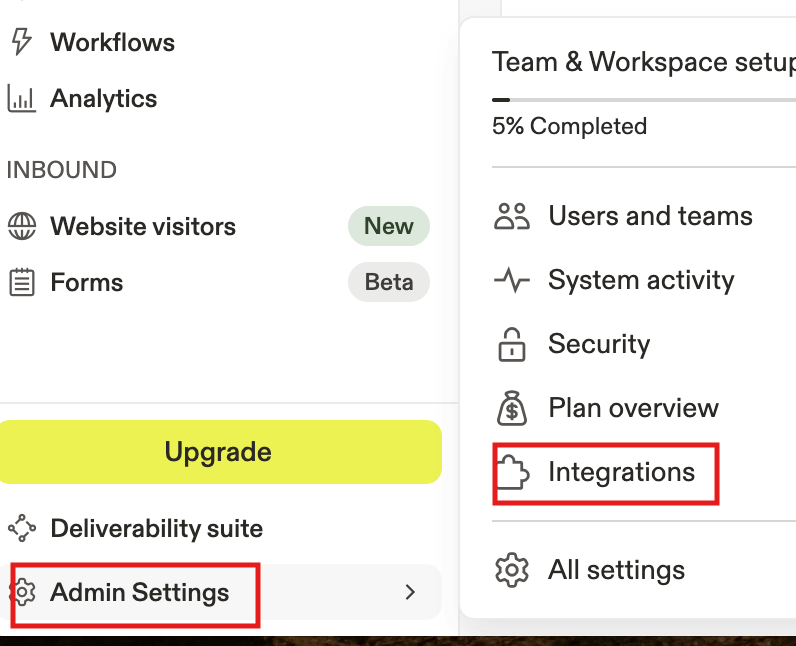
Apolloログイン後、**Admin Settings** > **Integrations** をクリックします。
<img src="https://mintcdn.com/moneyforwardi/yRr9M1Mo9PbmsShv/images/integrations/7qfa2jo3vg/screenshot-2025-12-10-at-12-10-22.png?fit=max&auto=format&n=yRr9M1Mo9PbmsShv&q=85&s=4b2209dd429605851f136372306b748d" alt="Admin Settings > Integrations" data-og-width="796" width="796" data-og-height="646" height="646" data-path="images/integrations/7qfa2jo3vg/screenshot-2025-12-10-at-12-10-22.png" data-optimize="true" data-opv="3" srcset="https://mintcdn.com/moneyforwardi/yRr9M1Mo9PbmsShv/images/integrations/7qfa2jo3vg/screenshot-2025-12-10-at-12-10-22.png?w=280&fit=max&auto=format&n=yRr9M1Mo9PbmsShv&q=85&s=b313d468199daf49c2a99524a5d0fc2e 280w, https://mintcdn.com/moneyforwardi/yRr9M1Mo9PbmsShv/images/integrations/7qfa2jo3vg/screenshot-2025-12-10-at-12-10-22.png?w=560&fit=max&auto=format&n=yRr9M1Mo9PbmsShv&q=85&s=1c2555239e17d35f172bd9ee3429f819 560w, https://mintcdn.com/moneyforwardi/yRr9M1Mo9PbmsShv/images/integrations/7qfa2jo3vg/screenshot-2025-12-10-at-12-10-22.png?w=840&fit=max&auto=format&n=yRr9M1Mo9PbmsShv&q=85&s=990b7fe294eb6f95a732e3c4b1d1b64a 840w, https://mintcdn.com/moneyforwardi/yRr9M1Mo9PbmsShv/images/integrations/7qfa2jo3vg/screenshot-2025-12-10-at-12-10-22.png?w=1100&fit=max&auto=format&n=yRr9M1Mo9PbmsShv&q=85&s=6e61fcd4ba9ce5fae66d1d6555917f74 1100w, https://mintcdn.com/moneyforwardi/yRr9M1Mo9PbmsShv/images/integrations/7qfa2jo3vg/screenshot-2025-12-10-at-12-10-22.png?w=1650&fit=max&auto=format&n=yRr9M1Mo9PbmsShv&q=85&s=c5a1cb5c9bbd87b92faabfa57b43fc70 1650w, https://mintcdn.com/moneyforwardi/yRr9M1Mo9PbmsShv/images/integrations/7qfa2jo3vg/screenshot-2025-12-10-at-12-10-22.png?w=2500&fit=max&auto=format&n=yRr9M1Mo9PbmsShv&q=85&s=b5ea4b742d632e722a61db1266f32822 2500w" />

**API** の **Connect**をクリックします。

<img src="https://mintcdn.com/moneyforwardi/yRr9M1Mo9PbmsShv/images/integrations/7qfa2jo3vg/screenshot-2025-12-10-at-12-11-22.png?fit=max&auto=format&n=yRr9M1Mo9PbmsShv&q=85&s=6ea8404c112cc8e573f58286a884dc1a" alt="API Connect" width="2432" height="270" data-path="images/integrations/7qfa2jo3vg/screenshot-2025-12-10-at-12-11-22.png" />

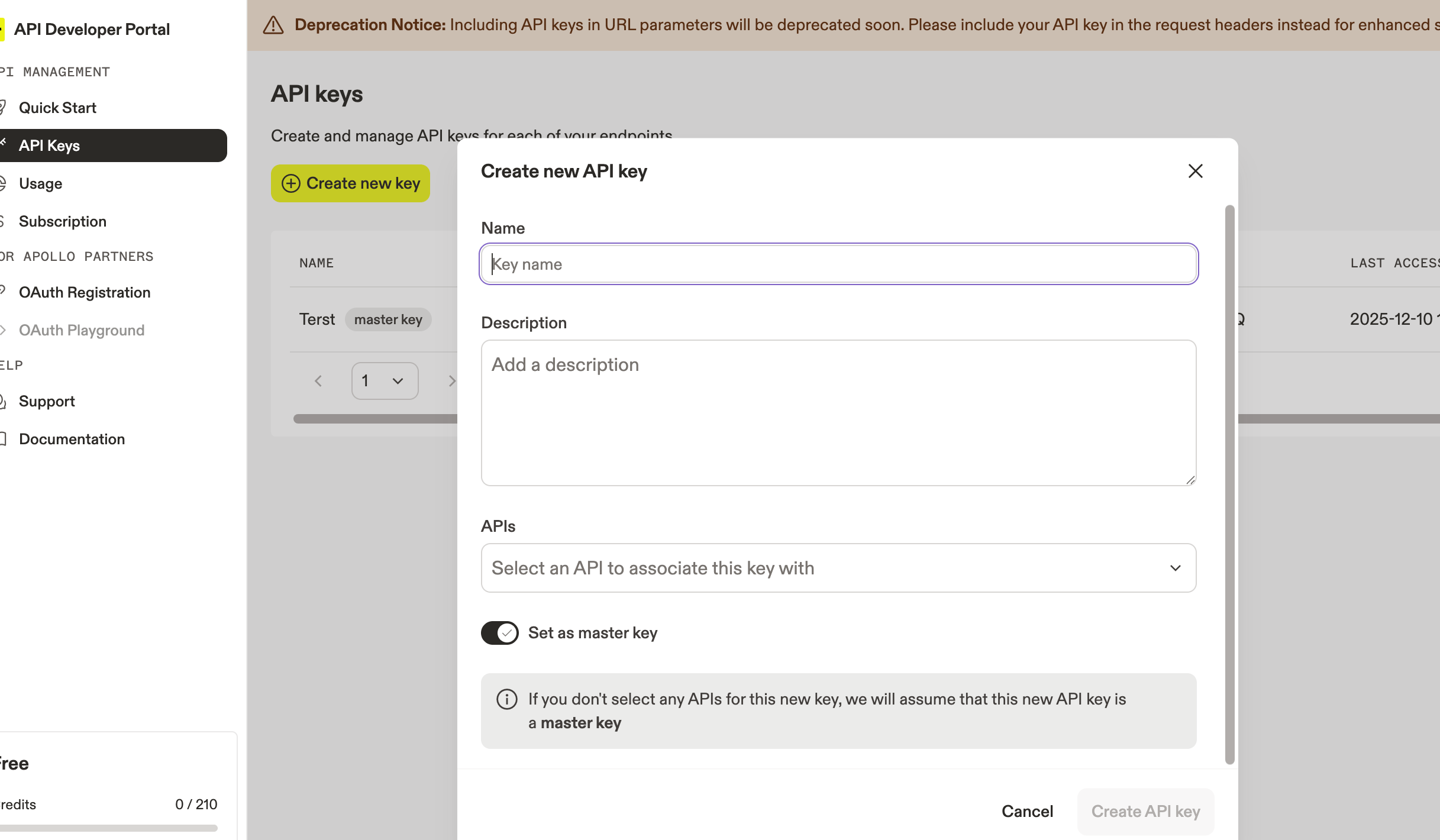
**API Keys** > **Create new key** をクリックします。

必要な情報を入力し、**Set as master key** にチェックを入れ、**Create API key** をクリックします。
<img src="https://mintcdn.com/moneyforwardi/yRr9M1Mo9PbmsShv/images/integrations/7qfa2jo3vg/screenshot-2025-12-10-at-12-11-40.png?fit=max&auto=format&n=yRr9M1Mo9PbmsShv&q=85&s=7f1d1382005d18a2fe8104dff07ef084" alt="API Key作成" width="2434" height="1420" data-path="images/integrations/7qfa2jo3vg/screenshot-2025-12-10-at-12-11-40.png" />

作成された**APIキー**をコピーします。

## インテグレーションのセットアップ

インテグレーション画面にて、**Apollo**で検索します。

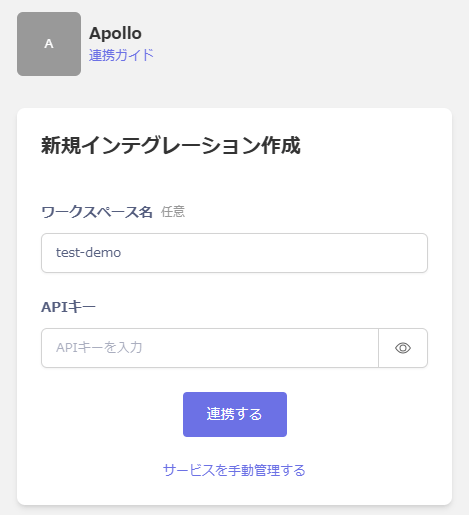
任意のワークスペース名、前の手順で取得した**APIキー**を入力し、**連携する**をクリックします。
<img src="https://mintcdn.com/moneyforwardi/yRr9M1Mo9PbmsShv/images/integrations/7qfa2jo3vg/2025-12-19-121123.png?fit=max&auto=format&n=yRr9M1Mo9PbmsShv&q=85&s=3393426722aa5a03f1de2efc1ab4508d" alt="Admina連携画面" width="469" height="515" data-path="images/integrations/7qfa2jo3vg/2025-12-19-121123.png" />

連携に成功すると、アカウント一覧に登録済みのユーザー情報が表示されます。

正常に完了しない場合は、インテグレーション画面のステータスタブから**編集**し、再度連携をお試しください。

解決しない場合はチャットにてお問い合わせください。
