> ## Documentation Index
> Fetch the complete documentation index at: https://support.i.moneyforward.com/llms.txt
> Use this file to discover all available pages before exploring further.

# Qiita Team

> Qiita Teamとの連携方法です。マネーフォワードAdminaからQiita Teamへの、管理者のログインから、連携方法まで一連の手順を解説します。

## サポートする機能

<Badge color="blue">アカウント削除</Badge> <Badge color="blue">アカウント作成</Badge>

## 事前準備

### Qiita Teamへのログイン方法

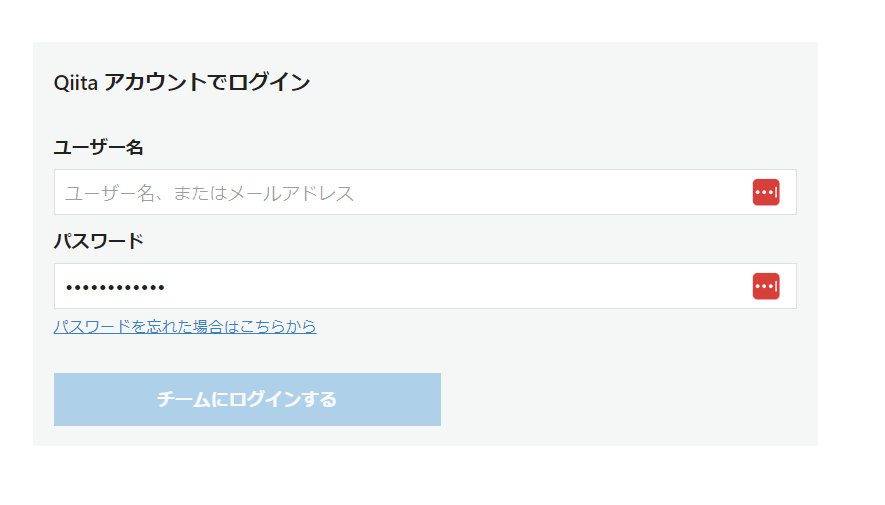
[Qiita Teamログインページ](https://teams-center.qiita.com/login)にて、メールアドレス・パスワードを入力しログインします。

※連携情報取得には管理者アカウントでログインしてください。
<img src="https://mintcdn.com/moneyforwardi/zAdY-Q72dgQYDZIE/images/integrations/yvtawcrlaz/image-1718607854480.png?fit=max&auto=format&n=zAdY-Q72dgQYDZIE&q=85&s=9729fb1052931f76c82f3ce58ecdb684" alt="Qiita Teamログイン画面" width="885" height="505" data-path="images/integrations/yvtawcrlaz/image-1718607854480.png" />

### ワークスペースキーの取得方法

Qiita Teamログイン後、URLの一部がワークスペースキーとなるのでコピー・保存します。

https\:// `**ワークスペースキー**` .qiita.com

<img src="https://mintcdn.com/moneyforwardi/zAdY-Q72dgQYDZIE/images/integrations/yvtawcrlaz/image-1718614296270.png?fit=max&auto=format&n=zAdY-Q72dgQYDZIE&q=85&s=878e2c1f4f1f64f1ae7a27aa365a9d4c" alt="ワークスペースキーの場所" width="286" height="55" data-path="images/integrations/yvtawcrlaz/image-1718614296270.png" />

### アクセスキーの取得方法

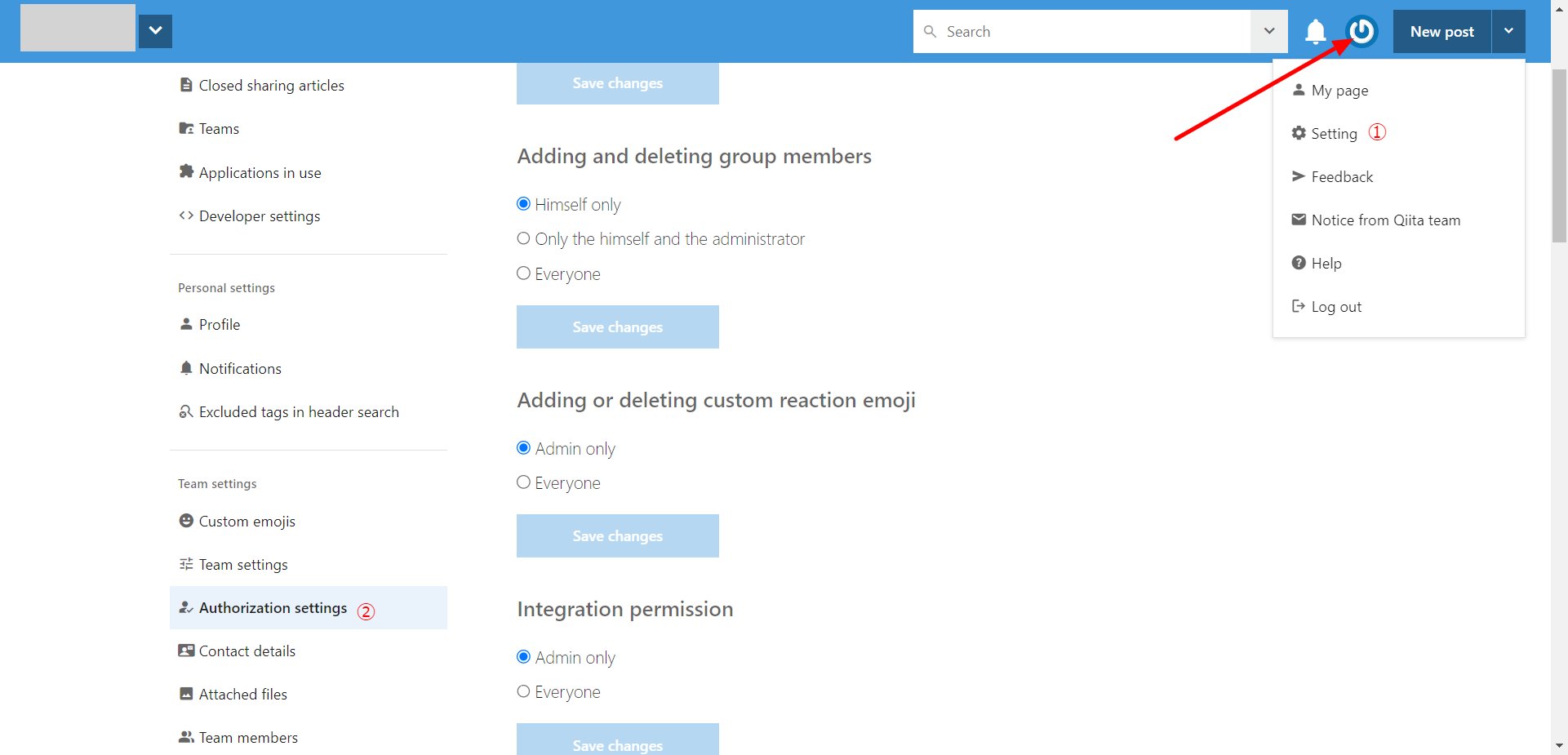
左上のアイコンからメニュを開き、**Settings＞Authorization settings＞Issuance of access token**と進みます。

<img src="https://mintcdn.com/moneyforwardi/zAdY-Q72dgQYDZIE/images/integrations/yvtawcrlaz/image-1718615316628.png?fit=max&auto=format&n=zAdY-Q72dgQYDZIE&q=85&s=04cdae6a4296b636ed2987d9a713ab2d" alt="Settings メニュー" width="1921" height="925" data-path="images/integrations/yvtawcrlaz/image-1718615316628.png" />

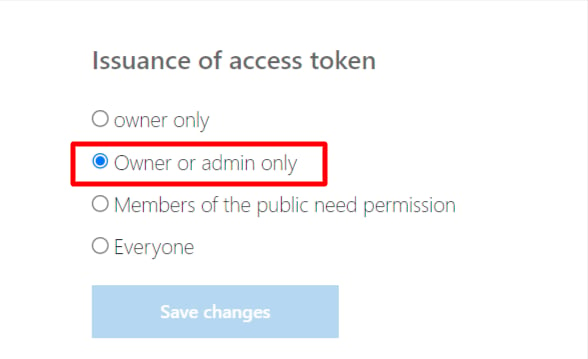
`**Owner or admin only**`にチェックします。

<img src="https://mintcdn.com/moneyforwardi/zAdY-Q72dgQYDZIE/images/integrations/yvtawcrlaz/image-1718615441954.png?fit=max&auto=format&n=zAdY-Q72dgQYDZIE&q=85&s=eebfe4ef4e042f24142e860708f6f487" alt="Owner or admin only チェック" width="588" height="359" data-path="images/integrations/yvtawcrlaz/image-1718615441954.png" />

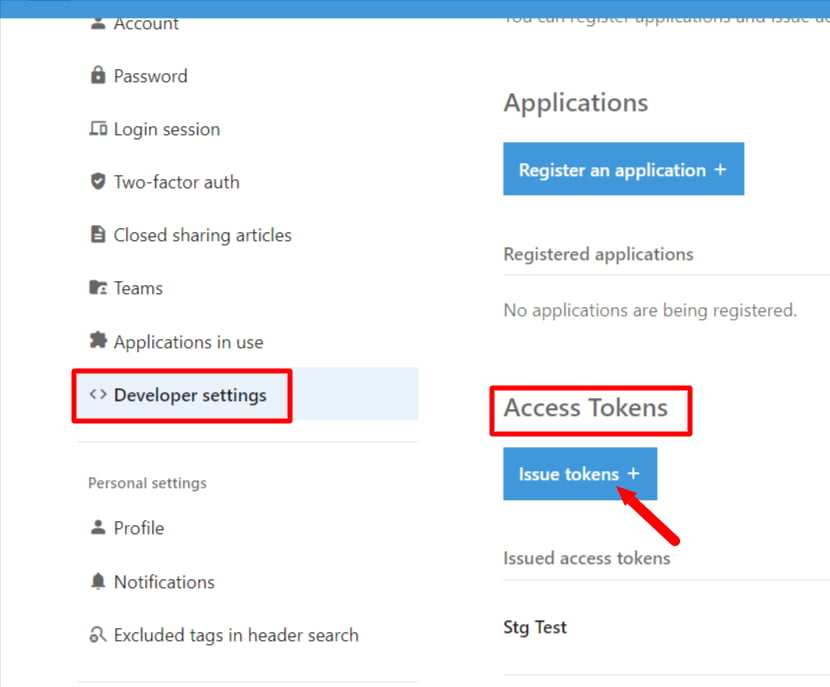
**Developer settings ＞Access Tokens**と進み、\*\*Issue tokens+\*\*をクリックします。
<img src="https://mintcdn.com/moneyforwardi/zAdY-Q72dgQYDZIE/images/integrations/yvtawcrlaz/image-1718615723856.png?fit=max&auto=format&n=zAdY-Q72dgQYDZIE&q=85&s=456514ce6aaaabaef28f51a80bcdbbf7" alt="Access Tokens 画面" width="830" height="687" data-path="images/integrations/yvtawcrlaz/image-1718615723856.png" />

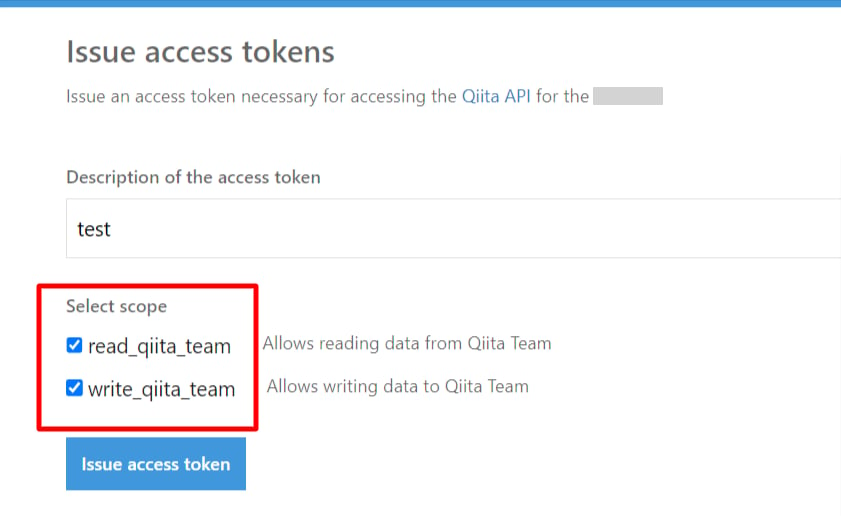
Description of the access tokenは任意の名称を入力し、**scopeはreadとwrite**にチェックを入れ

Issue access tokenをクリックします。
<img src="https://mintcdn.com/moneyforwardi/zAdY-Q72dgQYDZIE/images/integrations/yvtawcrlaz/image-1718615930730.png?fit=max&auto=format&n=zAdY-Q72dgQYDZIE&q=85&s=d1a809e3593af1de375d5bd5722fa8f7" alt="Access Token 作成画面" width="841" height="516" data-path="images/integrations/yvtawcrlaz/image-1718615930730.png" />

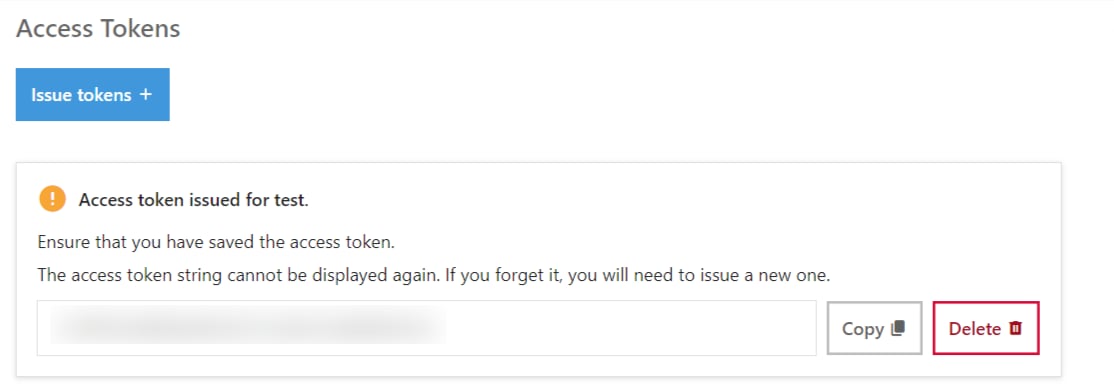
Access Tokenが生成されます。**Access Tokenがアクセスキー**となるので、コピー・保存します。

※Access Tokenは再表示されないので注意してください。
<img src="https://mintcdn.com/moneyforwardi/zAdY-Q72dgQYDZIE/images/integrations/yvtawcrlaz/image-1718616137992.png?fit=max&auto=format&n=zAdY-Q72dgQYDZIE&q=85&s=c5e01c579785ffbeba556438fb34c6c1" alt="Access Token 生成完了" width="1114" height="390" data-path="images/integrations/yvtawcrlaz/image-1718616137992.png" />

## インテグレーションのセットアップ

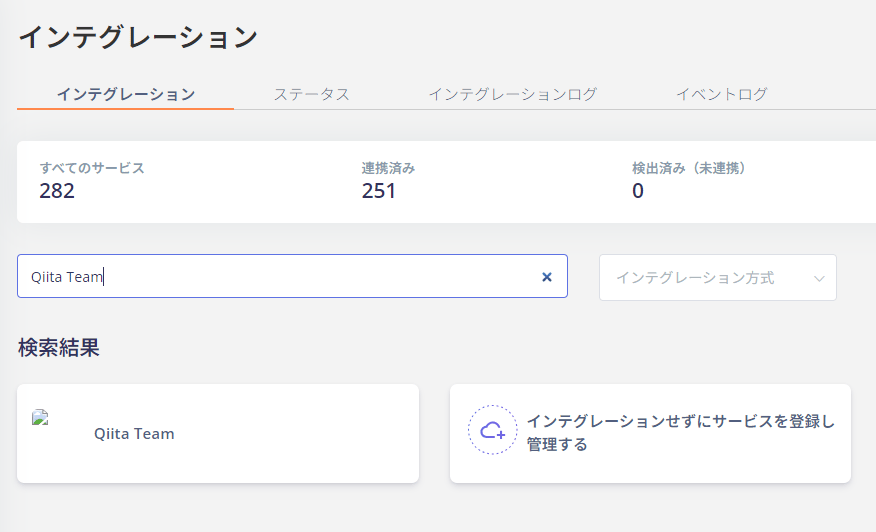
インテグレーション画面にて、**Qiita Team**で検索します。
<img src="https://mintcdn.com/moneyforwardi/zAdY-Q72dgQYDZIE/images/integrations/yvtawcrlaz/image-1718616245096.png?fit=max&auto=format&n=zAdY-Q72dgQYDZIE&q=85&s=8ae9708184051d0c7f41545a74dd5504" alt="インテグレーション検索" width="876" height="532" data-path="images/integrations/yvtawcrlaz/image-1718616245096.png" />

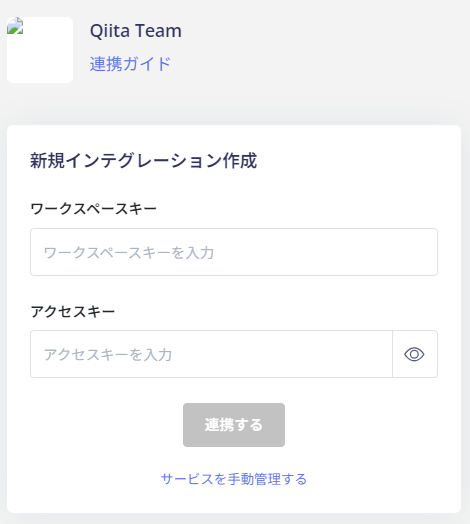
前の手順で取得した**ワークスペースキーとアクセスキー**を入力し、**連携する**をクリックします。
<img src="https://mintcdn.com/moneyforwardi/zAdY-Q72dgQYDZIE/images/integrations/yvtawcrlaz/image-1718616294224.png?fit=max&auto=format&n=zAdY-Q72dgQYDZIE&q=85&s=201a9b3a495cd583dde9aa1a44356d45" alt="連携情報入力" width="470" height="524" data-path="images/integrations/yvtawcrlaz/image-1718616294224.png" />

Qiita Team との連携に成功すると、アカウント一覧に登録済みのユーザー情報が表示されます。

正常に完了しない場合は、インテグレーション画面のステータスタブから**編集**し、再度連携をお試しください。

解決しない場合はチャットにてお問い合わせください🙏