> ## Documentation Index
> Fetch the complete documentation index at: https://support.i.moneyforward.com/llms.txt
> Use this file to discover all available pages before exploring further.

# Domo

> Domoとの連携の手順です。

## サポートする機能

<Badge color="blue">アカウント削除</Badge> <Badge color="blue">アカウント作成</Badge>

## 事前準備

### Domoへのログイン方法

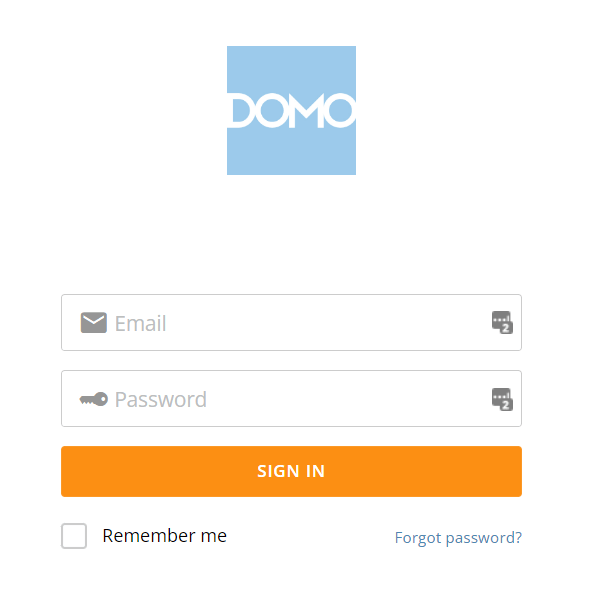
[Domoログインページ](https://mycompany.domo.com/)にて、メールアドレス・パスワードを入力しログインします。
<img src="https://mintcdn.com/moneyforwardi/zAdY-Q72dgQYDZIE/images/integrations/yzxva08tet/1656484353552.png?fit=max&auto=format&n=zAdY-Q72dgQYDZIE&q=85&s=7e4bd74e941f8ac5e983bfb63df9bb71" alt="Domoログインページ" width="600" height="607" data-path="images/integrations/yzxva08tet/1656484353552.png" />

### クライアントIDとクライアントシークレットの取得方法

Domoの[Deveroperサイト](https://developer.domo.com/)にアクセスし、ログインします。

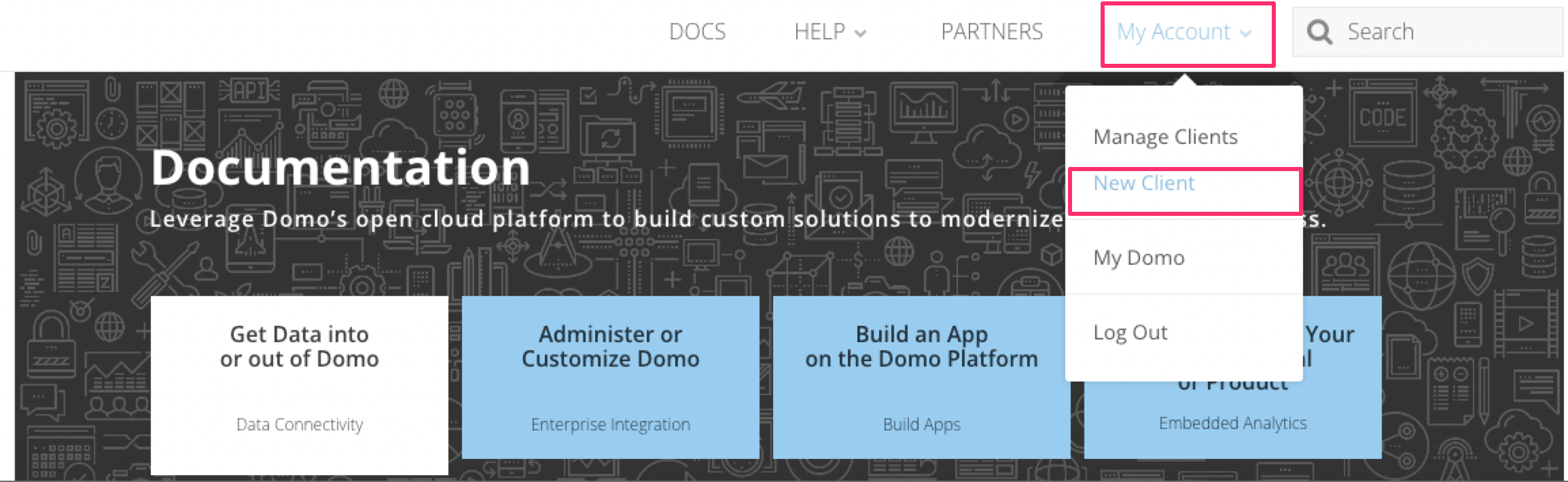
**My Account > New Client**に移動します。
<img src="https://mintcdn.com/moneyforwardi/zAdY-Q72dgQYDZIE/images/integrations/yzxva08tet/1670914265104.png?fit=max&auto=format&n=zAdY-Q72dgQYDZIE&q=85&s=381c582624e766c0602a7fa7062e3766" alt="My Account > New Client" data-og-width="2308" width="2308" data-og-height="710" height="710" data-path="images/integrations/yzxva08tet/1670914265104.png" data-optimize="true" data-opv="3" srcset="https://mintcdn.com/moneyforwardi/zAdY-Q72dgQYDZIE/images/integrations/yzxva08tet/1670914265104.png?w=280&fit=max&auto=format&n=zAdY-Q72dgQYDZIE&q=85&s=8a641f70df8611fcce54f6b56f0c4f2a 280w, https://mintcdn.com/moneyforwardi/zAdY-Q72dgQYDZIE/images/integrations/yzxva08tet/1670914265104.png?w=560&fit=max&auto=format&n=zAdY-Q72dgQYDZIE&q=85&s=b6813eecc8e2f61dc26654f3fc6e5d14 560w, https://mintcdn.com/moneyforwardi/zAdY-Q72dgQYDZIE/images/integrations/yzxva08tet/1670914265104.png?w=840&fit=max&auto=format&n=zAdY-Q72dgQYDZIE&q=85&s=69d41e37968f84120050dae3f49b1b54 840w, https://mintcdn.com/moneyforwardi/zAdY-Q72dgQYDZIE/images/integrations/yzxva08tet/1670914265104.png?w=1100&fit=max&auto=format&n=zAdY-Q72dgQYDZIE&q=85&s=8643960ae80b7755b82e21b9e0fc9fee 1100w, https://mintcdn.com/moneyforwardi/zAdY-Q72dgQYDZIE/images/integrations/yzxva08tet/1670914265104.png?w=1650&fit=max&auto=format&n=zAdY-Q72dgQYDZIE&q=85&s=84000c577953c69d4c8285f9fa90be49 1650w, https://mintcdn.com/moneyforwardi/zAdY-Q72dgQYDZIE/images/integrations/yzxva08tet/1670914265104.png?w=2500&fit=max&auto=format&n=zAdY-Q72dgQYDZIE&q=85&s=5849e088c1218967c6687285f1bf0e0b 2500w" />

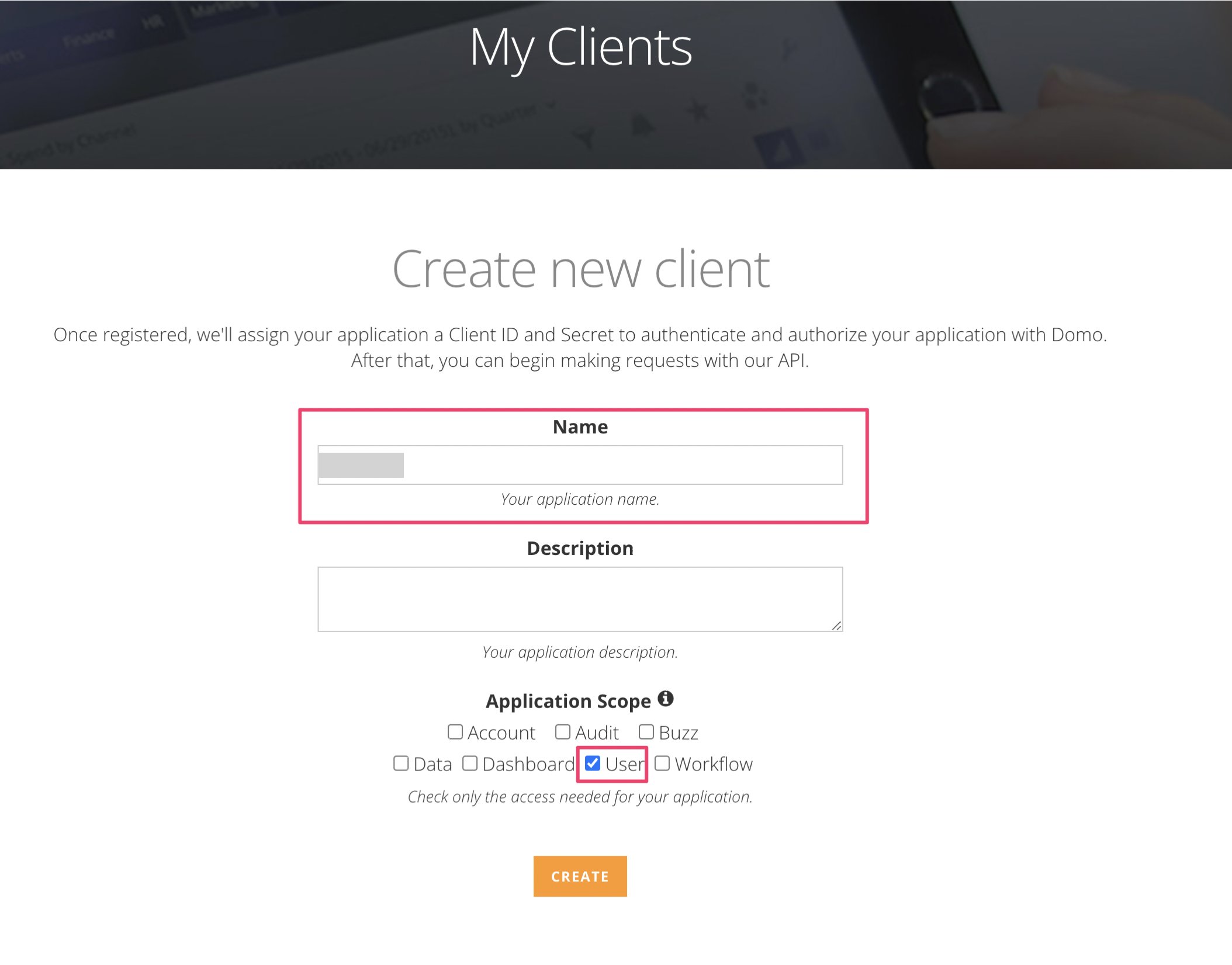
Client IDとSecretを表示するためのキーを作成します。

Nameに**任意の名前**を、Scopeに**User**をチェックし、**Create**ボタンをクリックします。
<img src="https://mintcdn.com/moneyforwardi/zAdY-Q72dgQYDZIE/images/integrations/yzxva08tet/1670914360859.png?fit=max&auto=format&n=zAdY-Q72dgQYDZIE&q=85&s=b74c40522b05809e03efee40dc9f72ea" alt="Create Client" width="2108" height="1652" data-path="images/integrations/yzxva08tet/1670914360859.png" />

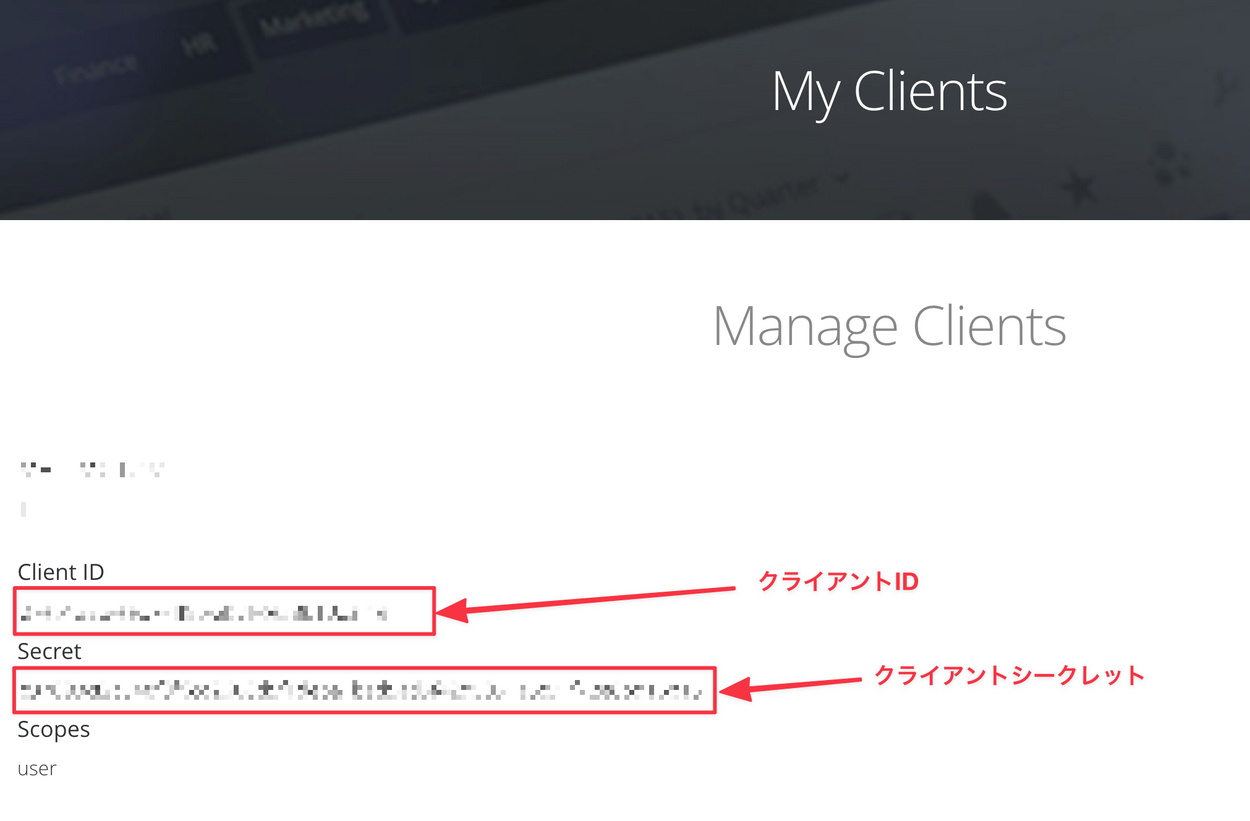
作成すると、次のように**Client ID** と **Secret**が表示されます。

**Client IDがクライアントID、Secretがクライアントシークレット**となるので保存します。
<img src="https://mintcdn.com/moneyforwardi/zAdY-Q72dgQYDZIE/images/integrations/yzxva08tet/1640407423489.png?fit=max&auto=format&n=zAdY-Q72dgQYDZIE&q=85&s=31572e9bfc05455e0ef45bd8ad8e2a43" alt="Client ID and Secret" width="1250" height="821" data-path="images/integrations/yzxva08tet/1640407423489.png" />

## インテグレーションのセットアップ

インテグレーション画面にて、**Domo** で検索します。
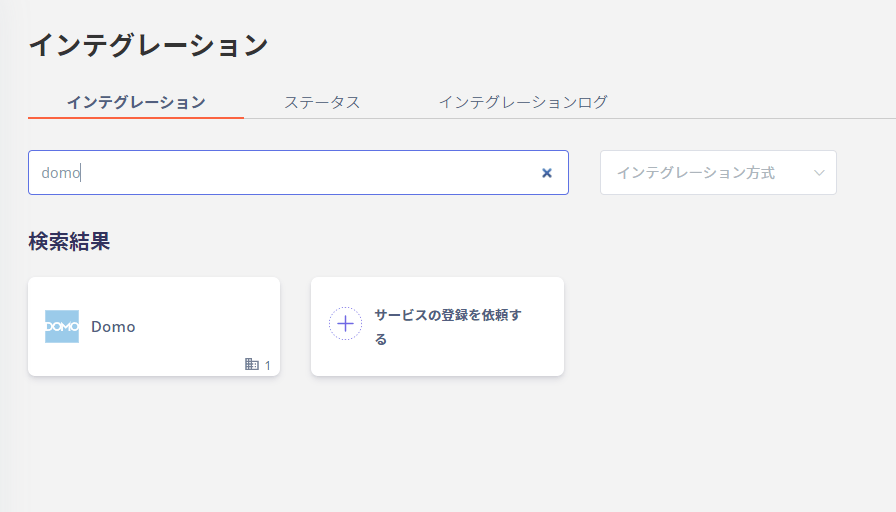
<img src="https://mintcdn.com/moneyforwardi/zAdY-Q72dgQYDZIE/images/integrations/yzxva08tet/1646790097279.png?fit=max&auto=format&n=zAdY-Q72dgQYDZIE&q=85&s=f7afacd87119b7808b54713e2d51202c" alt="Adminaインテグレーション画面でDomo検索" width="896" height="512" data-path="images/integrations/yzxva08tet/1646790097279.png" />

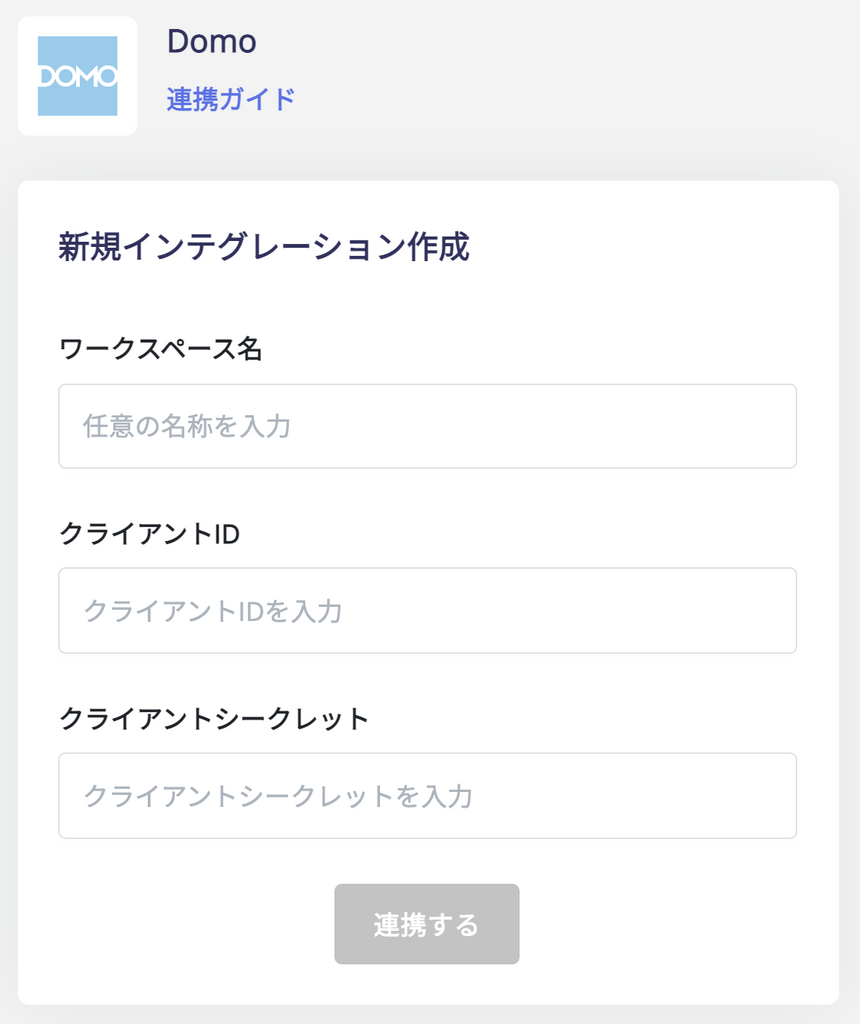
**ワークスペース名は任意の名称**（会社名など）、 前の手順で取得した**クライアントIDとクライアントシークレット**を入力し、 **連携する**をクリックします。
<img src="https://mintcdn.com/moneyforwardi/zAdY-Q72dgQYDZIE/images/integrations/yzxva08tet/1640407472090.png?fit=max&auto=format&n=zAdY-Q72dgQYDZIE&q=85&s=3cd5a6bf36523179d8c5e1b873398d0d" alt="連携設定" width="860" height="1024" data-path="images/integrations/yzxva08tet/1640407472090.png" />

Domoとの連携に成功すると、アカウント一覧に登録済みのユーザー情報が表示されます。

正常に完了しない場合は、インテグレーション画面のステータスタブから**編集**し、再度連携をお試しください。

解決しない場合はチャットにてお問い合わせください。

Domoの連携概要については[連携ページ](http://admina.moneyforward.com/jp/integrations/domo)をご覧ください。
