> ## Documentation Index
> Fetch the complete documentation index at: https://support.i.moneyforward.com/llms.txt
> Use this file to discover all available pages before exploring further.
# 2025/11/14 Release !!
> デバイスの表示名をカスタマイズできるようになりました。資産番号やホスト名などの標準項目、カスタム項目から選択して、管理の柔軟性が向上します。
 **🎉 デバイス機能アップデート:表示名をカスタマイズできるようになりました!**
これまで固定だったデバイス名を、任意の情報に置き換えて表示できるようになりました💡
資産番号、ホスト名、シリアル番号などの全ての標準項目に対応しており、さらにはカスタム項目も選択できるため、管理の柔軟性が向上します。
これにより、ユーザーは必要なデータをすぐに確認・検索でき、識別や管理がスムーズになります。
**設定方法**
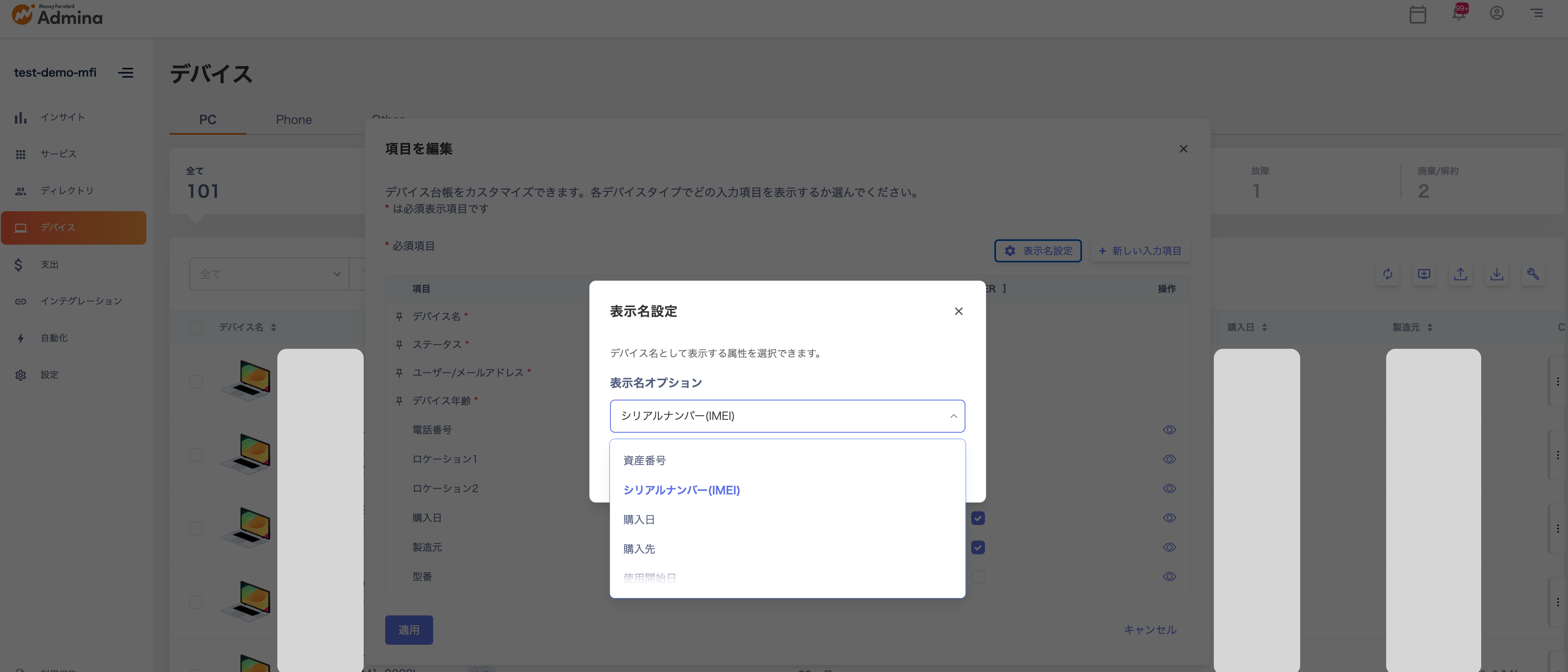
デバイス→テーブルを編集する→表示名設定より、設定したい項目を選択してください。
✨ぜひ新しいデバイス管理体験をお試しください!
**🎉 デバイス機能アップデート:表示名をカスタマイズできるようになりました!**
これまで固定だったデバイス名を、任意の情報に置き換えて表示できるようになりました💡
資産番号、ホスト名、シリアル番号などの全ての標準項目に対応しており、さらにはカスタム項目も選択できるため、管理の柔軟性が向上します。
これにより、ユーザーは必要なデータをすぐに確認・検索でき、識別や管理がスムーズになります。
**設定方法**
デバイス→テーブルを編集する→表示名設定より、設定したい項目を選択してください。
✨ぜひ新しいデバイス管理体験をお試しください!