> ## Documentation Index
> Fetch the complete documentation index at: https://support.i.moneyforward.com/llms.txt
> Use this file to discover all available pages before exploring further.
# 2026/10/2 Release‼︎
> イベントログの検索において、ログの取得元を指定して絞り込める「ソース」選択機能をリリースしました。
 イベントログの検索において、ログの取得元を指定して絞り込める「ソース」選択機能をリリースしました。
## イベントログで「ソース」を指定して絞り込み
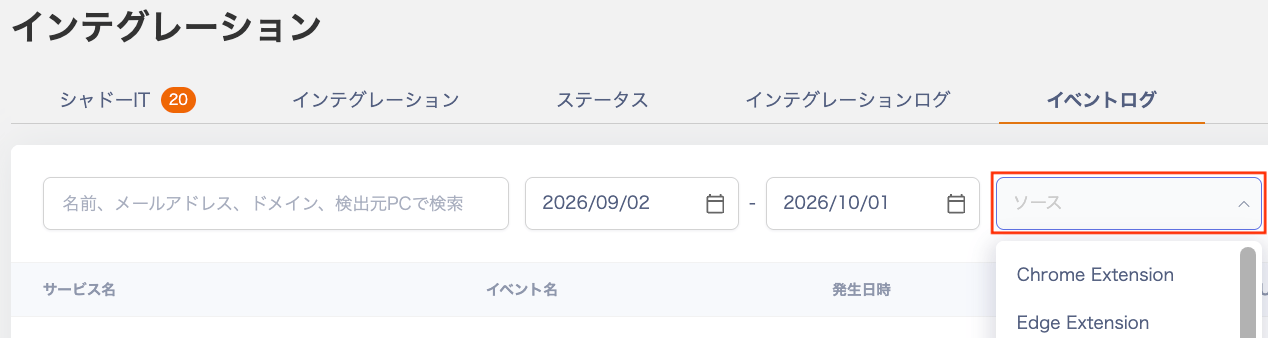
イベントログ画面の検索条件に「ソース」が追加され、特定の取得元(ソース)に限定したログを効率的に検索・確認できるようになりました。
* ソース別の絞り込み:検索バー内の「ソース」フィールドから、Chrome Extension や Edge Extension などの対象ソースを選択してログを絞り込めます。
* 表形式(一覧)でのスムーズな確認:選択したソースと一致するイベントログが下部の表形式一覧へすぐに反映され、ログの確認作業がスムーズになります。
* 柔軟な条件検索:従来のキーワード検索(名前、メールアドレス、ドメイン、検出元PC)や発生日時の範囲指定と組み合わせて検索できます。
## ご利用方法
インテグレーション > イベントログの「ソース」欄で絞り込み、一覧をご確認いただけます。
イベントログの検索において、ログの取得元を指定して絞り込める「ソース」選択機能をリリースしました。
## イベントログで「ソース」を指定して絞り込み
イベントログ画面の検索条件に「ソース」が追加され、特定の取得元(ソース)に限定したログを効率的に検索・確認できるようになりました。
* ソース別の絞り込み:検索バー内の「ソース」フィールドから、Chrome Extension や Edge Extension などの対象ソースを選択してログを絞り込めます。
* 表形式(一覧)でのスムーズな確認:選択したソースと一致するイベントログが下部の表形式一覧へすぐに反映され、ログの確認作業がスムーズになります。
* 柔軟な条件検索:従来のキーワード検索(名前、メールアドレス、ドメイン、検出元PC)や発生日時の範囲指定と組み合わせて検索できます。
## ご利用方法
インテグレーション > イベントログの「ソース」欄で絞り込み、一覧をご確認いただけます。
 詳細は[イベントログでの利用状況の確認](/it-management/shadow-it/oepl0j5y5g-eventlog)をご参照ください。
ご質問やご不明な点がございましたら、[お問い合わせ窓口](/contact-support)までお気軽にご連絡ください!
This documentation is built and hosted on [Mintlify](https://mintlify.com), a developer documentation platform.
詳細は[イベントログでの利用状況の確認](/it-management/shadow-it/oepl0j5y5g-eventlog)をご参照ください。
ご質問やご不明な点がございましたら、[お問い合わせ窓口](/contact-support)までお気軽にご連絡ください!
This documentation is built and hosted on [Mintlify](https://mintlify.com), a developer documentation platform.