> ## Documentation Index
> Fetch the complete documentation index at: https://support.i.moneyforward.com/llms.txt
> Use this file to discover all available pages before exploring further.
# 2026/9/28 Release‼︎
> 指定した条件に一致するデバイスを動的に抽出し、グループ化できる「デバイスグループ」機能をリリースしました。
 指定した条件に一致するデバイスを動的に抽出し、グループ化できる「デバイスグループ」機能をリリースしました。
## 指定した条件に応じてデバイスをグループ化
デバイスの属性・演算子・値を組み合わせて条件を設定すると、一致するデバイスが動的に集計され、グループとして表示されます。
* 柔軟な条件設定:デバイス種別、モデル名、OS、ロケーション、カスタム項目、MDM項目などの属性を指定し、「AND / OR」条件や各種演算子(等しい/含む/で始まる/以降 など)を組み合わせて絞り込めます。
* デバイス一覧でスムーズに確認:作成したグループはデバイス一覧画面にタブとして表示されるため、条件に一致するデバイスをすぐに確認できます。
* グループの管理:作成したグループは、編集・複製・削除のほか、タブの表示/非表示を切り替えられます。
## ご利用方法
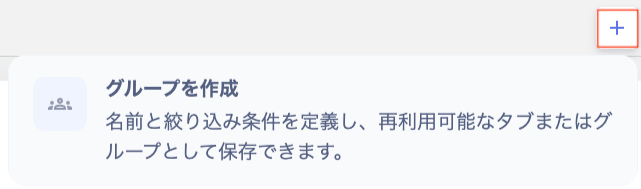
デバイス画面上部の\[**+**]から\[**グループを作成**]を選択します。
指定した条件に一致するデバイスを動的に抽出し、グループ化できる「デバイスグループ」機能をリリースしました。
## 指定した条件に応じてデバイスをグループ化
デバイスの属性・演算子・値を組み合わせて条件を設定すると、一致するデバイスが動的に集計され、グループとして表示されます。
* 柔軟な条件設定:デバイス種別、モデル名、OS、ロケーション、カスタム項目、MDM項目などの属性を指定し、「AND / OR」条件や各種演算子(等しい/含む/で始まる/以降 など)を組み合わせて絞り込めます。
* デバイス一覧でスムーズに確認:作成したグループはデバイス一覧画面にタブとして表示されるため、条件に一致するデバイスをすぐに確認できます。
* グループの管理:作成したグループは、編集・複製・削除のほか、タブの表示/非表示を切り替えられます。
## ご利用方法
デバイス画面上部の\[**+**]から\[**グループを作成**]を選択します。
 詳細は[デバイスグループの作成と管理](/it-management/device/tfkxibk4gi-device-group)をご参照ください。
ご質問やご不明な点がございましたら、[お問い合わせ窓口](/contact-support)までお気軽にご連絡ください!
This documentation is built and hosted on [Mintlify](https://mintlify.com), a developer documentation platform.
詳細は[デバイスグループの作成と管理](/it-management/device/tfkxibk4gi-device-group)をご参照ください。
ご質問やご不明な点がございましたら、[お問い合わせ窓口](/contact-support)までお気軽にご連絡ください!
This documentation is built and hosted on [Mintlify](https://mintlify.com), a developer documentation platform.