



メインコンテンツへスキップ
2026/4/3 Release!! 2026/4/3 Release!! 2026/4/3 Release!! In the device management feature, you can now freely add and edit the “device types” used to classify devices to match your organization’s operations. Previously, only fixed types were available, but this update allows for more flexible device management that reflects the actual state of your assets, including peripherals and specialized equipment.

Highlights of This Update

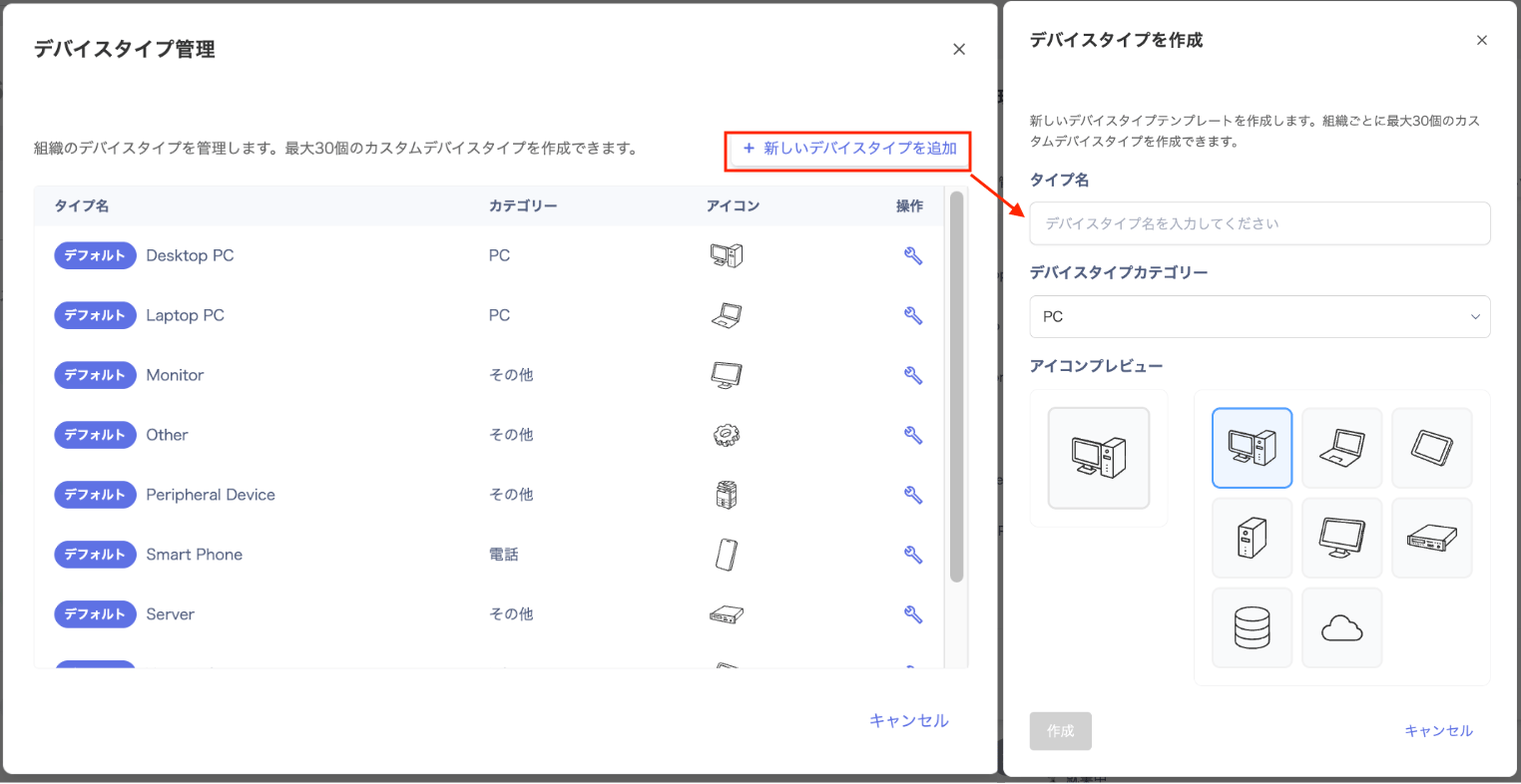
  • Add device types: Create up to 30 custom types in the “PC/Phone/Other” categories
  • Customize icons and names: Freely set icons to match each type name
  • Flexible classification management: You can also change the names and icons of default items to better suit your needs

How to Use

Go to Devices > click [Edit Device Types] in the upper right. On the “Device Type Management” screen, edit existing items or create new ones by clicking [+ Add New Device Type]. Set the type name, category, and icon, then save to make it available as an option when registering devices. Manage Devices If you have any questions or requests, please feel free to contact us.
最終更新日 2026年6月18日