

This feature requires Admin permission or the Survey Manager role to operate, and Member permission or the Survey Viewer role to view.
See Configure login users and roles for details.
The “Device” target type requires the Device feature.
Survey Templates
- Device Inventory Survey_template.json
- Service Satisfaction Survey_template.json
- SaaS Inventory Survey_template.json
How to Use Templates
Refer to the templates on this page or your own templates to Create a survey. You can save a created survey as a template and reuse it in future surveys.Importing a Template
- Download the survey template file (JSON).
-
Go to Survey and click [+] in the upper right of the “Survey” screen.

-
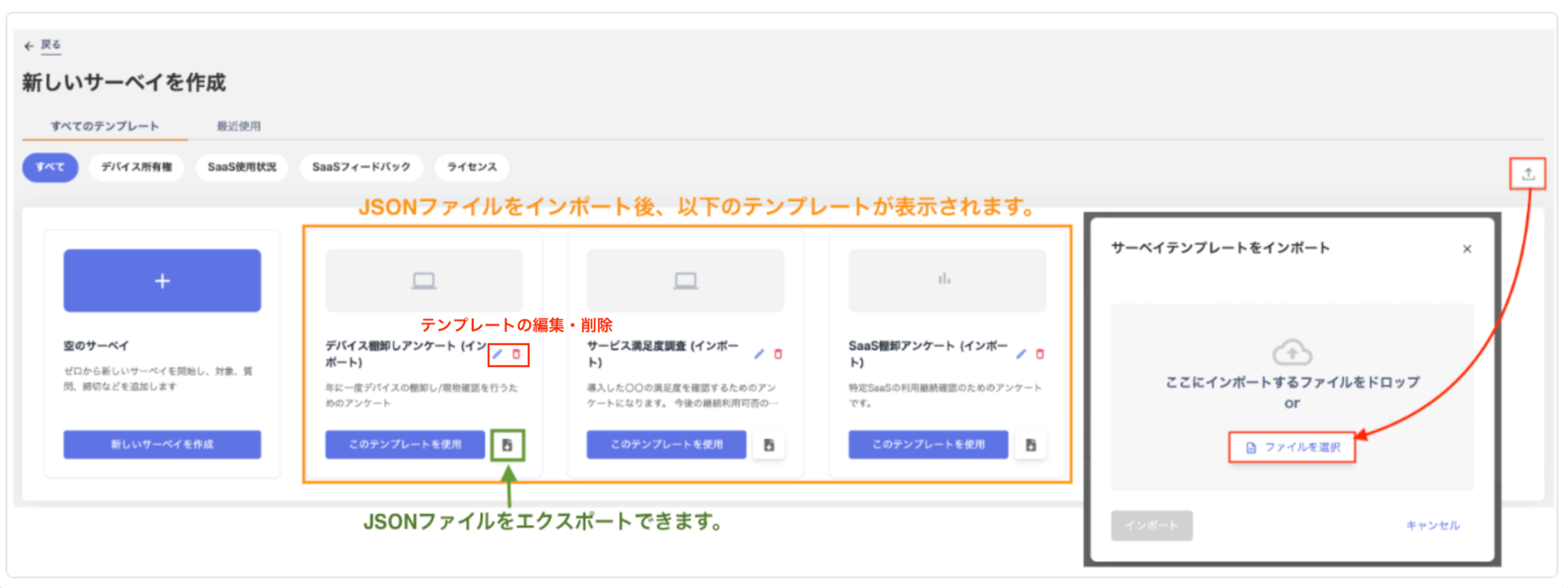
In the “Create New Survey” screen, click [Import] in the upper right and select the JSON file.
Imported templates appear in the “All Templates” tab. You can also export templates as JSON files.
Note: Use the [Edit] and [Delete] buttons within a template to edit or delete it.
How to Preview a Template
Click the toggle highlighted in red below to preview a template.
Device Asset Inventory
Template Details
Template Details
Title: YYYY/MM Device Asset InventoryDescription:This survey verifies that device assets owned by employees are still with their owner or manager. It also confirms the assets are being properly maintained.You can respond to this survey from either a smartphone or a PC.If you have any questions, contact the IT department.
Q1. Do you currently possess or manage this asset? [Answer type] Single selection
Q2. What is the purpose of this asset? [Answer type] Multiple selection
Q3. Where do you primarily use this asset? Select the location you normally use. [Answer type] Multiple selection
Q4. Will you continue using this asset going forward? [Answer type] Multiple selection
Q5. Upload a photo showing the asset number and the device itself. [Answer type] Image upload
Q6. Upload an overall photo of the asset. [Answer type] Image upload
Q7. Are there any issues with the asset? Please note any concerns. [Answer type] Free text
[Submission method] Target type = Select target device from Device Recipient type = “Target person / Owner”
Q1. Do you currently possess or manage this asset? [Answer type] Single selection
- Yes
- No
Q2. What is the purpose of this asset? [Answer type] Multiple selection
- Personal use
- Shared use (multiple users)
- Fixed equipment (store/office use)
- For lending or testing
- No longer in my possession
- Other
Q3. Where do you primarily use this asset? Select the location you normally use. [Answer type] Multiple selection
- Company office / store / factory
- Client site office
- Home / outdoor phone booth
- On the go (client visits / in a vehicle)
- On the go (public facilities / cafe / train)
- No longer in my possession
- Other
Q4. Will you continue using this asset going forward? [Answer type] Multiple selection
- Continue using
- Request return
- Request replacement
- Propose disposal
- Undecided
- No longer in my possession
- Other
Q5. Upload a photo showing the asset number and the device itself. [Answer type] Image upload
Q6. Upload an overall photo of the asset. [Answer type] Image upload
Q7. Are there any issues with the asset? Please note any concerns. [Answer type] Free text
[Submission method] Target type = Select target device from Device Recipient type = “Target person / Owner”
Service Usage Experience Check
Template Details
Template Details
Title: ◎ service Usage Experience CheckDescription:
Three months have passed since we introduced ◎ service.
Please share your current usage experience to help us decide whether to continue using it.
You can respond to this survey from either a smartphone or a PC.
If you have any questions, contact the IT department.
Q1. How satisfied are you with ◎ service overall? [Answer type] Single selection
Q2. How often do you use ◎ service? [Answer type] Single selection
Q3. Please rate the impact on your work. (Very effective: 5 — Not very effective: 1) [Answer type] Single selection
Q4. Please share any additional comments or requests. [Answer type] Free text
[Submission method] Target type = Select target ID from SaaS app Recipient type = “Target person / Owner”
Q1. How satisfied are you with ◎ service overall? [Answer type] Single selection
- Indispensable — I would be lost without it.
- Somewhat useful — nice to have.
- Neutral — I could manage with previous methods if it were gone.
- Minimally useful — I would be fine stopping use.
- Other (please provide details in the comment field at the end)
Q2. How often do you use ◎ service? [Answer type] Single selection
- Almost every day
- Multiple times a week
- Multiple times a month
- Not used in the past month
- Not used in the past 3 months
- Not using it
Q3. Please rate the impact on your work. (Very effective: 5 — Not very effective: 1) [Answer type] Single selection
- 5
- 4
- 3
- 2
- 1
Q4. Please share any additional comments or requests. [Answer type] Free text
[Submission method] Target type = Select target ID from SaaS app Recipient type = “Target person / Owner”
Service Continued Use Confirmation
Template Details
Template Details
Title: YYYY/MM ◎ Service Continued Use ConfirmationDescription:
This workflow confirms the usage status of ◎ service.
You can respond to this survey from either a smartphone or a PC.
We ask users to return their license if they have not used ◎ service for a certain period.
The cost per ID is 0000 yen.
Licenses can be reassigned when needed, so we appreciate your cooperation in returning them proactively.
Note that returning a license does not delete your data.
If you have any questions, contact the IT department.
Q1. Will you continue using ◎ service? [Answer type] Single selection
[Submission method]Target type = Select target ID from SaaS app, filtered by usage frequencyRecipient type = “Target person / Owner”
Q1. Will you continue using ◎ service? [Answer type] Single selection
- No, I no longer need it.
- Yes, I will continue using it.
[Submission method]Target type = Select target ID from SaaS app, filtered by usage frequencyRecipient type = “Target person / Owner”
Contractor Enrollment Verification
Template Details
Template Details
Title: YYYY/MM ◇ Co. Contractor Enrollment VerificationDescription:This survey confirms the status of contracted work with ◯◯ Co. and the enrollment status of contracted staff.It verifies whether the company still does business with us. It also checks whether the person in charge is still involved in our operations.If the contract has ended or the person is no longer involved, we take action such as deleting the account.If you have any questions, contact the IT department.
Q1. Is this employee currently working at our company? [Answer type] Single selection
Q2. Does your company have an ongoing business relationship with ◇ Co.? [Answer type] Single selection
Q3. Confirm the ID status of employees whose contract has ended or who are no longer working. [Answer type] Single selection
Q4. Confirm the device status of employees whose contract has ended or who are no longer working. [Answer type] Single selection
Q5. Add any supplementary information to your response if needed. [Answer type] Free text
[Submission method]Target type = Select target ID from employees, filtered by “company”Recipient type = “Target person / Owner’s manager”
Q1. Is this employee currently working at our company? [Answer type] Single selection
- Currently working
- No longer working
- Scheduled to end within 3 months (please specify the end date at the bottom)
- Other
Q2. Does your company have an ongoing business relationship with ◇ Co.? [Answer type] Single selection
- Business relationship ongoing
- Scheduled to end within 3 months (please specify the end date at the bottom)
- Business relationship has already ended
- Other
Q3. Confirm the ID status of employees whose contract has ended or who are no longer working. [Answer type] Single selection
- Not applicable
- Already deleted
- Scheduled for deletion (request submitted)
- Missed deletion (may be deleted)
- Do not delete (please specify the reason at the bottom)
Q4. Confirm the device status of employees whose contract has ended or who are no longer working. [Answer type] Single selection
- Not applicable
- Already returned
- Return in progress
- Not yet returned
Q5. Add any supplementary information to your response if needed. [Answer type] Free text
[Submission method]Target type = Select target ID from employees, filtered by “company”Recipient type = “Target person / Owner’s manager”