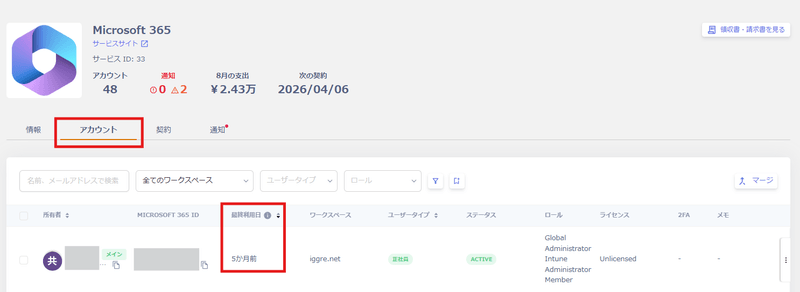
Where to check the Last Activity date of service accounts, and the three ways it is collected: directly via API, from Google, Microsoft 365, or Microsoft Entra ID login history, and through the browser extension. It also explains what happens when both the API and the extension provide a date, and the difference between “Never logged in” and ”-”.
This value shows how much time has passed since the last access (login) to a SaaS application. Use it as a reference for how frequently a SaaS is being used.
Last Activity data is collected through three methods.
Direct API retrieval. This method retrieves the Last Activity date via API using the value stored in the SaaS.
For SaaS applications that support this method, see the Supported SaaS and Features List. Check the Retrievable Data > Last Activity column.
Login history (Google, Microsoft 365, or Microsoft Entra ID). This method uses login history instead of API access.
Some SaaS applications don’t support direct API retrieval (method 1). For these, this method calculates the Last Activity date from Google, Microsoft 365, or Entra ID login history.
For log retrieval conditions, see the main Shadow IT detection methods.
If no login occurs for an extended period after the previous login, the value may not reflect accurately. Use the Chrome extension below in that case.
Browser extension
Installing the browser extension retrieves the Last Activity date from SaaS access history. For usage instructions, see Distribute and install the browser extension.
When both the API and the extension provide a date
Some services provide the Last Activity date directly through the API. If the browser extension detects more recent use, the Last Activity date changes to that detection time. At the next sync, it returns to the value retrieved from the API.Each service defines what the retrieved value means (for example, the last login time).The browser extension identifies the service by the host name (domain) of the page that the user accesses. The extension doesn’t check whether the user has logged in. It doesn’t detect use in browsers without the extension, desktop apps, or mobile apps.
Appears for services that provide the Last Activity date directly through the API. It means the service returned no Last Activity date for the account, and the browser extension hasn’t detected any use.
-
Appears for services that don’t provide the Last Activity date through the API, when no other method has collected a date either.