

SaaS status: The target SaaS must be connected with admin permissions (including API permissions) that allow account creation and deletion.
Overview of Automations
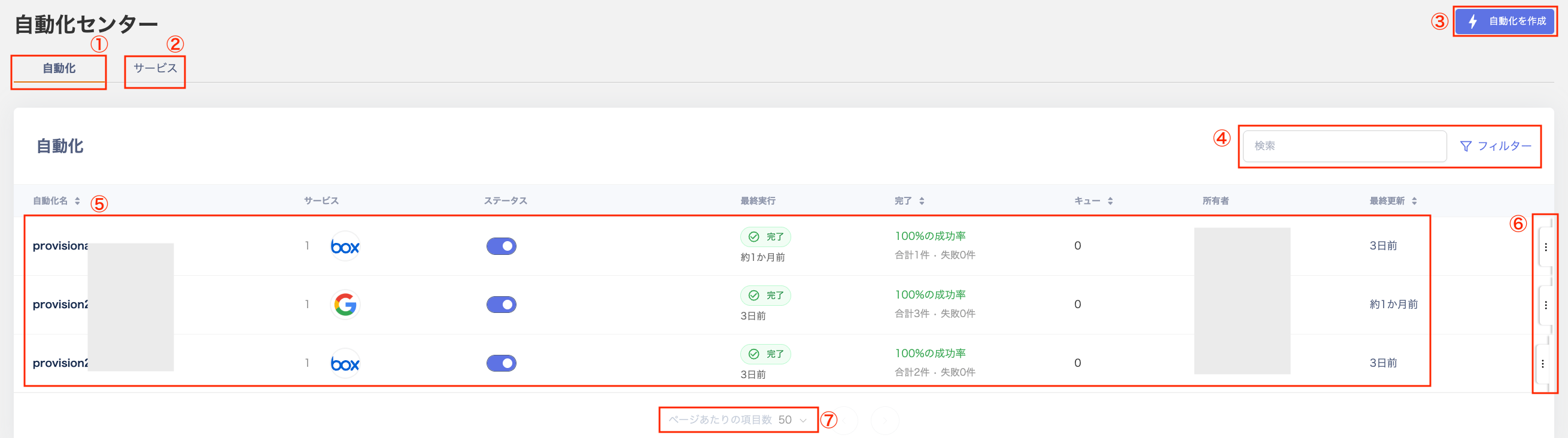
Automations is a workflow feature for software and SaaS services. It automates account creation during onboarding and account deletion during offboarding. It runs automatically based on user data according to pre-configured flows, reducing routine tasks for IT teams.Screen description (Automations)
| # | Item | Description |
|---|---|---|
| 1 | Automations | View a list of configured workflows. |
| 2 | Services | Configure service mappings to enable Provisioning and Deprovisioning workflows for each service. |
| 3 | Create automation | Select a template to configure the workflow. |
| 4 | Search, filter | Filter by keyword search and status (Enabled / Disabled / Error). |
| 5 | Workflow list | View the list of automation workflows. |
| 6 | Three-dot menu | Choose from “Delete workflow / Show logs / View workflow”. |
| 7 | Items per page | Switch between 50 or 100 items per page. Use the buttons on the right to navigate to the next or previous page. |