

Integration Specifications
Prerequisites
Checking your company code
When you register for SS1 Cloud, you receive a login URL. The{company_code} portion of that URL is your company code.

If you use the overseas environment management option, the domain portion of the login URL (
mgr.ss1-cloud-gl.com) differs.Setting up the integration
- On the integration screen, search for SS1 Cloud.
-
Select a region: “Japan (
mgr.ss1-cloud.com)” or “Global (mgr.ss1-cloud-gl.com)”. Then enter your domain code (your company code), username, and password, and click Connect.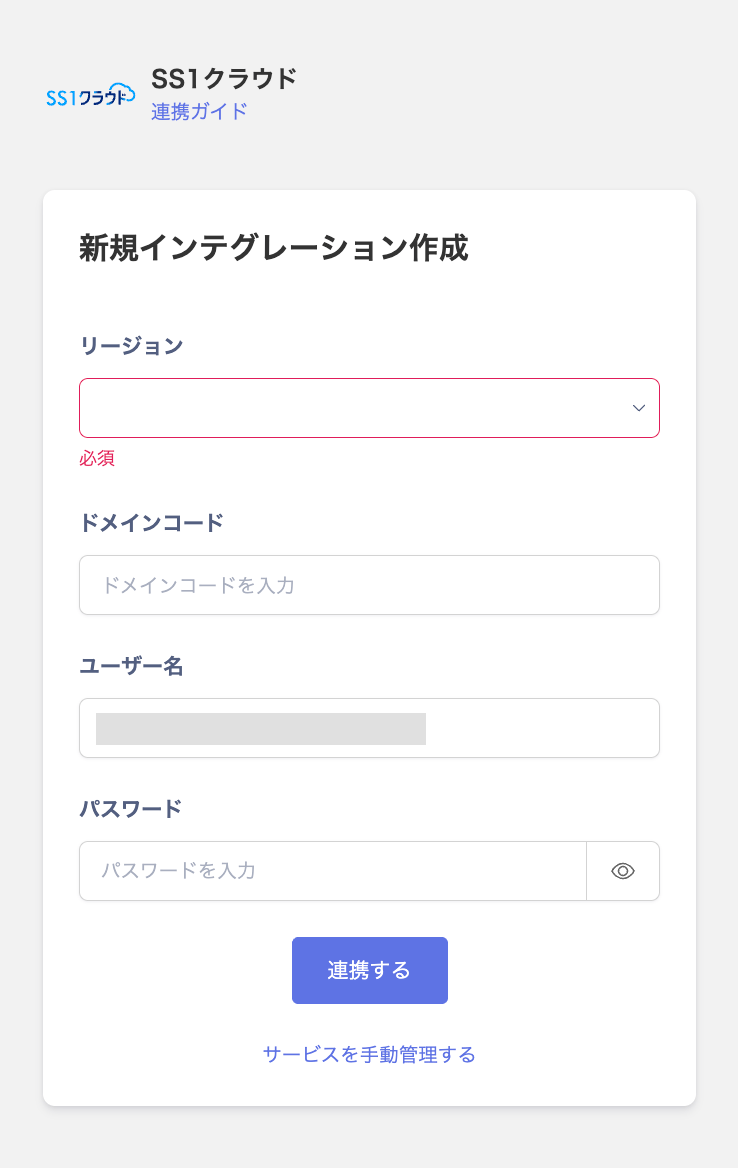
- Once the integration with SS1 Cloud succeeds, registered user information appears in the account list. If it doesn’t complete successfully, first try the steps in Troubleshoot SaaS integration errors. If that doesn’t resolve it, check Information to provide and contact support.
MDM Integration
If you are using the device management feature, you can synchronize devices with SS1 Cloud. For details, see Sync devices with MDM-compatible SaaS.The SS1 Cloud device API provides information for Windows PCs, as well as Mac and mobile devices.Also, the serial number is not included in the SS1 Cloud API response, so it cannot be retrieved. It therefore cannot act as a merge key. Devices are always registered as new rather than merged with an existing device.Note that SS1 Cloud is not currently included in the list of services covered by the Managed field. The value is retrieved but not reflected in the Managed field on the Devices screen.