How to integrate Nextcloud with Admina using an API key. Admina retrieves user names, email addresses, and statuses and supports account creation and deletion.
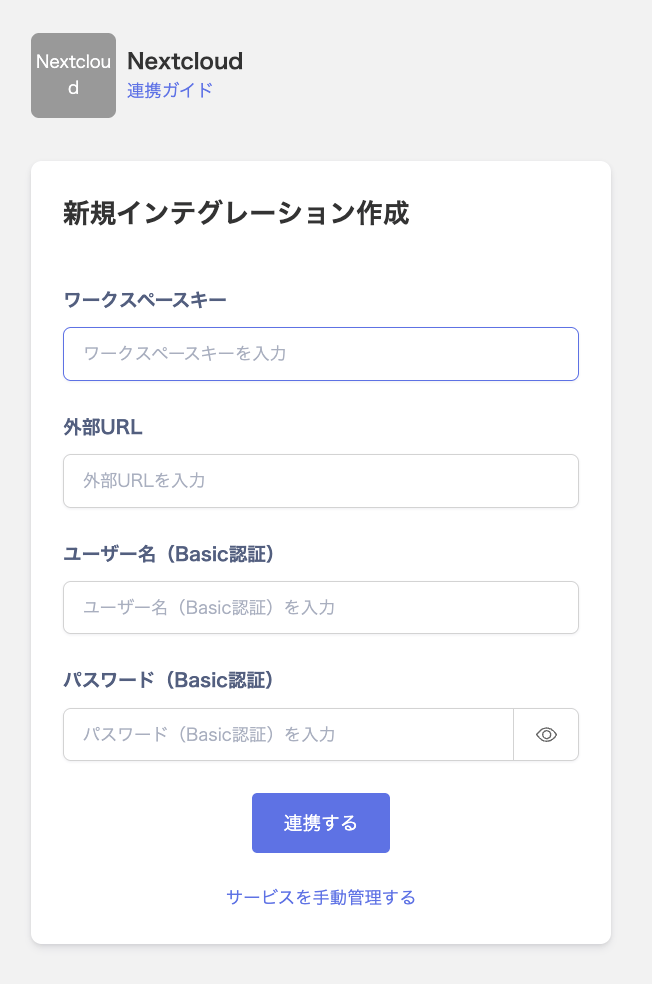
Enter any string into Workspace key. Enter the URL of your Nextcloud instance (for example, https://nextcloud.example.com) into External URL. Use a Nextcloud admin account (an account in the admin group). Enter its username into Username (Basic Authentication) and its password into Password (Basic Authentication). Then click Connect.
Once the integration with Nextcloud succeeds, registered user information appears in the account list. If it doesn’t complete successfully, first try the steps in Troubleshoot SaaS integration errors. If that doesn’t resolve it, check Information to provide and contact support.
Enter a URL that starts with https:// into External URL. URLs that use http://, an IP address, or localhost can’t be used.
Enter a URL that connects directly to your Nextcloud server into External URL. URLs that redirect to another URL can’t be used.