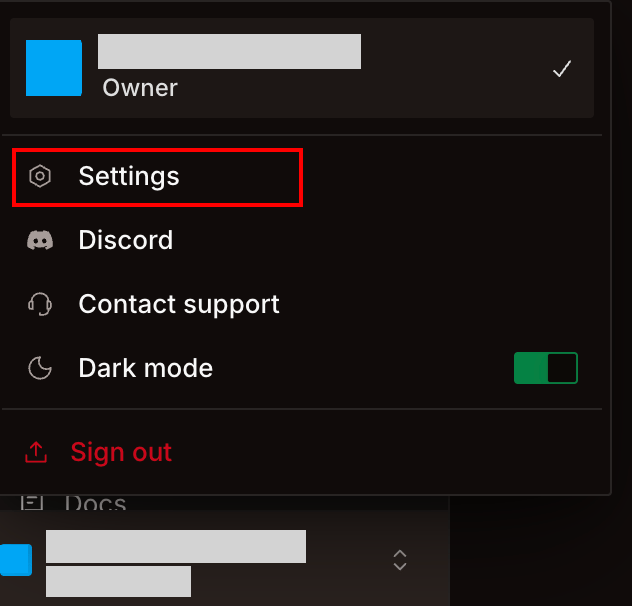
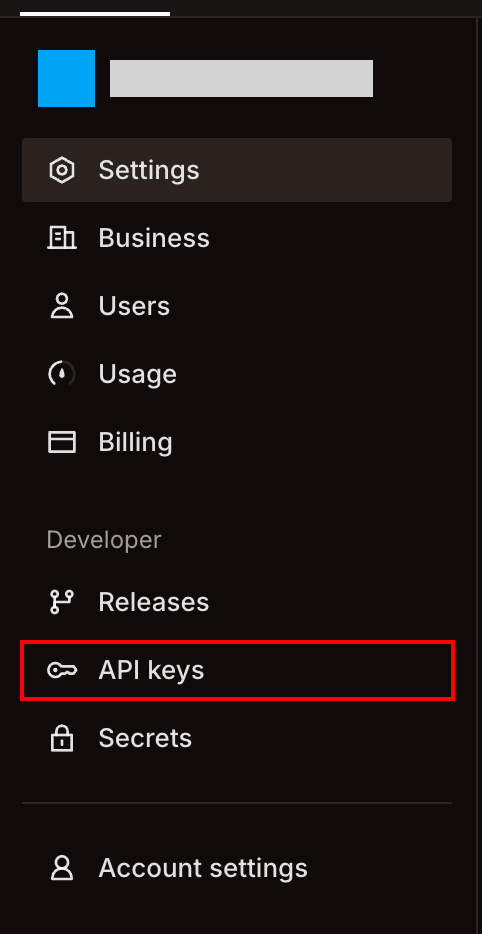
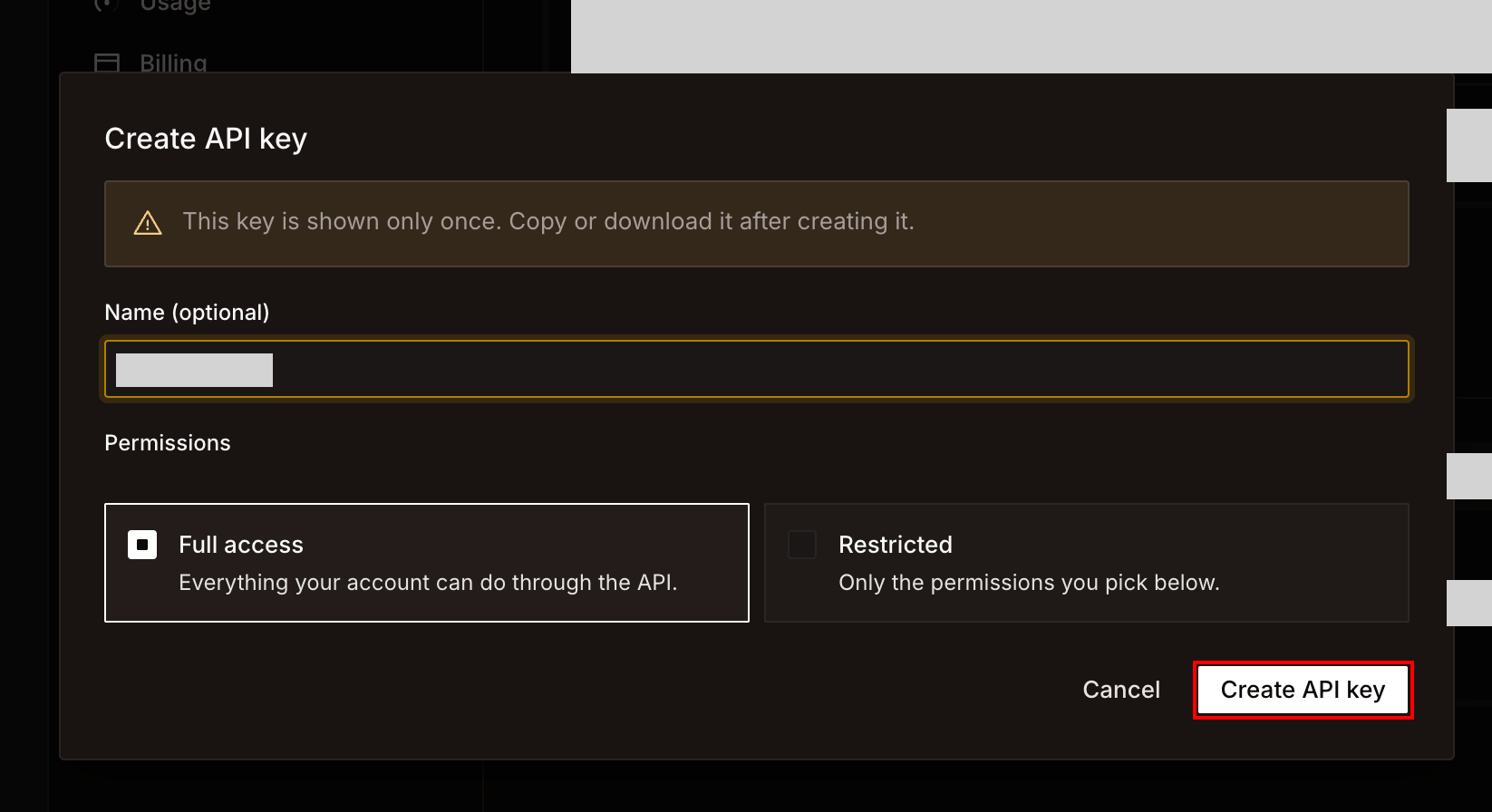
How to integrate Bland with Admina using an API key. Admina retrieves data such as user names, email addresses, and roles and supports account creation and deletion.
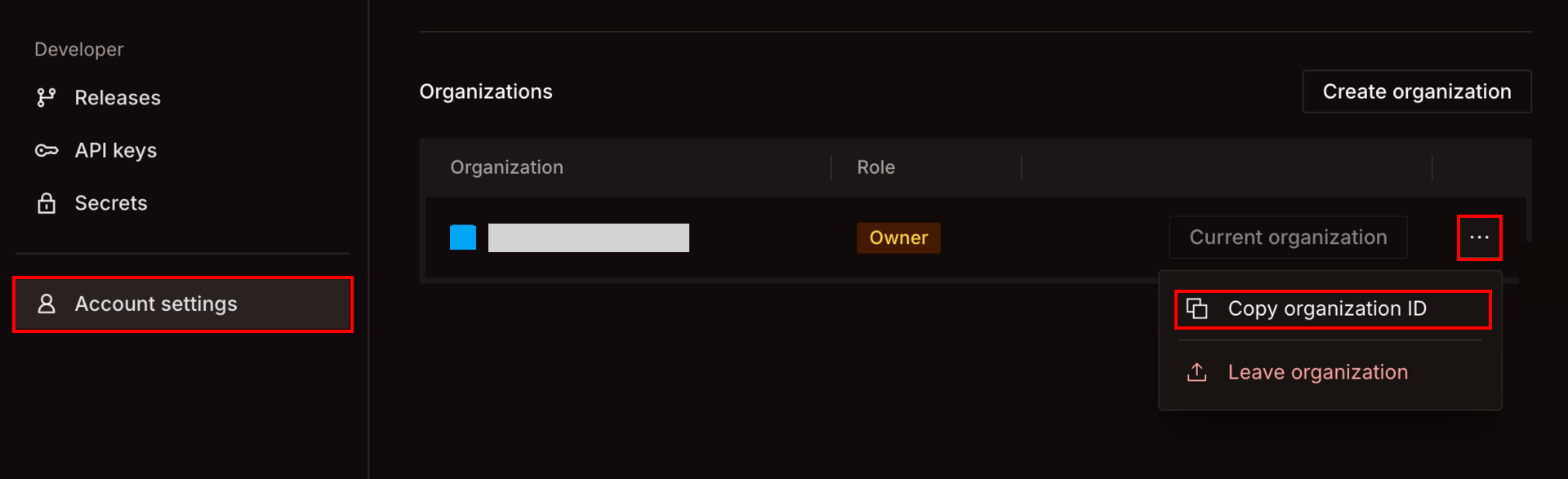
Select Account settings at the bottom of the left menu.
In the Organizations list, click … to the right of the organization to connect, then select Copy organization ID. The copied organization ID is the workspace key.
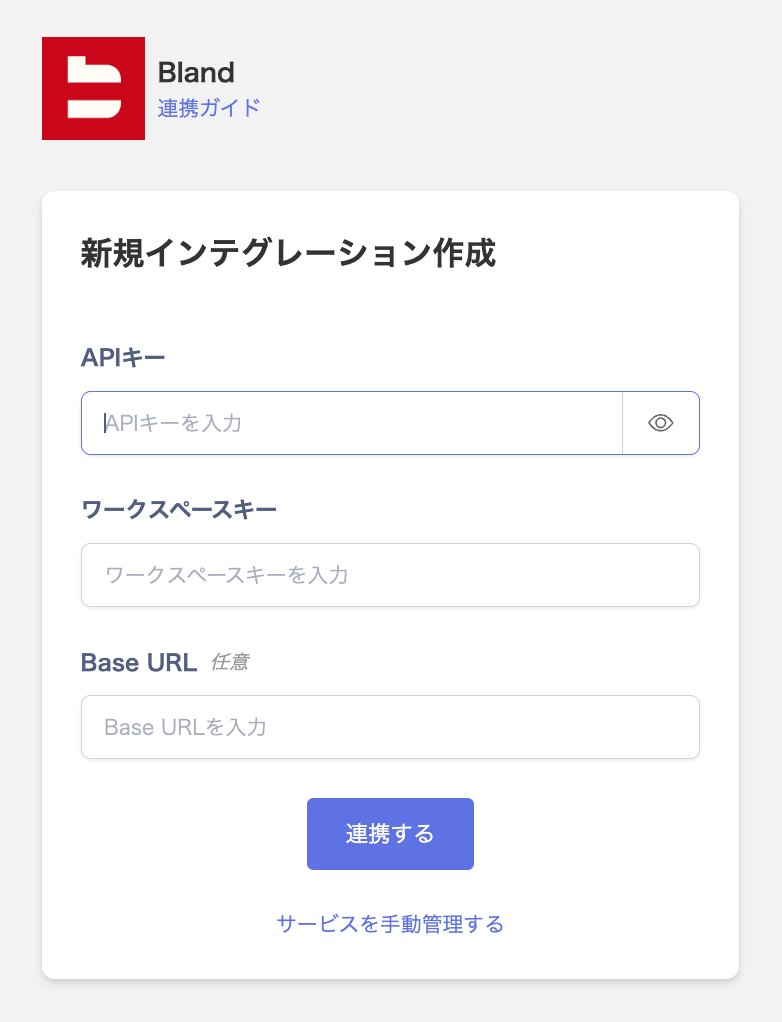
Enter the API key in API Key and the organization ID in Workspace key, then click Connect. Base URL is optional.
When the integration with Bland succeeds, registered user information appears in the account list. If it does not complete successfully, first try the steps in Troubleshoot SaaS integration errors. If the issue persists, check Information to provide and contact Support.
For Workspace key, enter the ID of an organization that the API key you entered can access.
If you leave Base URL empty, the integration connects to https://api.bland.ai. The value must be one of https://api.bland.ai, https://eu.api.bland.ai, https://ca.api.bland.ai, or https://asia.api.bland.ai.
Admina cannot delete the owners of a Bland organization.
Admina cannot revoke a pending invitation that was sent from Admina. Revoke it in the Bland dashboard.
Last modified on November 13, 2026
Was this page helpful?
{"docsConfig":{"theme":"mint","$schema":"https://mintlify.com/docs.json","name":"Admina Help Center","colors":{"primary":"#4361ee","light":"#bcd1ff","dark":"#4361ee"},"logo":{"light":"https://mintcdn.com/moneyforwardi/r7Kl_XskKl0zZU6O/images/logo-light.png?fit=max\u0026auto=format\u0026n=r7Kl_XskKl0zZU6O\u0026q=85\u0026s=34f61220e23b4287c2562d1517958299","dark":"https://mintcdn.com/moneyforwardi/r7Kl_XskKl0zZU6O/images/logo-dark.png?fit=max\u0026auto=format\u0026n=r7Kl_XskKl0zZU6O\u0026q=85\u0026s=5b6db21942c268fab71887726d3cf3f7","href":"/"},"favicon":"https://mintcdn.com/moneyforwardi/sBonQ3jiLBZfmNUI/images/favicon.jpg?fit=max\u0026auto=format\u0026n=sBonQ3jiLBZfmNUI\u0026q=85\u0026s=357aac4e2a753f60c369805a0e93e061","appearance":{"default":"system"},"background":{"color":{"light":"#faf9f7","dark":"#050919"}},"navbar":{"links":[{"href":"https://admina.moneyforward.com/jp","label":"サービス紹介"}],"primary":{"type":"button","label":"ログイン","href":"/goto/service-login"}},"footer":{"socials":{"x":"https://x.com/A_D_M_I_N_A_MFi","github":"https://github.com/moneyforward-i","facebook":"https://www.facebook.com/moneyforwardi"},"links":[{"header":"サービス","items":[{"label":"サービス紹介","href":"https://admina.moneyforward.com/jp"},{"label":"ログイン","href":"/goto/service-login"},{"label":"サービス稼働状況","href":"https://status.i.moneyforward.com/"}]},{"header":"規約","items":[{"label":"利用規約","href":"https://admina.moneyforward.com/jp/terms-of-service"},{"label":"プライバシーポリシー","href":"https://admina.moneyforward.com/jp/privacy"},{"label":"AIサービス特約","href":"https://admina.moneyforward.com/jp/terms-of-service"},{"label":"外部送信ツールに関する公表事項","href":"https://admina.moneyforward.com/jp/external-tools"}]},{"header":"会社情報","items":[{"label":"会社概要","href":"https://admina.moneyforward.com/jp/company"},{"label":"お問い合わせ","href":"https://admina.moneyforward.com/jp/contact"}]}]},"seo":{"metatags":{"google-site-verification":"NQWwJQFaBXylW27NyMRORXsBvXNu-mUz6MDPqC7NzF8","og:site_name":"Admina ヘルプセンター","og:locale":"ja_JP","og:type":"website","twitter:card":"summary_large_image","twitter:site":"@A_D_M_I_N_A_MFi"},"paths":[{"path":"en","metatags":{"og:site_name":"Admina Help Center","og:locale":"en_US"}}],"indexing":"navigable"},"fonts":{"heading":{"family":"Sora","weight":600},"body":{"family":"Nunito Sans","weight":400}},"icons":{"library":"fontawesome"},"integrations":{"clarity":{"projectId":"x8ucua5277"},"gtm":{"tagId":"GTM-PGZJN7LM"},"intercom":{"appId":"wgvy651g"}},"errors":{"404":{"redirect":true}},"contextual":{"options":["copy","view","chatgpt","claude"],"display":"header"},"thumbnails":{"appearance":"light","background":"https://mintcdn.com/moneyforwardi/UrS7Sqkq91cqBl-T/images/thumbnail-bg.svg?fit=max\u0026auto=format\u0026n=UrS7Sqkq91cqBl-T\u0026q=85\u0026s=fd3dfe79cbd33b042fef3356c334195f","fonts":{"family":"Noto Sans JP"}},"metadata":{"timestamp":true},"styling":{"latex":false},"navigation":{"languages":[{"language":"ja","href":""},{"language":"en","href":"en"}]}},"deployment":{"deploymentMetadataValue":{"subdomain":"moneyforwardi","hasAudioNarration":false,"actualSubdomain":"moneyforwardi","customDomains":["support.i.moneyforward.com"],"gitSource":{"type":"github","owner":"moneyforward-i","repo":"admina-support-docs","deployBranch":"main","contentDirectory":"docs","isPrivate":true,"mountPath":"","label":""},"feedback":{"agentFeedback":true,"thumbs":true},"entitlements":{"AI_CHAT":{"status":"DISABLED"}},"buildId":"6af66873d3e681db17277b98","clientVersion":"0.0.4124","searchFilterCounts":[{"language":"ja","tag":"インテグレーション","count":496},{"language":"en","tag":"Integration","count":496},{"language":"ja","tag":"連携ガイド","count":488},{"language":"en","tag":"Integration guides","count":488},{"language":"default","tag":"API・MCP","count":204},{"language":"default","tag":"リファレンス","count":204},{"language":"default","tag":"IT Management API","count":179},{"language":"ja","tag":"IT Management","count":167},{"language":"en","tag":"IT Management","count":167},{"language":"en","tag":"0-9 / A-E","count":134},{"language":"ja","tag":"0-9 / A-E","count":128},{"language":"ja","tag":"機能別ガイド","count":125},{"language":"en","tag":"Guides by feature","count":125},{"language":"en","tag":"K-O","count":108},{"language":"en","tag":"P-T","count":103},{"language":"en","tag":"F-J","count":95},{"language":"ja","tag":"P-T","count":93},{"language":"ja","tag":"K-O","count":89},{"language":"ja","tag":"F-J","count":88},{"language":"en","tag":"U-Z","count":48},{"language":"ja","tag":"U-Z","count":47},{"language":"ja","tag":"日本語","count":43},{"language":"en","tag":"Admin settings","count":41},{"language":"default","tag":"Devices","count":40},{"language":"default","tag":"AIヘルプデスク API","count":25},{"language":"default","tag":"Directory","count":20},{"language":"default","tag":"Services","count":16},{"language":"default","tag":"Workspaces","count":13},{"language":"default","tag":"Contracts","count":12},{"language":"default","tag":"Surveys","count":12}],"searchSettings":{"maxResults":10}},"assistantConfig":{"enableAskAiButton":false,"enableStarterQuestions":false,"enableContextualStarterQuestions":false,"enableAskAiSearchBar":true},"basePath":"","hasChatPermissions":false,"hasWebMcpPermissions":false,"toggles":[{"name":"kill-isr","enabled":true,"variant":{"name":"disabled","enabled":false,"feature_enabled":true},"impressionData":false},{"name":"custom-rbac-roles","enabled":true,"variant":{"name":"disabled","enabled":false,"feature_enabled":true},"impressionData":false},{"name":"agent-mintlify-slack","enabled":true,"variant":{"name":"disabled","enabled":false,"feature_enabled":true},"impressionData":false},{"name":"agent-integrations-settings","enabled":true,"variant":{"name":"disabled","enabled":false,"feature_enabled":true},"impressionData":false},{"name":"rbac-expansion","enabled":true,"variant":{"name":"disabled","enabled":false,"feature_enabled":true},"impressionData":false},{"name":"automations-pr-grouping","enabled":true,"variant":{"name":"disabled","enabled":false,"feature_enabled":true},"impressionData":false},{"name":"custom-prefix","enabled":true,"variant":{"name":"disabled","enabled":false,"feature_enabled":true},"impressionData":false},{"name":"analytics-v7","enabled":true,"variant":{"name":"disabled","enabled":false,"feature_enabled":true},"impressionData":false},{"name":"user-flows-analytics","enabled":true,"variant":{"name":"disabled","enabled":false,"feature_enabled":true},"impressionData":false},{"name":"no-publish-flow","enabled":true,"variant":{"name":"disabled","enabled":false,"feature_enabled":true},"impressionData":false},{"name":"workos-onboarding","enabled":true,"variant":{"name":"disabled","enabled":false,"feature_enabled":true},"impressionData":false},{"name":"snapshot-serving-live","enabled":true,"variant":{"name":"disabled","enabled":false,"feature_enabled":true},"impressionData":false},{"name":"stripTemperatureMiddleware","enabled":true,"variant":{"name":"disabled","enabled":false,"feature_enabled":true},"impressionData":false},{"name":"support-platform-pylon-zendesk","enabled":true,"variant":{"name":"disabled","enabled":false,"feature_enabled":true},"impressionData":false},{"name":"snapshot-serving","enabled":true,"variant":{"name":"disabled","enabled":false,"feature_enabled":true},"impressionData":false},{"name":"instant-rollback","enabled":true,"variant":{"name":"disabled","enabled":false,"feature_enabled":true},"impressionData":false},{"name":"granular-notifications-server","enabled":true,"variant":{"name":"disabled","enabled":false,"feature_enabled":true},"impressionData":false},{"name":"granular-notifications","enabled":true,"variant":{"name":"disabled","enabled":false,"feature_enabled":true},"impressionData":false},{"name":"automations-fable","enabled":true,"variant":{"name":"disabled","enabled":false,"feature_enabled":true},"impressionData":false},{"name":"fixed-ai-action-pricing","enabled":true,"variant":{"name":"disabled","enabled":false,"feature_enabled":true},"impressionData":false},{"name":"automation-resolve-merge-conflict","enabled":true,"variant":{"name":"disabled","enabled":false,"feature_enabled":true},"impressionData":false},{"name":"scoped-publishing","enabled":true,"variant":{"name":"disabled","enabled":false,"feature_enabled":true},"impressionData":false},{"name":"mintql","enabled":true,"variant":{"name":"disabled","enabled":false,"feature_enabled":true},"impressionData":false},{"name":"page-level-analytics","enabled":true,"variant":{"name":"disabled","enabled":false,"feature_enabled":true},"impressionData":false},{"name":"editor-version-history-v2","enabled":true,"variant":{"name":"disabled","enabled":false,"feature_enabled":true},"impressionData":false},{"name":"billing-page-v2","enabled":true,"variant":{"name":"disabled","enabled":false,"feature_enabled":true},"impressionData":false},{"name":"full-page-search","enabled":true,"variant":{"name":"disabled","enabled":false,"feature_enabled":true},"impressionData":false},{"name":"workspace-projects","enabled":true,"variant":{"name":"disabled","enabled":false,"feature_enabled":true},"impressionData":false},{"name":"assistant-v5","enabled":true,"variant":{"name":"disabled","enabled":false,"feature_enabled":true},"impressionData":false},{"name":"fork-pr-previews","enabled":true,"variant":{"name":"disabled","enabled":false,"feature_enabled":true},"impressionData":false},{"name":"revalidation-jwt","enabled":true,"variant":{"name":"disabled","enabled":false,"feature_enabled":true},"impressionData":false},{"name":"workos-sso-scim","enabled":true,"variant":{"name":"disabled","enabled":false,"feature_enabled":true},"impressionData":false},{"name":"hobby-abuse-scan","enabled":true,"variant":{"name":"disabled","enabled":false,"feature_enabled":true},"impressionData":false},{"name":"dashboard-inbox","enabled":true,"variant":{"name":"disabled","enabled":false,"feature_enabled":true},"impressionData":false},{"name":"workos-signup","enabled":true,"variant":{"name":"disabled","enabled":false,"feature_enabled":true},"impressionData":false},{"name":"turbopuffer-dual-write","enabled":true,"variant":{"name":"disabled","enabled":false,"feature_enabled":true},"impressionData":false},{"name":"workos-enabled","enabled":true,"variant":{"name":"disabled","enabled":false,"feature_enabled":true},"impressionData":false},{"name":"approve-review-flow","enabled":true,"variant":{"name":"disabled","enabled":false,"feature_enabled":true},"impressionData":false},{"name":"editor-metadata","enabled":true,"variant":{"name":"disabled","enabled":false,"feature_enabled":true},"impressionData":false},{"name":"sso-setup-deadline-banner","enabled":true,"variant":{"name":"disabled","enabled":false,"feature_enabled":true},"impressionData":false},{"name":"turbopuffer-serve","enabled":true,"variant":{"name":"disabled","enabled":false,"feature_enabled":true},"impressionData":false},{"name":"live-agents","enabled":true,"variant":{"name":"disabled","enabled":false,"feature_enabled":true},"impressionData":false},{"name":"llms-txt-v2","enabled":true,"variant":{"name":"disabled","enabled":false,"feature_enabled":true},"impressionData":false}],"googleFontsInlined":true},"customCss":[{"filePath":"style.css","content":":is(#sidebar,#mobile-nav) button[aria-expanded] span{font-weight:600}:is(#sidebar,#mobile-nav) .sidebar-group-header{font-size:0.75rem;color:rgb(107 114 128)}html.dark :is(#sidebar,#mobile-nav) .sidebar-group-header{color:rgb(156 163 175)}:is(#sidebar,#mobile-nav) button[aria-expanded]+ul{margin-left:1rem;padding-left:0.375rem;border-left:1px solid rgb(229 231 235)}html.dark :is(#sidebar,#mobile-nav) button[aria-expanded]+ul{border-left-color:rgb(255 255 255 / 0.1)}:is(#sidebar,#mobile-nav) button[aria-expanded]+ul>li>a{padding-left:0.625rem!important}footer div:has(>[data-testid^=\"mode-switch-\"]){display:none}#footer p~a,#footer a[href*=\"mintlify.com\"]{color:#4a5565}#footer p~a:hover,#footer a[href*=\"mintlify.com\"]:hover{color:#030712}html.dark #footer p~a{color:#82858c}html.dark #footer p~a:hover{color:#b4b5ba}html.dark #footer a[href*=\"mintlify.com\"]{color:#99a1af}html.dark #footer a[href*=\"mintlify.com\"]:hover{color:#e5e7eb}html.dark{--admina-dark-surface: rgb(21 24 38);--admina-dark-border: rgb(255 255 255 / 0.12)}html.dark .card{background:var(--admina-dark-surface);border-color:var(--admina-dark-border)}html.dark .home-search{border-color:var(--admina-dark-border)}.blog-author-card{display:flex;gap:1rem;align-items:flex-start;margin-top:2rem;padding:1.25rem;border:1px solid rgb(229 231 235);border-radius:0.75rem;background:rgb(249 250 251)}html.dark .blog-author-card{border-color:rgb(55 65 81);background:rgb(31 41 55)}.blog-author-avatar{flex-shrink:0;width:3.5rem;height:3.5rem;border-radius:50%;display:flex;align-items:center;justify-content:center;background:#4361ee;color:white;font-weight:600;font-size:1.125rem;overflow:hidden}.blog-author-avatar img{width:100%;height:100%;object-fit:cover}.blog-author-body{min-width:0}.blog-author-name{font-weight:600;color:rgb(17 24 39)}html.dark .blog-author-name{color:rgb(243 244 246)}.blog-author-title{font-size:0.875rem;color:rgb(107 114 128);margin-top:0.125rem}html.dark .blog-author-title{color:rgb(156 163 175)}.blog-author-bio{font-size:0.875rem;line-height:1.6;color:rgb(75 85 99);margin-top:0.5rem}html.dark .blog-author-bio{color:rgb(209 213 219)}.blog-author-links{display:flex;gap:0.75rem;margin-top:0.75rem}.blog-author-links a{display:inline-flex;color:rgb(107 114 128);text-decoration:none;border-bottom:none}.blog-author-links a:hover{color:#4361ee}.blog-author-brand-icon{display:inline-block;width:18px;height:18px;vertical-align:middle;background-color:currentColor;-webkit-mask-repeat:no-repeat;mask-repeat:no-repeat;-webkit-mask-position:center;mask-position:center;-webkit-mask-size:contain;mask-size:contain}html.dark .blog-author-links a{color:rgb(156 163 175)}html.dark .blog-author-links a:hover{color:#6d83f2}html[data-page-mode=\"center\"]:has(.home) div:has(>#content-container){max-width:none;padding-left:0;padding-right:0}html[data-page-mode=\"center\"]:has(.home) div:has(>#content-area){padding-top:calc(4rem + var(--banner-height, 2.5rem))}@media (min-width: 1024px){html[data-page-mode=\"center\"]:has(.home) div:has(>#content-area){padding-top:0}}html[data-page-mode=\"center\"]:has(.home) #header{display:none}html[data-page-mode=\"center\"]:has(.home) #content-area>.feedback-toolbar{display:none}html[data-page-mode=\"center\"]:has(.home) #content{margin-top:0;margin-bottom:0}html[data-page-mode=\"center\"] .home-section-head h2{line-height:1.7}html[data-page-mode=\"center\"] .home :is(h1,h2,h3,h4)>.absolute{display:none}html[data-page-mode=\"center\"] .home :is(h1,h2,h3,h4)>.cursor-pointer{cursor:auto}html[data-page-mode=\"center\"] .home a{border-bottom:none}.home{--home-heading: rgb(17 24 39);--home-border: rgb(229 231 235);--home-muted: rgb(75 85 99);--home-faint: rgb(107 114 128);--home-surface: #ffffff;--home-primary: #4361ee;max-width:64rem;margin:0 auto;padding:0 1.25rem;line-height:1.7;word-break:auto-phrase}html.dark .home{--home-heading: rgb(229 231 235);--home-border: rgb(35 42 69);--home-muted: rgb(175 182 197);--home-faint: rgb(148 156 174);--home-surface: var(--admina-dark-surface);--home-primary: #8fa2f7}html[data-current-path=\"/\"] #search-bar-entry,html[data-current-path=\"/en\"] #search-bar-entry{display:none}.home-hero{display:flex;flex-direction:column;align-items:center;gap:0.875rem;padding:4rem 0 3rem;text-align:center}.home-hero h1{margin:0;color:var(--home-heading);font-size:2.25rem;font-weight:700;line-height:1.3;letter-spacing:-0.02em;text-wrap:balance}.home-hero p{max-width:36rem;margin:0;font-size:1rem;color:var(--home-muted)}.home-search{display:flex;align-items:center;gap:0.7rem;width:min(100%, 34rem);height:3.5rem;margin-top:0.75rem;padding:0 1.15rem;border:1.5px solid var(--home-border);border-radius:999px;background:var(--home-surface);box-shadow:0 1px 2px rgb(0 0 0 / 5%), 0 8px 24px rgb(0 0 0 / 4%);font:inherit;color:var(--home-faint);text-align:left;cursor:pointer;transition:border-color 0.15s, box-shadow 0.15s}.home-search:hover{border-color:var(--home-primary)}.home-search:focus-visible{outline:2px solid var(--home-primary);outline-offset:2px}html.dark .home-search:hover{border-color:rgb(var(--primary-light))}.home-search-label{flex:1;font-size:1rem}.home-search-kbd{flex:none;padding:0.1rem 0.4rem;border:1px solid var(--home-border);border-radius:0.3rem;font-size:0.75rem;font-weight:700}.home-section{padding-bottom:2.75rem}.home-section-head{display:flex;align-items:baseline;gap:0.75rem;margin-bottom:1rem}.home-section-head h2{margin:0;color:var(--home-heading);font-size:1.375rem;font-weight:600;letter-spacing:-0.01em}.home-section-links{display:flex;flex-wrap:wrap;gap:0.35rem 1rem;margin-left:auto}.home-section-links a{font-size:0.875rem;color:var(--home-muted);text-decoration:none;white-space:nowrap}.home-section-links a:hover{color:var(--home-primary);text-decoration:underline}.home-badge{display:inline-block;margin-right:0.5rem;padding:0.05rem 0.5rem;border:1px solid var(--home-border);border-radius:999px;font-size:0.72rem;font-weight:600;color:var(--home-muted);vertical-align:0.05em}.home-updates-date{font-size:0.875rem;font-weight:600;font-variant-numeric:tabular-nums;color:var(--home-heading)}.home-updates-list{display:grid;grid-template-columns:max-content max-content minmax(0, 1fr);column-gap:1rem;margin:1rem 0 0;padding:0;border-top:1px solid var(--home-border);list-style:none}.home-updates-list li{display:grid;grid-column:1 / -1;grid-template-columns:subgrid;margin:0;padding:0;border-bottom:1px solid var(--home-border)}.home-updates-list a{display:grid;grid-column:1 / -1;grid-template-columns:subgrid;align-items:baseline;padding:0.6rem 0.25rem;color:var(--home-heading);text-decoration:none}.home-updates-list .home-badge{justify-self:start;margin-right:0}.home-updates-title{font-size:0.9375rem}.home-updates-list a:hover .home-updates-title{color:var(--home-primary);text-decoration:underline}.home-updates-list a:focus-visible{outline:2px solid var(--home-primary);outline-offset:2px}@media (max-width: 640px){.home-hero{padding:4.5rem 0 2rem}.home-hero h1{font-size:1.75rem}.home-updates-list{grid-template-columns:max-content minmax(0, 1fr);column-gap:0.75rem}.home-updates-title{grid-column:1 / -1}}.integration-catalog-controls{display:flex;flex-wrap:wrap;gap:0.5rem;margin-bottom:0.75rem}.integration-catalog-control{padding:0.4rem 0.6rem;border-radius:0.5rem;border:1px solid rgb(156 163 175 / 0.45);background:transparent;color:inherit;font-size:0.8125rem}.integration-catalog-search{flex:1 1 9rem;min-width:0;max-width:24rem}.integration-catalog-meta{display:flex;flex-wrap:wrap;justify-content:space-between;align-items:center;gap:0.5rem 1rem;margin-bottom:0.5rem;font-size:0.8125rem}.integration-catalog-count{margin:0;opacity:0.7}.integration-catalog-toggle{display:inline-flex;align-items:center;gap:0.35rem;cursor:pointer;opacity:0.85}.integration-catalog-toggle input{margin:0}.integration-catalog-actions{display:flex;flex-wrap:wrap;align-items:center;gap:0.5rem 0.75rem}.integration-catalog-actions button{cursor:pointer}.integration-catalog-actions button:disabled{cursor:not-allowed;opacity:0.5}.integration-catalog-empty{opacity:0.45}.integration-catalog-updated{margin:0.5rem 0 0;font-size:0.75rem;opacity:0.6}.integration-catalog-scroll{max-height:33rem;overflow:auto;border:1px solid rgb(156 163 175 / 0.3);border-radius:0.5rem}.integration-catalog-scroll>div,.integration-catalog-scroll>div>div{display:block!important;overflow:visible!important;contain:none!important;padding:0!important;margin:0!important}.integration-catalog-scroll table{display:table;overflow:visible;border-collapse:separate;border-spacing:0;table-layout:fixed;width:100%;min-width:99rem;margin:0;font-size:0.8125rem}.integration-catalog-scroll th,.integration-catalog-scroll td{padding:0.5rem 0.6rem;border-bottom:1px solid rgb(156 163 175 / 0.25);vertical-align:top;text-align:left;overflow-wrap:anywhere}.integration-catalog-scroll thead th{position:sticky;top:0;z-index:2;font-weight:600;background:rgb(var(--background-light))}.integration-catalog-scroll th:first-child,.integration-catalog-scroll td:first-child{position:sticky;left:0;z-index:1;background:rgb(var(--background-light));border-right:1px solid rgb(156 163 175 / 0.3)}.integration-catalog-scroll thead th:first-child{z-index:3}html.dark .integration-catalog-scroll thead th,html.dark .integration-catalog-scroll th:first-child,html.dark .integration-catalog-scroll td:first-child{background:rgb(var(--background-dark))}.integration-catalog-scroll tbody tr:hover td{background:rgb(156 163 175 / 0.12)}.integration-catalog-scroll tbody tr:hover td:first-child{background:#efefee;background:color-mix(in srgb, rgb(var(--background-light)) 88%, rgb(156 163 175))}html.dark .integration-catalog-scroll tbody tr:hover td:first-child{background:#171b2b;background:color-mix(in srgb, rgb(var(--background-dark)) 88%, rgb(156 163 175))}.integration-catalog-badge{display:inline-block;padding:0.1rem 0.45rem;margin:0 0.25rem 0.25rem 0;border-radius:0.625rem;font-size:0.75rem;line-height:1.45;white-space:nowrap;color:#1d1f25}.integration-catalog-badge--blue{background:#cfdfff}.integration-catalog-badge--cyan{background:#d0f0fd}.integration-catalog-badge--teal{background:#c2f5e9}.integration-catalog-badge--green{background:#d1f7c4}.integration-catalog-badge--yellow{background:#ffeab6}.integration-catalog-badge--orange{background:#fee2d5}.integration-catalog-badge--red{background:#ffdce5}.integration-catalog-badge--pink{background:#ffdaf6}.integration-catalog-badge--purple{background:#ede2fe}.integration-catalog-badge--gray{background:#e5e7eb}html.dark .integration-catalog-badge{color:#e8eaf2}html.dark .integration-catalog-badge--blue{background:#2a3a63}html.dark .integration-catalog-badge--cyan{background:#1f3f52}html.dark .integration-catalog-badge--teal{background:#1c4340}html.dark .integration-catalog-badge--green{background:#26432a}html.dark .integration-catalog-badge--yellow{background:#4a3c1c}html.dark .integration-catalog-badge--orange{background:#4d3126}html.dark .integration-catalog-badge--red{background:#4d2632}html.dark .integration-catalog-badge--pink{background:#472541}html.dark .integration-catalog-badge--purple{background:#372a55}html.dark .integration-catalog-badge--gray{background:#2b3040}.integration-catalog-row--suspended td{color:rgb(156 163 175)}.integration-catalog-row--suspended a{color:inherit}.integration-catalog-row--suspended .integration-catalog-badge{opacity:0.5}.integration-catalog-suspended{display:block;font-size:0.75rem}.integration-catalog-scroll col.integration-catalog-col-name{width:13rem}.integration-catalog-scroll col.integration-catalog-col-mode{width:8rem}.integration-catalog-scroll col.integration-catalog-col-plan{width:10rem}.integration-catalog-scroll col.integration-catalog-col-lifecycle{width:12rem}.integration-catalog-scroll col.integration-catalog-col-automation{width:12rem}.integration-catalog-scroll col.integration-catalog-col-fetch{width:17rem}.integration-catalog-scroll col.integration-catalog-col-capabilities{width:13rem}.integration-catalog-scroll col.integration-catalog-col-memo{width:14rem}.integration-catalog:fullscreen{padding:3.25rem 1.25rem 1rem;overflow:auto;background:rgb(var(--background-light, 250 249 247))}.integration-catalog:fullscreen::backdrop{background:rgb(250 249 247)}html.dark .integration-catalog:fullscreen{background:rgb(var(--background-dark, 5 9 25))}html.dark .integration-catalog:fullscreen::backdrop{background:rgb(5 9 25)}.integration-catalog:fullscreen .integration-catalog-scroll{max-height:calc(100vh - 9.75rem)}.integration-catalog-control[aria-pressed=\"true\"]{border-color:rgb(var(--primary));color:rgb(var(--primary))}.integration-catalog:fullscreen .integration-catalog-scroll>div,.integration-catalog:fullscreen .integration-catalog-scroll>div>div{width:100%;max-width:100%}.integration-catalog:fullscreen .integration-catalog-scroll table{min-width:0;width:100%}.integration-catalog:fullscreen col.integration-catalog-col-name{width:15%}.integration-catalog:fullscreen col.integration-catalog-col-mode{width:8%}.integration-catalog:fullscreen col.integration-catalog-col-plan{width:10%}.integration-catalog:fullscreen col.integration-catalog-col-lifecycle{width:14%}.integration-catalog:fullscreen col.integration-catalog-col-automation{width:13%}.integration-catalog:fullscreen col.integration-catalog-col-fetch{width:15%}.integration-catalog:fullscreen col.integration-catalog-col-capabilities{width:12%}.integration-catalog:fullscreen col.integration-catalog-col-memo{width:13%}.nav-tag-pill-text[data-nav-tag=\"連携停止中\"],.nav-tag-pill-text[data-nav-tag=\"Suspended\"]{color:#854d0e;background:#fef9c3}html.dark .nav-tag-pill-text[data-nav-tag=\"連携停止中\"],html.dark .nav-tag-pill-text[data-nav-tag=\"Suspended\"]{color:#fde047;background:#342913}.integration-capabilities{margin:0 0 1.5rem;border:1px solid rgb(156 163 175 / 0.3);border-radius:0.5rem;overflow:hidden}.integration-capabilities-list{margin:0}.integration-capabilities-row{display:grid;grid-template-columns:12rem 1fr;gap:0 1rem;padding:0.6rem 0.9rem;border-bottom:1px solid rgb(156 163 175 / 0.2)}.integration-capabilities-row:last-child{border-bottom:none}.integration-capabilities-row dt{margin:0;font-size:0.8125rem;font-weight:600;opacity:0.75}.integration-capabilities-row dd{margin:0;font-size:0.8125rem}.integration-capabilities-empty{opacity:0.45}.integration-capabilities-note{display:block;margin-top:0.25rem;font-size:0.8125rem;opacity:0.65}@media (max-width: 40rem){.integration-capabilities-row{grid-template-columns:1fr;gap:0.25rem}}.mdx-content img[src*=\"/images/\"]:not(:is(.card,.blog-author-avatar) *){height:auto;max-height:500px;object-fit:contain;object-position:left top}.mdx-content picture>img[src*=\"/images/\"]:not(:is(.card,.blog-author-avatar,.frame) *){margin-top:2em;margin-bottom:2em}.mdx-content ol{padding-left:1.625em}.mdx-content ol>li{padding-left:0.375em}.a11y-limitations{margin:1.25rem 0;border:1px solid rgb(156 163 175 / 0.3);border-radius:0.5rem;overflow:hidden}.a11y-limitations>div{display:grid;grid-template-columns:minmax(9rem, 30%) 1fr}.a11y-limitations>div+div{border-top:1px solid rgb(156 163 175 / 0.2)}.a11y-limitations>div>p{margin:0;padding:0.75rem 1rem}.a11y-limitations>div>p:first-child{font-weight:600;background:rgb(156 163 175 / 0.12)}@media (max-width: 40rem){.a11y-limitations>div{grid-template-columns:1fr}}"}],"page":{"pagePath":"en/integrations/bland","slug":"/en/integrations/bland","pageMetadata":{"title":"Bland","description":"How to integrate Bland with Admina using an API key. Admina retrieves data such as user names, email addresses, and roles and supports account creation and deletion.","features":["account-deletion","provisioning"],"href":"/en/integrations/bland"},"description":{"compiledSource":"\"use strict\";\nconst {jsx: _jsx} = arguments[0];\nconst {useMDXComponents: _provideComponents} = arguments[0];\nfunction _createMdxContent(props) {\n const _components = {\n p: \"p\",\n ..._provideComponents(),\n ...props.components\n };\n return _jsx(_components.p, {\n children: \"How to integrate Bland with Admina using an API key. Admina retrieves data such as user names, email addresses, and roles and supports account creation and deletion.\"\n });\n}\nfunction MDXContent(props = {}) {\n const {wrapper: MDXLayout} = {\n ..._provideComponents(),\n ...props.components\n };\n return MDXLayout ? _jsx(MDXLayout, {\n ...props,\n children: _jsx(_createMdxContent, {\n ...props\n })\n }) : _createMdxContent(props);\n}\nreturn {\n default: MDXContent\n};\n","frontmatter":{},"scope":{}},"pageType":"default","mdx":{"mdxSource":{"compiledSource":"\"use strict\";const{Fragment:_Fragment,jsx:_jsx,jsxs:_jsxs}=arguments[0];const{useMDXComponents:_provideComponents}=arguments[0];const IntegrationCapabilities=({lang=`ja`,modes=``,plan=``,lifecycle=``,automation=``,fetch=``,capabilities=``,memo=``})=>{const _components={a:`a`,..._provideComponents()};const TEXT={ja:{rows:{mode:`連携モード`,plan:`連携可能プラン`,lifecycle:`アカウントライフサイクル`,automation:`自動化`,fetch:`取得データ`,capabilities:`対応機能`,memo:`備考`},empty:`-`,planNote:`AIによる調査をもとにした内容で、実際と異なる場合があります。最新の情報は、各サービスの公式サイトでご確認ください。`,more:`各項目の意味は[連携可能SaaS・機能対応一覧](/integrations/supported-saas)をご覧ください。`,mode:{\"API Key\":`APIキー`},lifecycle:{provisioning:`アカウント作成`,deactivate:`アカウント無効化`,delete:`アカウント削除`},automation:{provisioning:`アカウント作成`,deactivate:`アカウント無効化`,delete:`アカウント削除`},fetch:{User:`ユーザー名`,Mail:`メールアドレス`,Role:`ロール`,Status:`ステータス`,\"2FA\":`二要素認証`,LastActivity:`最終利用日`,Licenses:`ライセンス`},capabilities:{\"employee-master\":`従業員マスター連携`,\"identity-provider\":`IDプロバイダー連携`,\"cost-aggregation\":`コスト管理`,\"file-aggregation\":`ファイル管理`,\"file-permissions\":`ファイル権限管理`,\"device-aggregation\":`MDM連携`}},en:{rows:{mode:`Integration mode`,plan:`Supported plan`,lifecycle:`Account lifecycle`,automation:`Automation`,fetch:`Fetched data`,capabilities:`Capabilities`,memo:`Notes`},empty:`-`,planNote:`Based on AI research and may differ from the actual plans. For the latest information, check each service's official website.`,more:`See [Supported SaaS and Capabilities](/en/integrations/supported-saas) for what each item means.`,mode:{},lifecycle:{provisioning:`Account creation`,deactivate:`Account deactivation`,delete:`Account deletion`},automation:{provisioning:`Account creation`,deactivate:`Account deactivation`,delete:`Account deletion`},fetch:{LastActivity:`Last Activity`},capabilities:{\"employee-master\":`HR master`,\"identity-provider\":`Identity provider`,\"cost-aggregation\":`Cost management`,\"file-aggregation\":`File management`,\"file-permissions\":`File permissions`,\"device-aggregation\":`MDM integration`}}}[lang===`en`?`en`:`ja`];const BADGE_COLORS={\"ID/Password\":`yellow`,\"API Key\":`cyan`,OAuth:`red`,App:`purple`,User:`blue`,Mail:`cyan`,Role:`orange`,Status:`teal`,\"2FA\":`pink`,LastActivity:`green`,Licenses:`purple`,provisioning:`green`,delete:`red`,deactivate:`yellow`,\"employee-master\":`blue`,\"identity-provider\":`teal`,\"cost-aggregation\":`yellow`,\"file-aggregation\":`cyan`,\"file-permissions\":`orange`,\"device-aggregation\":`purple`};const list=value=>String(value||``).split(`,`).map(item=>item.trim()).filter(Boolean);const badges=(source,labels)=>{const values=list(source);if(values.length===0){return _jsx(`span`,{className:`integration-capabilities-empty`,children:TEXT.empty})}return values.map(value=>_jsx(`span`,{className:`integration-catalog-badge integration-catalog-badge--`+(BADGE_COLORS[value]||`gray`),children:labels?.[value]??value},value))};const text=value=>value||_jsx(`span`,{className:`integration-capabilities-empty`,children:TEXT.empty});const linkify=value=>{if(!value)return null;const parts=[];let rest=String(value);let key=0;for(;;){const mid=rest.indexOf(`](`);if(mid\u003c0)break;const open=rest.lastIndexOf(`[`,mid);const close=rest.indexOf(`)`,mid);if(close\u003c0)break;if(open\u003c0){parts.push(rest.slice(0,mid+2));rest=rest.slice(mid+2);continue}if(open>0)parts.push(rest.slice(0,open));parts.push(_jsx(_components.a,{href:rest.slice(mid+2,close),target:`_blank`,rel:`noopener noreferrer`,children:rest.slice(open+1,mid)},key++));rest=rest.slice(close+1)}if(rest)parts.push(rest);return parts};const ROWS=[[`mode`,badges(modes,TEXT.mode)],[`plan`,plan\u0026\u0026plan!==`-`?_jsxs(`span`,{children:[plan,_jsx(`span`,{className:`integration-capabilities-note`,children:TEXT.planNote})]}):text(plan)],[`lifecycle`,badges(lifecycle,TEXT.lifecycle)],[`automation`,badges(automation,TEXT.automation)],[`fetch`,badges(fetch,TEXT.fetch)],[`capabilities`,badges(capabilities,TEXT.capabilities)],[`memo`,text(linkify(memo))]];return _jsx(`div`,{className:`integration-capabilities`,children:_jsx(`dl`,{className:`integration-capabilities-list`,children:ROWS.map(([key,value])=>_jsxs(`div`,{className:`integration-capabilities-row`,children:[_jsx(`dt`,{children:TEXT.rows[key]}),_jsx(`dd`,{children:value})]},key))})})};function _createMdxContent(props){const _components={a:`a`,code:`code`,li:`li`,ol:`ol`,p:`p`,strong:`strong`,ul:`ul`,..._provideComponents(),...props.components},{Heading,Info,OptimizedImage,_MdxComponentBoundary}=_components;if(!Heading)_missingMdxReference(`Heading`,true);if(!Info)_missingMdxReference(`Info`,true);if(!OptimizedImage)_missingMdxReference(`OptimizedImage`,true);if(!_MdxComponentBoundary)_missingMdxReference(`_MdxComponentBoundary`,true);return _jsxs(_Fragment,{children:[_jsx(Heading,{level:`2`,id:`integration-specifications`,children:`Integration Specifications`}),`\n`,_jsx(_MdxComponentBoundary,{name:`IntegrationCapabilities`,children:_jsx(IntegrationCapabilities,{lang:`en`,modes:`API Key`,lifecycle:`provisioning, delete`,fetch:`User, Mail, Role, Status`})}),`\n`,_jsx(Heading,{level:`2`,id:`prerequisites`,children:`Prerequisites`}),`\n`,_jsx(Heading,{level:`3`,id:`getting-your-api-key`,children:`Getting your API key`}),`\n`,_jsxs(_components.ol,{children:[`\n`,_jsxs(_components.li,{children:[`\n`,_jsxs(_components.p,{children:[`After logging in to `,_jsx(_components.a,{href:`https://app.bland.ai/dashboard`,children:`Bland`}),`, click the avatar at the bottom of the sidebar, and select `,_jsx(_components.strong,{children:`Settings`}),`.`]}),`\n`,_jsx(`div`,{children:_jsx(OptimizedImage,{src:`https://mintcdn.com/moneyforwardi/JTpg9EcdUKAvUzwP/images/integrations/bland/bland-settings.png?fit=max\u0026auto=format\u0026n=JTpg9EcdUKAvUzwP\u0026q=85\u0026s=cb152eca6caec16956eb3322458fe3d7`,alt:`The Bland avatar menu with Settings highlighted`,style:{maxWidth:`min(100%, 320px)`,height:`auto`},\"data-og-width\":`632`,width:`632`,\"data-og-height\":`606`,height:`606`,\"data-path\":`images/integrations/bland/bland-settings.png`,\"data-optimize\":`true`,\"data-opv\":`3`,srcset:`https://mintcdn.com/moneyforwardi/JTpg9EcdUKAvUzwP/images/integrations/bland/bland-settings.png?w=280\u0026fit=max\u0026auto=format\u0026n=JTpg9EcdUKAvUzwP\u0026q=85\u0026s=2a042b5475ace43b41aaba0f80529905 280w, https://mintcdn.com/moneyforwardi/JTpg9EcdUKAvUzwP/images/integrations/bland/bland-settings.png?w=560\u0026fit=max\u0026auto=format\u0026n=JTpg9EcdUKAvUzwP\u0026q=85\u0026s=3f541ae5353118dd9aced158fcebb270 560w, https://mintcdn.com/moneyforwardi/JTpg9EcdUKAvUzwP/images/integrations/bland/bland-settings.png?w=840\u0026fit=max\u0026auto=format\u0026n=JTpg9EcdUKAvUzwP\u0026q=85\u0026s=69a3aa77a2d0e2fd08e9ddda3efb9b17 840w, https://mintcdn.com/moneyforwardi/JTpg9EcdUKAvUzwP/images/integrations/bland/bland-settings.png?w=1100\u0026fit=max\u0026auto=format\u0026n=JTpg9EcdUKAvUzwP\u0026q=85\u0026s=1e853fb63204a8cca242f8d9cff9252b 1100w, https://mintcdn.com/moneyforwardi/JTpg9EcdUKAvUzwP/images/integrations/bland/bland-settings.png?w=1650\u0026fit=max\u0026auto=format\u0026n=JTpg9EcdUKAvUzwP\u0026q=85\u0026s=7de3def9d6dde23531cb974a534dee19 1650w, https://mintcdn.com/moneyforwardi/JTpg9EcdUKAvUzwP/images/integrations/bland/bland-settings.png?w=2500\u0026fit=max\u0026auto=format\u0026n=JTpg9EcdUKAvUzwP\u0026q=85\u0026s=6b1d780fd4e082fc5e2ca58e1186f3e9 2500w`})}),`\n`]}),`\n`,_jsxs(_components.li,{children:[`\n`,_jsxs(_components.p,{children:[`Select `,_jsx(_components.strong,{children:`API keys`}),` under `,_jsx(_components.strong,{children:`Developer`}),` in the left menu.`]}),`\n`,_jsx(`div`,{children:_jsx(OptimizedImage,{src:`https://mintcdn.com/moneyforwardi/JTpg9EcdUKAvUzwP/images/integrations/bland/bland-api-keys.png?fit=max\u0026auto=format\u0026n=JTpg9EcdUKAvUzwP\u0026q=85\u0026s=3dbac0149c3ae18bea2656db85f41075`,alt:`The left menu of the Bland settings with API keys highlighted`,style:{maxWidth:`min(100%, 320px)`,height:`auto`},\"data-og-width\":`482`,width:`482`,\"data-og-height\":`934`,height:`934`,\"data-path\":`images/integrations/bland/bland-api-keys.png`,\"data-optimize\":`true`,\"data-opv\":`3`,srcset:`https://mintcdn.com/moneyforwardi/JTpg9EcdUKAvUzwP/images/integrations/bland/bland-api-keys.png?w=280\u0026fit=max\u0026auto=format\u0026n=JTpg9EcdUKAvUzwP\u0026q=85\u0026s=27736d44b94a47a7ad3c86638535fee8 280w, https://mintcdn.com/moneyforwardi/JTpg9EcdUKAvUzwP/images/integrations/bland/bland-api-keys.png?w=560\u0026fit=max\u0026auto=format\u0026n=JTpg9EcdUKAvUzwP\u0026q=85\u0026s=75de3b93c8bf9faacd92ec4ef5462d09 560w, https://mintcdn.com/moneyforwardi/JTpg9EcdUKAvUzwP/images/integrations/bland/bland-api-keys.png?w=840\u0026fit=max\u0026auto=format\u0026n=JTpg9EcdUKAvUzwP\u0026q=85\u0026s=f22fdef22cdc621eb5a7d5f16cb4ecd9 840w, https://mintcdn.com/moneyforwardi/JTpg9EcdUKAvUzwP/images/integrations/bland/bland-api-keys.png?w=1100\u0026fit=max\u0026auto=format\u0026n=JTpg9EcdUKAvUzwP\u0026q=85\u0026s=58b87c09d9e7769a77355ed4decb6b7b 1100w, https://mintcdn.com/moneyforwardi/JTpg9EcdUKAvUzwP/images/integrations/bland/bland-api-keys.png?w=1650\u0026fit=max\u0026auto=format\u0026n=JTpg9EcdUKAvUzwP\u0026q=85\u0026s=a42c0247e4ed227e987d42a5a1cb7a60 1650w, https://mintcdn.com/moneyforwardi/JTpg9EcdUKAvUzwP/images/integrations/bland/bland-api-keys.png?w=2500\u0026fit=max\u0026auto=format\u0026n=JTpg9EcdUKAvUzwP\u0026q=85\u0026s=8fb41b9bbba4acafd5f16ddd510265cf 2500w`})}),`\n`]}),`\n`,_jsxs(_components.li,{children:[`\n`,_jsxs(_components.p,{children:[`Click `,_jsx(_components.strong,{children:`+ Create API key`}),`. On the screen that appears, enter a name in `,_jsx(_components.strong,{children:`Name (optional)`}),` and select `,_jsx(_components.strong,{children:`Full access`}),` for `,_jsx(_components.strong,{children:`Permissions`}),`. Then click `,_jsx(_components.strong,{children:`Create API key`}),`.`]}),`\n`,_jsx(OptimizedImage,{src:`https://mintcdn.com/moneyforwardi/JTpg9EcdUKAvUzwP/images/integrations/bland/bland-create-api-key.png?fit=max\u0026auto=format\u0026n=JTpg9EcdUKAvUzwP\u0026q=85\u0026s=0f235a9c12286f821f601ebcea3f3b26`,alt:`The Bland Create API key screen with the Create API key button highlighted`,\"data-og-width\":`1646`,width:`1646`,\"data-og-height\":`896`,height:`896`,\"data-path\":`images/integrations/bland/bland-create-api-key.png`,\"data-optimize\":`true`,\"data-opv\":`3`,srcset:`https://mintcdn.com/moneyforwardi/JTpg9EcdUKAvUzwP/images/integrations/bland/bland-create-api-key.png?w=280\u0026fit=max\u0026auto=format\u0026n=JTpg9EcdUKAvUzwP\u0026q=85\u0026s=9193026ff980faca8ac87f8e74ecfe02 280w, https://mintcdn.com/moneyforwardi/JTpg9EcdUKAvUzwP/images/integrations/bland/bland-create-api-key.png?w=560\u0026fit=max\u0026auto=format\u0026n=JTpg9EcdUKAvUzwP\u0026q=85\u0026s=dd8da3f2fc0226f6895382bdf5aa37c3 560w, https://mintcdn.com/moneyforwardi/JTpg9EcdUKAvUzwP/images/integrations/bland/bland-create-api-key.png?w=840\u0026fit=max\u0026auto=format\u0026n=JTpg9EcdUKAvUzwP\u0026q=85\u0026s=8a31b14049e892bac6c1981cb4d37fc3 840w, https://mintcdn.com/moneyforwardi/JTpg9EcdUKAvUzwP/images/integrations/bland/bland-create-api-key.png?w=1100\u0026fit=max\u0026auto=format\u0026n=JTpg9EcdUKAvUzwP\u0026q=85\u0026s=06735ba8b92a4808973c07b4c1518e0e 1100w, https://mintcdn.com/moneyforwardi/JTpg9EcdUKAvUzwP/images/integrations/bland/bland-create-api-key.png?w=1650\u0026fit=max\u0026auto=format\u0026n=JTpg9EcdUKAvUzwP\u0026q=85\u0026s=7a481e4698bb978a80ba8a27caefe3b2 1650w, https://mintcdn.com/moneyforwardi/JTpg9EcdUKAvUzwP/images/integrations/bland/bland-create-api-key.png?w=2500\u0026fit=max\u0026auto=format\u0026n=JTpg9EcdUKAvUzwP\u0026q=85\u0026s=c7221737f567daec95a878062fdaae7c 2500w`}),`\n`]}),`\n`,_jsxs(_components.li,{children:[`\n`,_jsx(_components.p,{children:`Copy the API key that was created and save it. The API key is shown only once, so save it at this point.`}),`\n`]}),`\n`]}),`\n`,_jsxs(_components.p,{children:[`For details, see Bland’s `,_jsx(_components.a,{href:`https://docs.bland.ai/quickstart`,children:`Quickstart (external site)`}),`.`]}),`\n`,_jsx(Heading,{level:`3`,id:`finding-your-workspace-key-organization-id`,children:`Finding your workspace key (organization ID)`}),`\n`,_jsxs(_components.ol,{children:[`\n`,_jsxs(_components.li,{children:[`\n`,_jsxs(_components.p,{children:[`Select `,_jsx(_components.strong,{children:`Account settings`}),` at the bottom of the left menu.`]}),`\n`]}),`\n`,_jsxs(_components.li,{children:[`\n`,_jsxs(_components.p,{children:[`In the `,_jsx(_components.strong,{children:`Organizations`}),` list, click `,_jsx(_components.strong,{children:`…`}),` to the right of the organization to connect, then select `,_jsx(_components.strong,{children:`Copy organization ID`}),`. The copied organization ID is the workspace key.`]}),`\n`,_jsx(OptimizedImage,{src:`https://mintcdn.com/moneyforwardi/JTpg9EcdUKAvUzwP/images/integrations/bland/bland-copy-organization-id.png?fit=max\u0026auto=format\u0026n=JTpg9EcdUKAvUzwP\u0026q=85\u0026s=2eefe47fc006e9d0bd0bfa18c0ffedcd`,alt:`The Organizations list in Bland Account settings with Account settings, the … menu, and Copy organization ID highlighted`,\"data-og-width\":`1920`,width:`1920`,\"data-og-height\":`587`,height:`587`,\"data-path\":`images/integrations/bland/bland-copy-organization-id.png`,\"data-optimize\":`true`,\"data-opv\":`3`,srcset:`https://mintcdn.com/moneyforwardi/JTpg9EcdUKAvUzwP/images/integrations/bland/bland-copy-organization-id.png?w=280\u0026fit=max\u0026auto=format\u0026n=JTpg9EcdUKAvUzwP\u0026q=85\u0026s=c0823e9f4c57655b0a45e722b7e2d840 280w, https://mintcdn.com/moneyforwardi/JTpg9EcdUKAvUzwP/images/integrations/bland/bland-copy-organization-id.png?w=560\u0026fit=max\u0026auto=format\u0026n=JTpg9EcdUKAvUzwP\u0026q=85\u0026s=00462c8e6ce1d83f31a84f09f71d699d 560w, https://mintcdn.com/moneyforwardi/JTpg9EcdUKAvUzwP/images/integrations/bland/bland-copy-organization-id.png?w=840\u0026fit=max\u0026auto=format\u0026n=JTpg9EcdUKAvUzwP\u0026q=85\u0026s=6ccfe9e59806bf58f367081c6a41df19 840w, https://mintcdn.com/moneyforwardi/JTpg9EcdUKAvUzwP/images/integrations/bland/bland-copy-organization-id.png?w=1100\u0026fit=max\u0026auto=format\u0026n=JTpg9EcdUKAvUzwP\u0026q=85\u0026s=875723568f5e1a9e6f1b41b181ebca11 1100w, https://mintcdn.com/moneyforwardi/JTpg9EcdUKAvUzwP/images/integrations/bland/bland-copy-organization-id.png?w=1650\u0026fit=max\u0026auto=format\u0026n=JTpg9EcdUKAvUzwP\u0026q=85\u0026s=2d6f3f8ea780f64eb2a15fce52c74cee 1650w, https://mintcdn.com/moneyforwardi/JTpg9EcdUKAvUzwP/images/integrations/bland/bland-copy-organization-id.png?w=2500\u0026fit=max\u0026auto=format\u0026n=JTpg9EcdUKAvUzwP\u0026q=85\u0026s=5939ea2aebcec5156ec8fcf67a716903 2500w`}),`\n`]}),`\n`]}),`\n`,_jsx(Heading,{level:`2`,id:`setting-up-the-integration`,children:`Setting up the integration`}),`\n`,_jsxs(_components.ol,{children:[`\n`,_jsxs(_components.li,{children:[`\n`,_jsxs(_components.p,{children:[`In the integration screen, search for `,_jsx(_components.strong,{children:`Bland`}),`.`]}),`\n`]}),`\n`,_jsxs(_components.li,{children:[`\n`,_jsxs(_components.p,{children:[`Enter the API key in `,_jsx(_components.strong,{children:`API Key`}),` and the organization ID in `,_jsx(_components.strong,{children:`Workspace key`}),`, then click `,_jsx(_components.strong,{children:`Connect`}),`. `,_jsx(_components.strong,{children:`Base URL`}),` is optional.`]}),`\n`,_jsx(OptimizedImage,{src:`https://mintcdn.com/moneyforwardi/JTpg9EcdUKAvUzwP/images/integrations/bland/admina-bland-setup.png?fit=max\u0026auto=format\u0026n=JTpg9EcdUKAvUzwP\u0026q=85\u0026s=d9f9d14c5db7f1b2ecd027478c19c7ac`,alt:`The Bland integration screen where you enter the API key and workspace key`,\"data-og-width\":`782`,width:`782`,\"data-og-height\":`1022`,height:`1022`,\"data-path\":`images/integrations/bland/admina-bland-setup.png`,\"data-optimize\":`true`,\"data-opv\":`3`,srcset:`https://mintcdn.com/moneyforwardi/JTpg9EcdUKAvUzwP/images/integrations/bland/admina-bland-setup.png?w=280\u0026fit=max\u0026auto=format\u0026n=JTpg9EcdUKAvUzwP\u0026q=85\u0026s=f2600b80417ea7e761812ba2f89220ef 280w, https://mintcdn.com/moneyforwardi/JTpg9EcdUKAvUzwP/images/integrations/bland/admina-bland-setup.png?w=560\u0026fit=max\u0026auto=format\u0026n=JTpg9EcdUKAvUzwP\u0026q=85\u0026s=d992f97e98598d48ee1602f32c731770 560w, https://mintcdn.com/moneyforwardi/JTpg9EcdUKAvUzwP/images/integrations/bland/admina-bland-setup.png?w=840\u0026fit=max\u0026auto=format\u0026n=JTpg9EcdUKAvUzwP\u0026q=85\u0026s=0ccc2f3d5f1cb3d14287e100aa5c1e0c 840w, https://mintcdn.com/moneyforwardi/JTpg9EcdUKAvUzwP/images/integrations/bland/admina-bland-setup.png?w=1100\u0026fit=max\u0026auto=format\u0026n=JTpg9EcdUKAvUzwP\u0026q=85\u0026s=af3de0e55d7d3e2de922346706cef9bf 1100w, https://mintcdn.com/moneyforwardi/JTpg9EcdUKAvUzwP/images/integrations/bland/admina-bland-setup.png?w=1650\u0026fit=max\u0026auto=format\u0026n=JTpg9EcdUKAvUzwP\u0026q=85\u0026s=5de9f3f2c42ca5190ac6b49982d46317 1650w, https://mintcdn.com/moneyforwardi/JTpg9EcdUKAvUzwP/images/integrations/bland/admina-bland-setup.png?w=2500\u0026fit=max\u0026auto=format\u0026n=JTpg9EcdUKAvUzwP\u0026q=85\u0026s=af9d25558b86fa3aa5c02d6e83876041 2500w`}),`\n`]}),`\n`,_jsxs(_components.li,{children:[`\n`,_jsxs(_components.p,{children:[`When the integration with Bland succeeds, registered user information appears in the account list. If it does not complete successfully, first try the steps in `,_jsx(_components.a,{href:`/en/it-management/saas-management/93nahw45is-trouble`,children:`Troubleshoot SaaS integration errors`}),`. If the issue persists, check `,_jsx(_components.a,{href:`/en/it-management/saas-management/93nahw45is-trouble#info-to-provide`,children:`Information to provide`}),` and contact `,_jsx(_components.a,{href:`/en/contact-support`,children:`Support`}),`.`]}),`\n`]}),`\n`]}),`\n`,_jsx(Info,{children:_jsxs(_components.ul,{children:[`\n`,_jsxs(_components.li,{children:[`For `,_jsx(_components.strong,{children:`Workspace key`}),`, enter the ID of an organization that the API key you entered can access.`]}),`\n`,_jsxs(_components.li,{children:[`If you leave `,_jsx(_components.strong,{children:`Base URL`}),` empty, the integration connects to `,_jsx(_components.code,{children:`https://api.bland.ai`}),`. The value must be one of `,_jsx(_components.code,{children:`https://api.bland.ai`}),`, `,_jsx(_components.code,{children:`https://eu.api.bland.ai`}),`, `,_jsx(_components.code,{children:`https://ca.api.bland.ai`}),`, or `,_jsx(_components.code,{children:`https://asia.api.bland.ai`}),`.`]}),`\n`,_jsx(_components.li,{children:`Admina cannot delete the owners of a Bland organization.`}),`\n`,_jsx(_components.li,{children:`Admina cannot revoke a pending invitation that was sent from Admina. Revoke it in the Bland dashboard.`}),`\n`]})})]})}function MDXContent(props={}){const{wrapper:MDXLayout}={..._provideComponents(),...props.components};return MDXLayout?_jsx(MDXLayout,{...props,children:_jsx(_createMdxContent,{...props})}):_createMdxContent(props)}return{IntegrationCapabilities,default:MDXContent};function _missingMdxReference(id,component){throw new Error(`Expected `+(component?`component`:`object`)+\" `\"+id+\"` to be defined: you likely forgot to import, pass, or provide it.\")}","frontmatter":{},"scope":{"config":{},"pageMetadata":{"title":"Bland","description":"How to integrate Bland with Admina using an API key. Admina retrieves data such as user names, email addresses, and roles and supports account creation and deletion.","features":["account-deletion","provisioning"],"href":"/en/integrations/bland"}}},"mdxSourceWithNoJs":null,"noJsSplices":[[159,4217,")=>null;function _cr"]]},"mdxExtracts":{"tableOfContents":[{"title":"Integration Specifications","slug":"integration-specifications","depth":2,"children":[]},{"title":"Prerequisites","slug":"prerequisites","depth":2,"children":[{"title":"Getting your API key","slug":"getting-your-api-key","depth":3,"children":[]},{"title":"Finding your workspace key (organization ID)","slug":"finding-your-workspace-key-organization-id","depth":3,"children":[]}]},{"title":"Setting up the integration","slug":"setting-up-the-integration","depth":2,"children":[]}],"codeExamples":{}},"jsLinks":["/_mintlify/custom/moneyforwardi/abbf0b4838830c9e/search-trigger.js","/_mintlify/custom/moneyforwardi/5c486283aa17f605/blog-author-jsonld.js"],"subdomain":"moneyforwardi","siteName":"Admina Help Center","title":"Bland - Admina Help Center","navMaps":{"firstHrefInVersion":{},"firstHrefInLanguage":{"ja":{"href":"/integrations/bland","matchLevel":1},"en":{"href":"/en/integrations/bland","matchLevel":0}}},"lastModified":"2026-11-13T00:57:58.819Z","gitLastModified":"2026-11-13T00:56:32.000Z","originalFileLocation":"en/integrations/bland.mdx","locale":"en"},"headHtml":"\u003cscript data-mint-head>(function(){var d=document.documentElement,p=null;if(!p){try{p=localStorage.getItem(\"isDarkMode\")}catch(e){}if(p==='true')p='dark';else if(p==='false')p='light';if(p!=='light'\u0026\u0026p!=='dark'\u0026\u0026p!=='system')p=\"system\"}var r=p==='system'?(matchMedia(\"(prefers-color-scheme: dark)\").matches?'dark':'light'):p;d.classList.remove(r==='dark'?'light':'dark');d.classList.add(r);d.setAttribute(\"data-theme-preference\",p)})();\u003c/script>\u003cmeta data-mint-head name=\"description\" content=\"How to integrate Bland with Admina using an API key. Admina retrieves data such as user names, email addresses, and roles and supports account creation and deletion.\">\u003cmeta data-mint-head name=\"application-name\" content=\"Admina Help Center\">\u003cmeta data-mint-head name=\"generator\" content=\"Mintlify\">\u003clink data-mint-head rel=\"icon\" type=\"image/png\" sizes=\"192x192\" href=\"/mintlify-assets/_mintlify/favicons/moneyforwardi/mqyv-j-ER3Q2YTmV/_generated/favicon/android-chrome-192x192.png\" media=\"(prefers-color-scheme: light)\">\u003clink data-mint-head rel=\"apple-touch-icon\" type=\"image/png\" sizes=\"180x180\" href=\"/mintlify-assets/_mintlify/favicons/moneyforwardi/mqyv-j-ER3Q2YTmV/_generated/favicon/apple-touch-icon.png\">\u003clink data-mint-head rel=\"icon\" type=\"image/png\" sizes=\"16x16\" href=\"/mintlify-assets/_mintlify/favicons/moneyforwardi/mqyv-j-ER3Q2YTmV/_generated/favicon/favicon-16x16.png\" media=\"(prefers-color-scheme: light)\">\u003clink data-mint-head rel=\"icon\" type=\"image/png\" sizes=\"32x32\" href=\"/mintlify-assets/_mintlify/favicons/moneyforwardi/mqyv-j-ER3Q2YTmV/_generated/favicon/favicon-32x32.png\" media=\"(prefers-color-scheme: light)\">\u003clink data-mint-head rel=\"shortcut icon\" type=\"image/x-icon\" href=\"/mintlify-assets/_mintlify/favicons/moneyforwardi/mqyv-j-ER3Q2YTmV/_generated/favicon/favicon.ico\" media=\"(prefers-color-scheme: light)\">\u003clink data-mint-head rel=\"icon\" type=\"image/png\" sizes=\"192x192\" href=\"/mintlify-assets/_mintlify/favicons/moneyforwardi/mqyv-j-ER3Q2YTmV/_generated/favicon-dark/android-chrome-192x192.png\" media=\"(prefers-color-scheme: dark)\">\u003clink data-mint-head rel=\"icon\" type=\"image/png\" sizes=\"16x16\" href=\"/mintlify-assets/_mintlify/favicons/moneyforwardi/mqyv-j-ER3Q2YTmV/_generated/favicon-dark/favicon-16x16.png\" media=\"(prefers-color-scheme: dark)\">\u003clink data-mint-head rel=\"icon\" type=\"image/png\" sizes=\"32x32\" href=\"/mintlify-assets/_mintlify/favicons/moneyforwardi/mqyv-j-ER3Q2YTmV/_generated/favicon-dark/favicon-32x32.png\" media=\"(prefers-color-scheme: dark)\">\u003clink data-mint-head rel=\"shortcut icon\" type=\"image/x-icon\" href=\"/mintlify-assets/_mintlify/favicons/moneyforwardi/mqyv-j-ER3Q2YTmV/_generated/favicon-dark/favicon.ico\" media=\"(prefers-color-scheme: dark)\">\u003cmeta data-mint-head property=\"og:title\" content=\"Bland - Admina Help Center\">\u003cmeta data-mint-head property=\"og:description\" content=\"How to integrate Bland with Admina using an API key. Admina retrieves data such as user names, email addresses, and roles and supports account creation and deletion.\">\u003cmeta data-mint-head property=\"og:site_name\" content=\"Admina Help Center\">\u003cmeta data-mint-head property=\"og:url\" content=\"https://support.i.moneyforward.com/en/integrations/bland\">\u003cmeta data-mint-head property=\"og:type\" content=\"website\">\u003cmeta data-mint-head property=\"og:image\" content=\"https://moneyforwardi.mintlify.site/_mintlify/api/og/v2?division=0-9+%2F+A-E\u0026amp;title=Bland\u0026amp;description=How+to+integrate+Bland+with+Admina+using+an+API+key.+Admina+retrieves+data+such+as+user+names%2C+email+addresses%2C+and+roles+and+supports+account+creation+and+dele\u0026amp;theme=f979563614dd0ece42fd4a82\u0026amp;signature=d41016c4768753b66a99bf90b416987fdc680442ef0db49516f6b94565bae72d\">\u003cmeta data-mint-head property=\"og:image:width\" content=\"1200\">\u003cmeta data-mint-head property=\"og:image:height\" content=\"630\">\u003cmeta data-mint-head name=\"twitter:card\" content=\"summary_large_image\">\u003cmeta data-mint-head name=\"twitter:title\" content=\"Bland - Admina Help Center\">\u003cmeta data-mint-head name=\"twitter:description\" content=\"How to integrate Bland with Admina using an API key. Admina retrieves data such as user names, email addresses, and roles and supports account creation and deletion.\">\u003cmeta data-mint-head name=\"twitter:image\" content=\"https://moneyforwardi.mintlify.site/_mintlify/api/og/v2?division=0-9+%2F+A-E\u0026amp;title=Bland\u0026amp;description=How+to+integrate+Bland+with+Admina+using+an+API+key.+Admina+retrieves+data+such+as+user+names%2C+email+addresses%2C+and+roles+and+supports+account+creation+and+dele\u0026amp;theme=f979563614dd0ece42fd4a82\u0026amp;signature=d41016c4768753b66a99bf90b416987fdc680442ef0db49516f6b94565bae72d\">\u003cmeta data-mint-head name=\"twitter:image:width\" content=\"1200\">\u003cmeta data-mint-head name=\"twitter:image:height\" content=\"630\">\u003cmeta data-mint-head name=\"msapplication-config\" content=\"/mintlify-assets/_mintlify/favicons/moneyforwardi/mqyv-j-ER3Q2YTmV/_generated/favicon/browserconfig.xml\">\u003cmeta data-mint-head name=\"apple-mobile-web-app-title\" content=\"Admina Help Center\">\u003cmeta data-mint-head name=\"msapplication-TileColor\" content=\"#4361ee\">\u003cmeta data-mint-head name=\"og:locale\" content=\"en_US\">\u003cmeta data-mint-head name=\"google-site-verification\" content=\"NQWwJQFaBXylW27NyMRORXsBvXNu-mUz6MDPqC7NzF8\">\u003clink data-mint-head rel=\"canonical\" href=\"https://support.i.moneyforward.com/en/integrations/bland\">\u003clink data-mint-head rel=\"alternate\" type=\"application/xml\" href=\"/sitemap.xml\">\u003clink data-mint-head rel=\"alternate\" type=\"text/markdown\" href=\"/en/integrations/bland.md\">\u003clink data-mint-head rel=\"alternate\" hreflang=\"en\" href=\"https://support.i.moneyforward.com/en/integrations/bland\">\u003clink data-mint-head rel=\"alternate\" hreflang=\"ja\" href=\"https://support.i.moneyforward.com/integrations/bland\">\u003clink data-mint-head rel=\"alternate\" hreflang=\"x-default\" href=\"https://support.i.moneyforward.com/integrations/bland\">\u003cscript data-mint-head type=\"application/ld+json\">{\"@context\":\"https://schema.org\",\"@graph\":[{\"@type\":\"Organization\",\"@id\":\"https://support.i.moneyforward.com/#organization\",\"name\":\"Admina Help Center\",\"url\":\"https://support.i.moneyforward.com\",\"logo\":{\"@type\":\"ImageObject\",\"url\":\"https://mintcdn.com/moneyforwardi/r7Kl_XskKl0zZU6O/images/logo-light.png?fit=max\u0026auto=format\u0026n=r7Kl_XskKl0zZU6O\u0026q=85\u0026s=34f61220e23b4287c2562d1517958299\"}},{\"@type\":\"WebSite\",\"@id\":\"https://support.i.moneyforward.com#website\",\"name\":\"Admina Help Center\",\"url\":\"https://support.i.moneyforward.com\",\"publisher\":{\"@id\":\"https://support.i.moneyforward.com/#organization\"}},{\"@type\":\"WebPage\",\"@id\":\"https://support.i.moneyforward.com/en/integrations/bland#webpage\",\"url\":\"https://support.i.moneyforward.com/en/integrations/bland\",\"name\":\"Bland\",\"description\":\"How to integrate Bland with Admina using an API key. Admina retrieves data such as user names, email addresses, and roles and supports account creation and deletion.\",\"dateModified\":\"2026-11-13T00:56:32.000Z\",\"isPartOf\":{\"@id\":\"https://support.i.moneyforward.com#website\"},\"breadcrumb\":{\"@id\":\"https://support.i.moneyforward.com/en/integrations/bland#breadcrumb\"}},{\"@type\":\"BreadcrumbList\",\"@id\":\"https://support.i.moneyforward.com/en/integrations/bland#breadcrumb\",\"itemListElement\":[{\"@type\":\"ListItem\",\"position\":1,\"name\":\"Integration guides\",\"item\":\"https://support.i.moneyforward.com/en/integrations/15five\"},{\"@type\":\"ListItem\",\"position\":2,\"name\":\"0-9 / A-E\",\"item\":\"https://support.i.moneyforward.com/en/integrations/15five\"},{\"@type\":\"ListItem\",\"position\":3,\"name\":\"Bland\",\"item\":\"https://support.i.moneyforward.com/en/integrations/bland\"}]},{\"@type\":[\"Article\",\"TechArticle\"],\"@id\":\"https://support.i.moneyforward.com/en/integrations/bland#article\",\"headline\":\"Bland\",\"name\":\"Bland\",\"description\":\"How to integrate Bland with Admina using an API key. Admina retrieves data such as user names, email addresses, and roles and supports account creation and deletion.\",\"url\":\"https://support.i.moneyforward.com/en/integrations/bland\",\"mainEntityOfPage\":{\"@id\":\"https://support.i.moneyforward.com/en/integrations/bland#webpage\"},\"dateModified\":\"2026-11-13T00:56:32.000Z\",\"publisher\":{\"@id\":\"https://support.i.moneyforward.com/#organization\"},\"isPartOf\":{\"@id\":\"https://support.i.moneyforward.com#website\"}}]}\u003c/script>\u003cscript data-mint-head type=\"application/ld+json\">{\"@context\":\"https://schema.org\",\"@type\":\"WebSite\",\"name\":\"Admina Help Center\",\"publisher\":{\"@type\":\"Organization\",\"name\":\"Admina Help Center\"},\"provider\":{\"@type\":\"Organization\",\"name\":\"Mintlify\",\"url\":\"https://mintlify.com\"}}\u003c/script>","agentPointerHref":"/en/integrations/bland.md","siteName":"Admina Help Center","nav":{"global":null,"languages":[{"language":"ja","pages":[{"title":"ja","href":"/integrations/bland"}]},{"language":"en","tabs":[{"tab":"Home","pages":[{"title":"Home","href":"/en"}]},{"tab":"IT Management","pages":[{"title":"IT Management","href":"/en/it-management"}]},{"tab":"AI Helpdesk","pages":[{"title":"AI Helpdesk","href":"/en/ai-helpdesk"}]},{"tab":"Integration","groups":[{"group":"Introduction","pages":[{"title":"About Integration","href":"/en/integrations"},{"title":"Integration Release Notes","href":"/en/integrations/changelog"}]},{"group":"Integration","pages":[{"title":"List of supported SaaS","href":"/en/integrations/supported-saas"},{"title":"Stopped Integration Services","href":"/en/integrations/3o136jtgw2-stop-services"},{"title":"Identity Provider Integration (Entra ID)","href":"/en/integrations/4l37o2sowt-idp-entraid"}]},{"group":"Integration guides","pages":[{"group":"0-9 / A-E","expanded":false,"pages":[{"title":"15Five","href":"/en/integrations/15five"},{"title":"1Password","href":"/en/integrations/7es19bafxn-1-password"},{"title":"Acall","href":"/en/integrations/386zoza9k6-workstyle-os-acall"},{"title":"Active! gate SS","href":"/en/integrations/begdlmzoij-active-gate-ss"},{"title":"ActiveCampaign","href":"/en/integrations/p9x940kand-active-campaign"},{"title":"Admina","href":"/en/integrations/r522oisczf-admina"},{"title":"Adobe","href":"/en/integrations/mbxljfy03c-adobe-enterprise-plan"},{"title":"Aha!","href":"/en/integrations/aha"},{"title":"AirCourse","href":"/en/integrations/xvvubzr7eb-air-course"},{"title":"Aircall","href":"/en/integrations/aircall"},{"title":"Airtable","tag":"Suspended","href":"/en/integrations/w9iartebkn-airtable"},{"title":"Akerun","href":"/en/integrations/stnxbz0lwb-akerun"},{"title":"Amazon Business","tag":"Suspended","href":"/en/integrations/o61qwgwd2w-amazon-business"},{"title":"Amazon Web Services (AWS IAM)","href":"/en/integrations/dc2mjsw9oy-aws"},{"title":"Amplitude","href":"/en/integrations/j71tfpqbr5-amplitude"},{"title":"AmpTalk","href":"/en/integrations/v7apjz28xg-amptalk"},{"title":"Apollo","href":"/en/integrations/7qfa2jo3vg-apollo"},{"title":"App Store Connect","href":"/en/integrations/ike1sh7ghl-app-store-connect"},{"title":"AppFigures","href":"/en/integrations/d4crjxmmm7-app-figures"},{"title":"AppFollow","href":"/en/integrations/7cfqtg86oq-appfollow"},{"title":"Apple Developer Enterprise Program","href":"/en/integrations/apple-developer-enterprise"},{"title":"AppsFlyer","href":"/en/integrations/4mjkxvswxb-apps-flyer"},{"title":"Asana","href":"/en/integrations/s01way5qw1-asana"},{"title":"Ashita no Cloud","href":"/en/integrations/sp1qst0jcv-ashitano-cloud"},{"title":"Astronomer","href":"/en/integrations/astronomer"},{"title":"Atlassian","href":"/en/integrations/fvq84nqet2-atlassian"},{"title":"Attio","href":"/en/integrations/attio"},{"title":"Auth0","href":"/en/integrations/auth0"},{"title":"Autify","href":"/en/integrations/t0phdfq3mg-autify"},{"title":"Autodesk","tag":"Suspended","href":"/en/integrations/1zqael7fth-autodesk"},{"title":"Autosana","href":"/en/integrations/autosana"},{"title":"Avoma","href":"/en/integrations/avoma"},{"title":"Awesome Screenshot","tag":"Suspended","href":"/en/integrations/n8ubs2tq5z-awesome-screenshot"},{"title":"AWS IAM Identity Center","href":"/en/integrations/eujd10zuc3-aws-sso"},{"title":"Azure DevOps","href":"/en/integrations/azure-devops"},{"title":"Backlog","href":"/en/integrations/hmkrwhoa98-backlog"},{"title":"Bakuraku Series","href":"/en/integrations/r7u4ghb6yi-bakuraku"},{"title":"BambooHR","href":"/en/integrations/cr0rct5aw8-bamboo-hr"},{"title":"Basecamp","href":"/en/integrations/odg5jj1uka-basecamp"},{"title":"Baserow","href":"/en/integrations/baserow"},{"title":"Bigin by Zoho CRM","href":"/en/integrations/0i60v7qc0v-bigin-by-zoho-crm"},{"title":"Bitbucket","href":"/en/integrations/5m2o6g9zy1-bitbucket"},{"title":"Bitdefender","href":"/en/integrations/jx2660280q-bitdefender"},{"title":"Bitrise","href":"/en/integrations/bqc0vlrgo8-bitrise"},{"title":"Bitwarden","href":"/en/integrations/wpq2xr7guh-bitwarden"},{"title":"Biz Storage File Share","description":"How to integrate Biz Storage File Share with Admina using an ID and password. Admina retrieves data such as user names, email addresses, and roles.","href":"/en/integrations/ak9xuan3a5-bizstorage"},{"title":"Bland","href":"/en/integrations/bland"},{"title":"BlazeMeter","description":"How to integrate BlazeMeter with Admina using an API key. Admina retrieves data such as user names, email addresses, and roles and supports account creation and deactivation.","href":"/en/integrations/mo7s1o3qfz-blaze-meter"},{"title":"Board","href":"/en/integrations/kudu9thi1d-board"},{"title":"BoldSign","href":"/en/integrations/boldsign"},{"title":"Bonusly","href":"/en/integrations/bonusly"},{"title":"Box","href":"/en/integrations/w1zy4zi45d-box"},{"title":"Brabio!","href":"/en/integrations/oouseblckw-brabio"},{"title":"Brevo","href":"/en/integrations/brevo"},{"title":"Buddycom","href":"/en/integrations/buddycom"},{"title":"BugSnag","href":"/en/integrations/bugsnag"},{"title":"Buildkite","href":"/en/integrations/buildkite"},{"title":"Businessmap","href":"/en/integrations/t5mbn7892s-businessmap"},{"title":"Cacoo","href":"/en/integrations/m7g7zqo3f1-cacoo"},{"title":"Calendly","href":"/en/integrations/d0sig49i3g-calendly"},{"title":"Call Connect","href":"/en/integrations/ih283rpilu-call-connect"},{"title":"Canny","href":"/en/integrations/wo2qi0fq50-canny"},{"title":"Canva","href":"/en/integrations/ww8qpvqk37-canva"},{"title":"Channel Talk","href":"/en/integrations/p8eshern4d-channel"},{"title":"ChatGPT Business (formerly ChatGPT Team)","tag":"Suspended","href":"/en/integrations/4zim1wpjbp-chatgpt-for-teams"},{"title":"Chatwork","href":"/en/integrations/sp3krhj6sn-chatwork"},{"title":"CircleCI","href":"/en/integrations/yjxebmxbbj-circle-ci"},{"title":"Cisco Duo","href":"/en/integrations/jrq4o9c483-cisco-duo"},{"title":"Cisco Meraki","href":"/en/integrations/x4i9war9h0-cisco-meraki"},{"title":"Cisco Umbrella","href":"/en/integrations/yyed0q40i0-cisco-umbrella"},{"title":"Claude (Anthropic)","href":"/en/integrations/8jvckq1cxk-claudeai"},{"title":"ClickHouse Cloud","href":"/en/integrations/clickhouse-cloud"},{"title":"ClickUp","href":"/en/integrations/xee8353y3o-click-up"},{"title":"Clinked","href":"/en/integrations/clinked"},{"title":"ClipStudio","href":"/en/integrations/a8hz7n2q85-clipstudio"},{"title":"Clockify","href":"/en/integrations/o33kkqzkhh-clockify"},{"title":"CLOMO","href":"/en/integrations/i7du3grltw-clomo"},{"title":"Close","href":"/en/integrations/close"},{"title":"Cloud Campus","href":"/en/integrations/ipkp46khcz-cloud-campus"},{"title":"Cloud CIRCUS","href":"/en/integrations/er2et0h79u-cloud-circus"},{"title":"Cloudflare","href":"/en/integrations/7sn4txfknp-cloudflare"},{"title":"Cloudflare Zero Trust","href":"/en/integrations/byfs337j6o-cloudflare-zero-trust"},{"title":"CloudGate UNO","href":"/en/integrations/pjindyqpsm-cloud-gate-uno"},{"title":"CloudSign","href":"/en/integrations/jq2glspkoa-cloudsign"},{"title":"CloudTalk","href":"/en/integrations/cloudtalk"},{"title":"Codecov","href":"/en/integrations/39wtowrizi-codecov"},{"title":"CoderPad","href":"/en/integrations/ruoq6q0oiu-coder-pad"},{"title":"Collaboflow","href":"/en/integrations/2t1x5w55td-collaboflow"},{"title":"Confluence","href":"/en/integrations/kvnlufkmiz-confluence"},{"title":"Contentful","href":"/en/integrations/k3y5rym2sv-contentful"},{"title":"ContractS CLM","href":"/en/integrations/5v8bkw3jv6-contract-s-clm"},{"title":"Convi.BASE","href":"/en/integrations/pr5zoklj5h-convi-base"},{"title":"Coopel","href":"/en/integrations/tz8qzshvby-coopel"},{"title":"Copper","href":"/en/integrations/copper"},{"title":"Craft","href":"/en/integrations/o46m04ukdc-craft"},{"title":"Create!Webflow","href":"/en/integrations/zvo3ys982y-createwebflow"},{"title":"Crisp","href":"/en/integrations/crisp"},{"title":"CrowdStrike","href":"/en/integrations/t7tx0v4prb-crowdstrike"},{"title":"Cursor","href":"/en/integrations/9c92jh7hl7-cursor"},{"title":"CyberMail","href":"/en/integrations/8ccv144y75-cybermail"},{"title":"Cybozu Office","href":"/en/integrations/79jc5hfcpb-cybozu"},{"title":"cybozu.com 共通管理","href":"/en/integrations/cybozu"},{"title":"Databricks","href":"/en/integrations/databricks"},{"title":"Datadog","href":"/en/integrations/l7k9m32990-datadog"},{"title":"DatoCMS","href":"/en/integrations/uejgsq4ov1-datocms"},{"title":"dbt platform (formerly dbt Cloud)","href":"/en/integrations/mfg6gqsqmd-dbt-cloud"},{"title":"Deel","href":"/en/integrations/deel"},{"title":"DeepL","tag":"Suspended","href":"/en/integrations/86thot789k-deepl"},{"title":"DeployGate","href":"/en/integrations/pjqchvktaa-deploygate"},{"title":"Deputy","href":"/en/integrations/deputy"},{"title":"desknet's NEO","href":"/en/integrations/svfko3w1ij-desknets-neo"},{"title":"Dialpad","href":"/en/integrations/91b27etzkf-dialpad"},{"title":"direct","href":"/en/integrations/ig9m949mfz-direct"},{"title":"DirectCloud","href":"/en/integrations/6yj9az049u-direct-cloud"},{"title":"Discord","href":"/en/integrations/wucg3s1k32-discord"},{"title":"Discourse","href":"/en/integrations/discourse"},{"title":"Docbase","href":"/en/integrations/d43uuq61l1-docbase"},{"title":"Docker","href":"/en/integrations/k4qje3khp7-docker"},{"title":"DocSend","href":"/en/integrations/4vi2ej2l02-doc-send"},{"title":"DocuSign","href":"/en/integrations/843jsa1gaw-docu-sign"},{"title":"Domo","href":"/en/integrations/yzxva08tet-domo"},{"title":"Drata","href":"/en/integrations/u794qk7sof-drata"},{"title":"Dropbox Business","href":"/en/integrations/tfthg9pesh-dropbox-business"},{"title":"Dropbox Sign (formerly Hellosign)","href":"/en/integrations/6q4q25nnf0-dropboxsign"},{"title":"Dynatrace","href":"/en/integrations/9h96eh0joi-dynatrace"},{"title":"eeasy","href":"/en/integrations/o0zsq3hb1u-eeasy"},{"title":"Elastic Cloud","href":"/en/integrations/1uylcojwwh-elastic-cloud"},{"title":"ElevenLabs","href":"/en/integrations/elevenlabs"},{"title":"Emergency Call","href":"/en/integrations/5yj0mbvd69-emergency-call"},{"title":"Envoy","href":"/en/integrations/jhmysqco1n-envoy"},{"title":"esa","href":"/en/integrations/flrr62psg2-esa"},{"title":"Exment","href":"/en/integrations/x20rqqc9e7-exment"},{"title":"Expensify","href":"/en/integrations/6bubkg72jm-expensify"},{"title":"ESET PROTECT Hub","href":"/en/integrations/eset-protect-hub"}]},{"group":"F-J","expanded":false,"pages":[{"title":"FastAnswer2","href":"/en/integrations/aameaokacf-fast-answer-2"},{"title":"Fastly","href":"/en/integrations/fvv8h0s6m2-fastly"},{"title":"Fathom","href":"/en/integrations/fathom"},{"title":"Favro","href":"/en/integrations/b6rfkcj0nd-favro"},{"title":"Fieldwire","href":"/en/integrations/fieldwire"},{"title":"Figma","href":"/en/integrations/p1quea1tdz-figma"},{"title":"FileForce","href":"/en/integrations/uecsus6fcv-file-force"},{"title":"Firebase","href":"/en/integrations/firebase"},{"title":"Fivetran","href":"/en/integrations/wjcar8clsj-fivetran"},{"title":"Float","href":"/en/integrations/d8he3uv173-float"},{"title":"Flyle","href":"/en/integrations/6354pq067b-flyle"},{"title":"fondesk","href":"/en/integrations/exw5885xe5-fondesk"},{"title":"Fontworks","href":"/en/integrations/0ua95y2jkt-fontworks"},{"title":"Formrun","href":"/en/integrations/06dfnkix0p-formrun"},{"title":"Formspree","href":"/en/integrations/mp17obsd0f-formspree"},{"title":"freee Accounting","href":"/en/integrations/t6l0w7sttn-freee"},{"title":"freee HR","href":"/en/integrations/phy5i4jwnu-freeehr"},{"title":"freee Sales","href":"/en/integrations/hd3twu1doi-freee-sales"},{"title":"freee Sign (formerly NINJA SIGN)","href":"/en/integrations/4jqd6w7a1y-ninja-sign"},{"title":"FreshBooks","href":"/en/integrations/mjl2hwh7oe-fresh-books"},{"title":"Freshcaller","href":"/en/integrations/k8fk8cd3h0-freshcaller"},{"title":"Freshchat","href":"/en/integrations/xwvru69a70-freshchat"},{"title":"Freshdesk","href":"/en/integrations/my2fk5ld5m-freshdesk"},{"title":"Freshsales","href":"/en/integrations/freshsales"},{"title":"Freshservice","href":"/en/integrations/o2jkh2dty2-freshservice"},{"title":"Front","href":"/en/integrations/2r1x818kde-front"},{"title":"Gainsight NXT","href":"/en/integrations/gainsight-nxt"},{"title":"Ganttpro","href":"/en/integrations/cxgpi4kxlp-ganttpro"},{"title":"Garoon","href":"/en/integrations/8rfggjnd7f-garoon"},{"title":"Gather","href":"/en/integrations/4x34enkfyg-gather"},{"title":"Genesys Cloud","href":"/en/integrations/c9aoxr2cu7-genesyscloud"},{"title":"Ghost","href":"/en/integrations/6cu87lk07y-ghost"},{"title":"GigaCC","href":"/en/integrations/c2zjuk3ep6-giga-cc"},{"title":"GitHub","href":"/en/integrations/ole2ao8nnb-github"},{"title":"GitKraken","href":"/en/integrations/y8s5gnb3no-git-kraken"},{"title":"GitLab","href":"/en/integrations/kft84lhxzk-git-lab"},{"title":"GMO Sign","href":"/en/integrations/7q14nu2x56-gmosign"},{"title":"GMO Trust Login","href":"/en/integrations/ozjjsa4c6z-trustlogin-by-gmo"},{"title":"Google Ads","href":"/en/integrations/56gwb33hdg-google-ads"},{"title":"Google Analytics","href":"/en/integrations/9ikeuhzgwl-google-analytics"},{"title":"Google Cloud Platform","href":"/en/integrations/n0b51m6id9-google-cloud-platform"},{"title":"Google Drive","href":"/en/integrations/k7vonejs7q-google-drive"},{"title":"Google Play Console","href":"/en/integrations/4rntg52e2j-google-play-console"},{"title":"Google Tag Manager","href":"/en/integrations/8xculxcikw-google-tag-manager"},{"title":"Google Workspace","href":"/en/integrations/n0zl359vup-google-workspace"},{"title":"Gorgias","href":"/en/integrations/gorgias"},{"title":"Grafana Cloud","href":"/en/integrations/fuzyhpx0ba-grafana-cloud"},{"title":"Greenhouse","href":"/en/integrations/greenhouse"},{"title":"Grist","href":"/en/integrations/grist"},{"title":"GrooveHQ","href":"/en/integrations/7fg2w7lma3-groove-hq"},{"title":"Guru","href":"/en/integrations/guru"},{"title":"HackMD","tag":"Suspended","href":"/en/integrations/bb3lz1zs5k-hack-md"},{"title":"HaloPSA","href":"/en/integrations/4jbf5cz8ap-halopsa"},{"title":"Harvest","href":"/en/integrations/harvest"},{"title":"HCP Terraform (formerly Terraform Cloud)","href":"/en/integrations/yllecvqyz0-terraform-cloud"},{"title":"Heap","href":"/en/integrations/h1ea4u5e54-heap"},{"title":"HENNGE One","href":"/en/integrations/6js8u23p28-hennge-one"},{"title":"Heroku","href":"/en/integrations/1mr1hoo79r-heroku"},{"title":"HERP Hire","href":"/en/integrations/goxtpp2q3u-herp-hire"},{"title":"Hex","href":"/en/integrations/hex"},{"title":"HeyReach","href":"/en/integrations/heyreach"},{"title":"Honeybadger","href":"/en/integrations/3hdm7lo91d-honeybadger"},{"title":"Honeycomb","href":"/en/integrations/bi6t4cprik-honeycomb"},{"title":"Hotjar","href":"/en/integrations/6jxo7aavg3-hotjar"},{"title":"HotProfile","href":"/en/integrations/p7q9k3bmtm-hotprofile"},{"title":"HRBrain Talent Management","href":"/en/integrations/aegf3040lo-hrbrain"},{"title":"HRMOS Attendance","href":"/en/integrations/pyny3jlw0i-hrmos-tr"},{"title":"HRMOS Recruit","href":"/en/integrations/sbcynvwzqt-hrmos-hr"},{"title":"HRMOS Talent Management","href":"/en/integrations/4cn6z4acaw-hrmos"},{"title":"Hubble","href":"/en/integrations/tq8t8msoro-hubble"},{"title":"Hubble (SCIM)","href":"/en/integrations/c9g13s8j2p-hubble-scim"},{"title":"HubSpot","href":"/en/integrations/iq3vf71kj6-hubspot"},{"title":"Hubstaff","href":"/en/integrations/hubstaff"},{"title":"Huntress","href":"/en/integrations/xv1b8gmfg5-huntress"},{"title":"i-Reporter","href":"/en/integrations/lh5771gdau-i-reporter"},{"title":"IBM MaaS360","href":"/en/integrations/ibm-maas360"},{"title":"Insightly","href":"/en/integrations/insightly"},{"title":"Intercom","href":"/en/integrations/y67r323dvk-intercom"},{"title":"InVision","tag":"Suspended","href":"/en/integrations/6lt7e9w2ya-invision"},{"title":"invox","href":"/en/integrations/jf879woj80-invox"},{"title":"Iru (Kandji)","href":"/en/integrations/ga789u4vdw-kandji"},{"title":"ISM CloudOne","href":"/en/integrations/4gd2tfn2j6-ism-cloud-one"},{"title":"Jamf (Pro)","href":"/en/integrations/a9ybjwczho-jamf"},{"title":"JetBrains","href":"/en/integrations/imyg5vsnno-jetbrains"},{"title":"Jibble","href":"/en/integrations/pusda3mgeh-jibble"},{"title":"Jicoo","href":"/en/integrations/8b9isuq5du-jicoo"},{"title":"Jinjer","href":"/en/integrations/zasbaln1b1-jinjer"},{"title":"Jira","href":"/en/integrations/ed18w2d8r3-jira"},{"title":"Jitbit Helpdesk","href":"/en/integrations/jitbit-helpdesk"},{"title":"Jobcan Attendance","href":"/en/integrations/b49ss4908h-kintai"},{"title":"Jobcan Labor HR","href":"/en/integrations/3unbhiz10e-jobcan-hr"},{"title":"Jobcan Payroll","href":"/en/integrations/f68boukfow-jobcan-payment"},{"title":"Jobcan Recruitment Management","href":"/en/integrations/6hfzjga7vw-jobcan-jinji"},{"title":"Jobcan Workflow","href":"/en/integrations/61ttgkropf-jobcan-wf"},{"title":"JumpCloud","href":"/en/integrations/jumpcloud"}]},{"group":"K-O","expanded":false,"pages":[{"title":"Kamon","href":"/en/integrations/vazds4d2hh-kamon"},{"title":"kaonavi","href":"/en/integrations/hsz8p8i38g-kaonavi"},{"title":"KARTE","href":"/en/integrations/8tvx0iz32m-karte"},{"title":"Keeper Enterprise","href":"/en/integrations/0z83xd6yzp-keeper"},{"title":"Kentik","href":"/en/integrations/jwpyovm6n2-kentik"},{"title":"Kibela","href":"/en/integrations/e1e0yva5n7-kibela"},{"title":"kickflow","href":"/en/integrations/vkxjfmf909-kickflow"},{"title":"Kincone","href":"/en/integrations/mw6cwiku3m-kincone"},{"title":"KING OF TIME","href":"/en/integrations/mzbp8uovgy-king-of-time"},{"title":"kintone (global version)","href":"/en/integrations/kwxku0pw8d-kintone-en"},{"title":"Kintone (Japan)","href":"/en/integrations/zdvaxq9b9x-kintone"},{"title":"Klipfolio","href":"/en/integrations/lt7lmpqb0u-klipfolio"},{"title":"KnowledgeOwl","href":"/en/integrations/knowledgeowl"},{"title":"Kommo","href":"/en/integrations/xjlzbaix6p-kommo"},{"title":"LANSCOPE Endpoint Manager","href":"/en/integrations/4qs08a6tkc-lanscope-endpoint-manager"},{"title":"LANSCOPE Endpoint Manager (Device)","href":"/en/integrations/0d8iamh58k-lanscope-endpoint-manager-device"},{"title":"Lark","href":"/en/integrations/xei3b539al-lark"},{"title":"Lastpass","href":"/en/integrations/g5u3ii8uy5-lastpass"},{"title":"LaunchDarkly","href":"/en/integrations/sbtbzgv33g-launch-darkly"},{"title":"learningBOX","href":"/en/integrations/i1bhgwylbl-learning-box"},{"title":"lemlist","href":"/en/integrations/lemlist"},{"title":"LINE WORKS","href":"/en/integrations/vh1g8tdfgn-lineworks"},{"title":"Linear","href":"/en/integrations/qbg5cilw29-linear"},{"title":"Livestorm","href":"/en/integrations/livestorm"},{"title":"LogMeIn","href":"/en/integrations/logmein"},{"title":"Logz.io","href":"/en/integrations/logzio"},{"title":"Lokalise","href":"/en/integrations/lokalise"},{"title":"Looker","href":"/en/integrations/dkuqgcrjon-looker"},{"title":"Loom","href":"/en/integrations/qz3x3v36ng-loom"},{"title":"Lucidchart","href":"/en/integrations/xt7uqh1fq6-lucidchart"},{"title":"Lumin","href":"/en/integrations/cpbznabbyw-lumin"},{"title":"Lychee Redmine","href":"/en/integrations/e2uduntzg0-lychee-redmine"},{"title":"Mackerel","href":"/en/integrations/9nme3w3ep7-mackerel"},{"title":"MagicPod","href":"/en/integrations/ycszcwx8n1-magic-pod"},{"title":"Mailgun","href":"/en/integrations/mailgun"},{"title":"Mailtrap","href":"/en/integrations/ai1fzfo82g-mailtrap"},{"title":"Mailwise","href":"/en/integrations/3r3loavepy-mailwise"},{"title":"MAJOR FLOW Z","href":"/en/integrations/s8e403fwwa-major-flow-z"},{"title":"Make","href":"/en/integrations/mkzuhvnfbq-make"},{"title":"ManageEngine ServiceDesk Plus (Cloud)","href":"/en/integrations/manageengine-servicedesk-plus-cloud"},{"title":"Manatal","href":"/en/integrations/manatal"},{"title":"Manifestly","href":"/en/integrations/manifestly"},{"title":"Marketo Engage","href":"/en/integrations/mic4spn9ww-marketo-engage"},{"title":"Mekari Jurnal","href":"/en/integrations/z4ohqpvb6x-mekari-jurnal"},{"title":"Mekari Talenta","href":"/en/integrations/210z3ljddy-mekari-talenta"},{"title":"Meta Ads Manager","tag":"Suspended","href":"/en/integrations/to54vjs8hb-meta-ad-manager"},{"title":"Meta for Business (Meta Business Suite)","tag":"Suspended","href":"/en/integrations/l2dl9iji0t-meta-for-business"},{"title":"Metabase","href":"/en/integrations/0x4wp1rmiq-metabase"},{"title":"MicroCMS","href":"/en/integrations/j1xa8qisq2-micro-cms"},{"title":"Microsoft 365","href":"/en/integrations/yp7xi6xpuk-microsoft-365"},{"title":"Microsoft Entra ID (Azure AD)","href":"/en/integrations/3fyaqnp8nn-azure-ad"},{"title":"Microsoft Intune","href":"/en/integrations/gih8y5idkp-microsoft-intune"},{"title":"Microsoft Teams","href":"/en/integrations/xn1e96v3j3-microsoft-teams"},{"title":"MiiTel","href":"/en/integrations/lvcdqj7dj5-miitel"},{"title":"Miro","href":"/en/integrations/av6idlf6qh-miro"},{"title":"Missive","href":"/en/integrations/missive"},{"title":"Mixmax","href":"/en/integrations/mixmax"},{"title":"Mixpanel","href":"/en/integrations/mixpanel"},{"title":"Monday.com","href":"/en/integrations/a83y4xdxjm-monday"},{"title":"Money Forward Cloud Attendance","href":"/en/integrations/odv3ujqe27-moneyforward-kintai"},{"title":"Money Forward Cloud Human Resources Management","href":"/en/integrations/boroq0cc60-moneyforward-employee"},{"title":"Money Forward Cloud Invoice","href":"/en/integrations/yzhj8qvhbt-moneyforward-invoice"},{"title":"Money Forward Cloud Kintai Plus (formerly AKASHI)","href":"/en/integrations/kvk5tm5epm-akashi"},{"title":"Money Forward Cloud Year-End Tax Adjustment","href":"/en/integrations/drrczgk9w7-money-forward-cloud-year-end-tax-adjustment"},{"title":"Money Forward Pay for Business","href":"/en/integrations/wrep36x1nd-pay-for-business"},{"title":"MoneyForward Cloud Accounting","href":"/en/integrations/blddlma8cd-moneyforward-ac"},{"title":"MoneyForward Cloud Accounting Plus (Accounts)","href":"/en/integrations/krpnv8pzpj-plus"},{"title":"MoneyForward Cloud Accounting Plus (Cost Data)","href":"/en/integrations/7ls3eohrd6-plus-cost"},{"title":"MoneyForward Cloud Accounts Payable","href":"/en/integrations/ux1mgh0a75-moneyforward-payable"},{"title":"MoneyForward Cloud Consolidated Accounting","href":"/en/integrations/j5jdky0i4n-moneyforward-cloud-consolidated-accounting"},{"title":"MoneyForward Cloud Contract","href":"/en/integrations/yt32iy0k0g-moneyforward-contract"},{"title":"MoneyForward Cloud Expense","href":"/en/integrations/0jcl85rfr5-moneyforward-keihi"},{"title":"MoneyForward Cloud Fixed Assets","href":"/en/integrations/g7dvxugyah-fixed-assets"},{"title":"MoneyForward Cloud MyNumber","href":"/en/integrations/66bof0s4fi-moneyforward-cloud-mynumber"},{"title":"MoneyForward Cloud Payroll","href":"/en/integrations/2paasi484j-moneyforward-payroll"},{"title":"MoneyForward Cloud Social Insurance","href":"/en/integrations/9au17o0j7j-moneyforward-cloud-social-insurance"},{"title":"MongoDB Cloud","href":"/en/integrations/hpxi935tbn-mongo-db-cloud"},{"title":"Morisawa Fonts","href":"/en/integrations/dqe221ozps-morisawa-fonts"},{"title":"Mural","href":"/en/integrations/j71amjxqo0-mural"},{"title":"My Redmine","href":"/en/integrations/yd18gv7emi-my-redmine"},{"title":"n8n","href":"/en/integrations/prv90tk517-n8n"},{"title":"n8n Self-Hosted","href":"/en/integrations/gc8vrmg0n1-n8n-self-hosted"},{"title":"Netlify","href":"/en/integrations/z8odcj5dj3-netlify"},{"title":"Netsuite","href":"/en/integrations/6el5kn3y4k-netsuite"},{"title":"New Relic","href":"/en/integrations/jftcsn62g7-new-relic"},{"title":"NEXT ENGINE","href":"/en/integrations/8n1o8xh2ay-next-engine"},{"title":"Nextcloud","href":"/en/integrations/nextcloud"},{"title":"NI Collabo 360","href":"/en/integrations/82urf16h1l-ni-collabo-360"},{"title":"Nicereply","href":"/en/integrations/nicereply"},{"title":"Nimble","href":"/en/integrations/nimble"},{"title":"NinjaMock","href":"/en/integrations/xy3d883spz-ninja-mock"},{"title":"NinjaOne RMM","href":"/en/integrations/m9d3dzk86e-ninjaone-rmm"},{"title":"noCRM.io","href":"/en/integrations/nocrm-io"},{"title":"NotePM","href":"/en/integrations/cyvbwqtdlg-note-pm"},{"title":"Notion","href":"/en/integrations/w4m649fp11-notion"},{"title":"Okta","href":"/en/integrations/5rad7jk230-okta"},{"title":"OneDrive","href":"/en/integrations/wzq7l0abvj-one-drive"},{"title":"Onelogin","href":"/en/integrations/mfo3ap26rr-onelogin"},{"title":"Onshape","href":"/en/integrations/onshape"},{"title":"OpenAI Platform","href":"/en/integrations/lxp6out516-openai-platform"},{"title":"OpenAI Platform (Project level)","href":"/en/integrations/openai-project"},{"title":"Openlogi","href":"/en/integrations/ki7omtrc91-openlogi"},{"title":"oplus","href":"/en/integrations/4a2e9raf57-oplus"},{"title":"OpsRamp","href":"/en/integrations/31psvj9nuo-opsramp"},{"title":"Outline","href":"/en/integrations/outline"},{"title":"OutSystems","href":"/en/integrations/hgqpj36wdn-out-systems"},{"title":"Overflow","href":"/en/integrations/ghscy521op-overflow"},{"title":"oVice","href":"/en/integrations/rlm7ot05za-o-vice"}]},{"group":"P-T","expanded":false,"pages":[{"title":"PagerDuty","href":"/en/integrations/pqyujwryt9-pager-duty"},{"title":"PandaDoc","href":"/en/integrations/pandadoc"},{"title":"PayPal","href":"/en/integrations/paypal"},{"title":"Percy","tag":"Suspended","href":"/en/integrations/hcl7fidtj8-percy"},{"title":"Perdoo","href":"/en/integrations/dw2bvgp5lb-perdoo"},{"title":"PHONE APPLI PEOPLE","href":"/en/integrations/d32r1ydky8-phone-appli-people"},{"title":"Phrase","href":"/en/integrations/phrase"},{"title":"Pingdom","href":"/en/integrations/pingdom"},{"title":"PingIdentity","href":"/en/integrations/pingidentity"},{"title":"Pipedrive","href":"/en/integrations/rnp41ikh8t-pipedrive"},{"title":"Pipefy","href":"/en/integrations/2b97e8do0a-pipefy"},{"title":"Plain","href":"/en/integrations/plain"},{"title":"PostHog","href":"/en/integrations/posthog"},{"title":"Postman","tag":"Suspended","href":"/en/integrations/y8bt5nirxk-postman"},{"title":"Productboard","href":"/en/integrations/mcpdmcty19-productboard"},{"title":"ProtoPie","href":"/en/integrations/0smkbi2ona-protopie"},{"title":"Qiita Team","href":"/en/integrations/yvtawcrlaz-qiita-team"},{"title":"Quantive","href":"/en/integrations/uzr1mserph-quantive"},{"title":"Quay","href":"/en/integrations/2n20dmct4b-quay"},{"title":"Questetra","href":"/en/integrations/8ok1jsuqnk-questetra"},{"title":"Quickbase","href":"/en/integrations/quickbase"},{"title":"Quickbooks","href":"/en/integrations/tdpi2jqz4u-quickbooks"},{"title":"Raku-ro","href":"/en/integrations/3piwdoe5xu-raku-ro"},{"title":"Rakuraku Hanbai","href":"/en/integrations/3l9o5qfiai-rakurakuhanbai"},{"title":"Rakuraku Jidootai (formerly Mail Dealer)","href":"/en/integrations/p61sp98uvq-mail-dealer"},{"title":"Rakuraku Seisan","href":"/en/integrations/srm4zqh0vc-rakurakuseisan"},{"title":"Re:lation","href":"/en/integrations/ntatw65v1d-relation"},{"title":"Receptionist","href":"/en/integrations/vbmoz788ec-receptionist"},{"title":"Redash","href":"/en/integrations/63zn1dirx1-redash"},{"title":"Redis Cloud","href":"/en/integrations/j3fioa2tia-redis-cloud"},{"title":"Reftab","href":"/en/integrations/vqf2ddr7fj-reftab"},{"title":"Ricoh Drive","href":"/en/integrations/d242rrwacm-ricoh-drive"},{"title":"Rollbar","href":"/en/integrations/4ctlnci1a8-rollbar"},{"title":"Runn","href":"/en/integrations/vv8meaqkau-runn"},{"title":"Sage HR","href":"/en/integrations/sage-hr"},{"title":"Saiyo Ikkatsu Kanri-kun","href":"/en/integrations/s82s890tjf-kanri-kun"},{"title":"SAKURA Cloud","href":"/en/integrations/eyaqadi4g1-sakura-cloud"},{"title":"Salesforce","href":"/en/integrations/4wesje6xey-salesforce"},{"title":"Sanity","href":"/en/integrations/sanity"},{"title":"Sansan","href":"/en/integrations/9egq6u8wqg-sansan"},{"title":"Save Point","href":"/en/integrations/7yqqvf4m1s-save-point"},{"title":"Seculio","href":"/en/integrations/ze1evglfas-seculio"},{"title":"SECURE DELIVER","href":"/en/integrations/2v07y0ogl7-secure-deliver"},{"title":"SecureNavi","href":"/en/integrations/ffugyhks7f-securenavi"},{"title":"SendGrid","href":"/en/integrations/pxzjyglr96-send-grid"},{"title":"Sentry","href":"/en/integrations/jqu7mdxcdu-sentry"},{"title":"ServiceM8","href":"/en/integrations/servicem8"},{"title":"ServiceNow","href":"/en/integrations/9hhkg21v33-service-now"},{"title":"Shopify","href":"/en/integrations/oo5n9wd6bu-shopify"},{"title":"Shortcut","href":"/en/integrations/shortcut"},{"title":"Signavio","href":"/en/integrations/fxqc6qrzdr-signavio"},{"title":"Site24x7","href":"/en/integrations/6ojiaqtske-site24x7"},{"title":"Sketch","href":"/en/integrations/mt307n3d70-sketch"},{"title":"Slack","href":"/en/integrations/ewbrldy8ej-slack"},{"title":"Slack Enterprise","href":"/en/integrations/ivgjrxqafk-slack-enterprise"},{"title":"Slido","href":"/en/integrations/64drbe4bx2-slido"},{"title":"Smaregi","href":"/en/integrations/zi1lggkm5y-smaregi"},{"title":"Smaregi TimeCard","href":"/en/integrations/6eugws8a9z-smaregi-tr"},{"title":"SmartDB","href":"/en/integrations/jloes0st8a-smart-db"},{"title":"SmartHR","href":"/en/integrations/zyl6g8sbgx-smart-hr"},{"title":"smartround","href":"/en/integrations/k7aqd0752r-smartround"},{"title":"Smartsheet","href":"/en/integrations/dkme7pl2we-smartsheet"},{"title":"Snowflake","href":"/en/integrations/isgle90yvb-snowflake"},{"title":"Snyk","href":"/en/integrations/yk5cx4vn9t-snyk"},{"title":"Soliton OneGate","href":"/en/integrations/q84p5ttyjx-soliton-one-gate"},{"title":"SonarQube Cloud (formerly SonarCloud)","href":"/en/integrations/t8fj5lzl1o-sonarcloud"},{"title":"Soracom","href":"/en/integrations/9ba4fffkej-soracom"},{"title":"Spir","href":"/en/integrations/spir"},{"title":"Splashtop Enterprise","href":"/en/integrations/9pveygc75d-splashtop-enterprise"},{"title":"Square","href":"/en/integrations/tlhb836y0m-square"},{"title":"SS1 Cloud","href":"/en/integrations/ss1-cloud"},{"title":"Statsig","href":"/en/integrations/statsig"},{"title":"Studio","href":"/en/integrations/q3xm63dp7u-studio"},{"title":"Sumo Logic","href":"/en/integrations/sumologic"},{"title":"Sunsama","href":"/en/integrations/glc4bot90y-sunsama"},{"title":"Supabase","href":"/en/integrations/supabase"},{"title":"Tableau","href":"/en/integrations/bnm2ez8od8-tableau"},{"title":"Tailscale","href":"/en/integrations/0srjpo76x6-tailscale"},{"title":"TalentLMS","href":"/en/integrations/talentlms"},{"title":"Tally","href":"/en/integrations/vma5tiflxr-tally"},{"title":"Tayoreru Doko Demo Cabinet","href":"/en/integrations/yg2aj7mx93-dococab"},{"title":"Tayori","href":"/en/integrations/atgf2ecxm7-tayori"},{"title":"Teachme Biz","href":"/en/integrations/vu7g4pc2lk-teachmebiz"},{"title":"TeamGantt","href":"/en/integrations/5lurp2njpf-team-gantt"},{"title":"TeamSpirit","href":"/en/integrations/ngqvn9shkt-teamspirit"},{"title":"TeamViewer","href":"/en/integrations/344i5hkcpa-teamviewer"},{"title":"Teamwork","href":"/en/integrations/f0x0a3adib-teamwork"},{"title":"Techtouch","href":"/en/integrations/l0gyhq1v0a-techtouch"},{"title":"TestRail","href":"/en/integrations/xnlxeyb7k3-testrail"},{"title":"TimeCrowd","href":"/en/integrations/0thykp0zzb-timecrowd"},{"title":"Timetastic","href":"/en/integrations/timetastic"},{"title":"Todoist","href":"/en/integrations/gl6vc70z6e-todoist"},{"title":"Toggl Track","href":"/en/integrations/vficid255g-toggl-track"},{"title":"TOKIUM","href":"/en/integrations/7d8sfshc6e-tokium"},{"title":"Toyokumo Safety Confirmation Service 2","href":"/en/integrations/ezjsxqt384-anpikakunin"},{"title":"TrackJS","href":"/en/integrations/qwplueeqjj-track-js"},{"title":"Transifex","href":"/en/integrations/8xlogdyn6i-transifex"},{"title":"Trello","href":"/en/integrations/zx3gwqisxm-trello"},{"title":"Trimble","href":"/en/integrations/uf7xp37zd9-trimble"},{"title":"trocco","href":"/en/integrations/f2v9rv7fzo-trocco"},{"title":"Twilio","href":"/en/integrations/uryg6oec9d-twilio"},{"title":"Typeform","href":"/en/integrations/xcuf7lryr7-typeform"},{"title":"TypeTalk","tag":"Suspended","href":"/en/integrations/4bhw1o5pyo-typetalk"}]},{"group":"U-Z","expanded":false,"pages":[{"title":"Unipos","tag":"Suspended","href":"/en/integrations/0oapm5l164-unipos"},{"title":"Unity","href":"/en/integrations/aqx0cjhbfj-unity"},{"title":"VAddy","href":"/en/integrations/fk5tgj9y6z-vaddy"},{"title":"Valimail","href":"/en/integrations/tzf1rd4ddm-valimail"},{"title":"Vercel","href":"/en/integrations/ba5w9kwaf2-vercel"},{"title":"Vimeo","href":"/en/integrations/kq1h6ed9he-vimeo"},{"title":"WakaTime","href":"/en/integrations/wakatime"},{"title":"Wantedly","href":"/en/integrations/leer2p7etd-wantedly"},{"title":"Webex by CISCO","href":"/en/integrations/c1tardcsas-webex-by-cisco"},{"title":"Webflow","href":"/en/integrations/i0ajmys3t3-webflow"},{"title":"Whimsical","href":"/en/integrations/j3asr9onl0-whimsical"},{"title":"Wistia","href":"/en/integrations/z8bh3lsien-wistia"},{"title":"WithSecure","href":"/en/integrations/evw4sq6odq-withsecure"},{"title":"Wix","href":"/en/integrations/kegw6n811m-wix"},{"title":"Wordpress","href":"/en/integrations/mn16q7cley-word-press-com"},{"title":"Wordpress self-host (API)","href":"/en/integrations/l8rsks1rlt-wordpress-selfhost-api"},{"title":"Workable","href":"/en/integrations/ra7rq3zf6w-workable"},{"title":"Workato","href":"/en/integrations/workato"},{"title":"workhub","href":"/en/integrations/6l0b84rqs1-workhub"},{"title":"Workleap","href":"/en/integrations/workleap"},{"title":"WorkOS","href":"/en/integrations/workos"},{"title":"Workplace from Meta","href":"/en/integrations/z0m3cb4q49-workplace-from-meta"},{"title":"Wrike","href":"/en/integrations/rdnxwdie2f-wrike"},{"title":"X-Point Cloud","href":"/en/integrations/m4sqkj2l08-x-point-cloud"},{"title":"xMatters","href":"/en/integrations/xmatters"},{"title":"Xero","href":"/en/integrations/08o450smuz-xero"},{"title":"YarakuZen","href":"/en/integrations/ixu3smjdt1-yarakuzen"},{"title":"Yayoi My Portal","href":"/en/integrations/d92b750sgi-yayoi-myportal"},{"title":"Yoom","href":"/en/integrations/k6967rbw9w-yoom"},{"title":"YouCanBook.me","href":"/en/integrations/mq1mm1tpoq-you-can-book-me"},{"title":"YouTrack","href":"/en/integrations/j8ux6r9cjs-you-track"},{"title":"YouTrack Self-Hosted","href":"/en/integrations/6gicv4soc5-you-track-self-hosted"},{"title":"ZAC","href":"/en/integrations/ktxs696t87-zac"},{"title":"Zaico","href":"/en/integrations/a7zu6u5ljx-zaico"},{"title":"Zapier","href":"/en/integrations/5qwondg96w-zapier"},{"title":"Zendesk","href":"/en/integrations/c45qdh3j6c-zendesk"},{"title":"Zenhub","href":"/en/integrations/uy44brddn2-zenhub"},{"title":"Zeplin","href":"/en/integrations/64d9vmzsuo-zeplin"},{"title":"Zoho Analytics","href":"/en/integrations/7voeaxzynv-zoho-analytics"},{"title":"Zoho Books","href":"/en/integrations/5jn8ggv1rd-zoho-books"},{"title":"Zoho CRM","href":"/en/integrations/z2wpu2vcgn-zoho-crm"},{"title":"Zoho Desk","href":"/en/integrations/bg6ovvnk3l-zoho-desk"},{"title":"Zoho Expense","href":"/en/integrations/4xwwji7s2x-zoho-expense"},{"title":"Zoho Inventory","href":"/en/integrations/09ac48jv6f-zoho-inventory"},{"title":"Zoho People","href":"/en/integrations/huj9r8wh1w-zoho-people"},{"title":"Zoho Recruit","href":"/en/integrations/uyl0mhaqzl-zoho-recruit"},{"title":"Zoho Shifts","href":"/en/integrations/yy346e4vdb-zoho-shifts"},{"title":"Zoom","href":"/en/integrations/49wg0blffw-zoom"}]}]}]},{"tab":"API \u0026 MCP","menu":[{"item":"IT Management API","icon":"server","pages":[{"title":"IT Management API","href":"/en/api-reference/it-management"}]},{"item":"AI Helpdesk API","icon":"message-bot","pages":[{"title":"AI Helpdesk API","href":"/en/api-reference/ai-helpdesk"}]},{"item":"Remote MCP","icon":"diagram-project","pages":[{"title":"Remote MCP","href":"/en/remote-mcp/it-management"}]}],"pages":[{"title":"API \u0026 MCP","href":"/en/api-reference/it-management"}]},{"tab":"Blog","pages":[{"title":"Blog","href":"/blog"}]}]}]},"basePath":"","title":"Bland - Admina Help Center","buildId":"dpl_8hoxaqFTU7hTr6A2fUraxAyjuiZo","deploymentId":"dpl_8hoxaqFTU7hTr6A2fUraxAyjuiZo","dynamics":["a74be98ba7"],"chunks":["zoom-image-lightbox-8gCTkA22.js","lightbox-handle-r17bVUz3.js"]}